假 採用 Intel 顯示卡的多個顯示器
Summary: 本文包含使用 Intel HD Graphics 時,Windows 10 中出現假顯示器的相關資訊。
This article applies to
This article does not apply to
This article is not tied to any specific product.
Not all product versions are identified in this article.
Symptoms
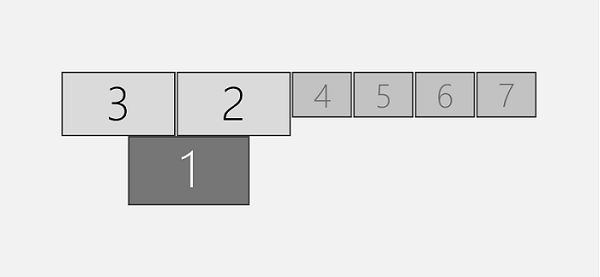
假 多重顯示器
您可能會遇到使用 Intel HD (4200、4400、4600、5000、5100、5200、5300、5500、6000、515、520、530、P530、Iris 540) 圖形驅動程式的行為,其中系統可能會顯示連接至系統的顯示器多於實際連接的顯示器。
Windows 10:自訂您的顯示器
Cause
沒有可用的原因資訊。
Resolution
下列因應措施可用於解決此行為。
安裝 Beta 驅動程式
- 開啟裝置管理員。
- 展開顯示卡區段。
- 尋找 Intel 圖形驅動程式。
- 以滑鼠右鍵按一下 Intel 圖形驅動程式,然後選取解除安裝。
- 選取核取方塊刪除此裝置的驅動程式軟體。
- 解除安裝程序完成後,請將電腦重新開機。
- 完成後,安裝以下驅動程式版本; 下載適用於 Windows® 10 和 Windows 7*/8.1* 的 Intel® Beta 顯示卡驅動程式 [15.40]

如需此因應措施的詳細資訊,請參閱: https://communities.intel.com/thread/110642
停用 Hyper-V
- 在提升的命令提示字元中,複製下列命令並貼上,然後按下 Enter 鍵。
- 命令:
dism.exe /Online /Disable-Feature:Microsoft-Hyper-V-All
管理員命令提示字元
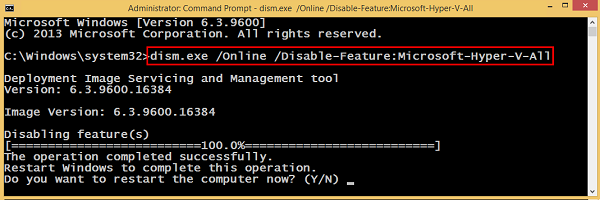
- 當系統提示您重新開機電腦時,請輸入 是 ,然後按下 Enter 鍵。
Article Properties
Article Number: 000133405
Article Type: Solution
Last Modified: 19 Apr 2026
Version: 5
Find answers to your questions from other Dell users
Support Services
Check if your device is covered by Support Services.