False 使用英特尔显卡的多台显示器
Summary: 本文包含有关使用 Intel HD 显卡时 Windows 10 中出现的错误显示器的信息。
This article applies to
This article does not apply to
This article is not tied to any specific product.
Not all product versions are identified in this article.
Symptoms
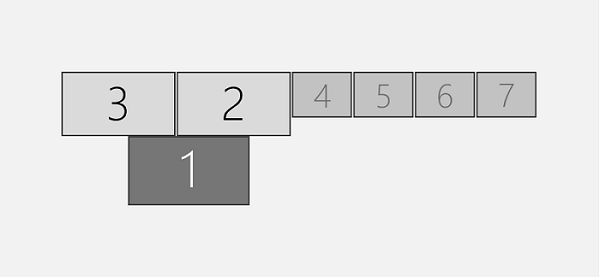
多显示器误报
使用 Intel HD(4200、4400、4600、5000、5100、5200、5300、5500、6000、515、520、530、P530、Iris 540)显卡驱动程序时,您可能会遇到这样的行为,其中系统可能会显示连接到系统的显示器比实际连接的显示器多。
Windows 10:定制显示屏
Cause
无可用的原因信息。
Resolution
以下解决方法可用于解决此行为。
安装 Beta 版驱动程序
- 打开 Device Manager。
- 展开显示适配器部分。
- 查找英特尔显卡驱动程序。
- 右键单击英特尔显卡驱动程序,然后选择卸载。
- 选中复选框删除此设备的驱动程序软件。
- 卸载过程完成后,重新启动计算机。
- 完成后,安装以下驱动程序版本; 下载适用于 Windows® 10 和 Windows 7*/8.1* 的英特尔®测试版显卡驱动程序 [15.40]

可在此处找到有关此解决方法的更多信息: https://communities.intel.com/thread/110642
禁用 Hyper-V
- 在提升的命令提示符下,复制并粘贴以下命令,然后按 Enter 键。
- 命令:
dism.exe /Online /Disable-Feature:Microsoft-Hyper-V-All
管理员命令提示符
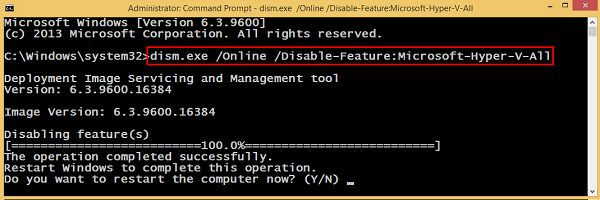
- 在系统提示重新启动计算机时键入 Y 并按 Enter 键。
Article Properties
Article Number: 000133405
Article Type: Solution
Last Modified: 19 Apr 2026
Version: 5
Find answers to your questions from other Dell users
Support Services
Check if your device is covered by Support Services.