MCE Errors May Be Generated on Unsupported Systems Running Linux
Summary: This article addresses MCE log errors that Linux users may encounter. Systems running Ubuntu ®, SUSE, & RedHat may experience MCE log errors on the Kabylake platform.
This article applies to
This article does not apply to
This article is not tied to any specific product.
Not all product versions are identified in this article.
Symptoms
MCE Log Errors
You may find reports or logs of MCE errors indicating Intel hardware platform is not recognized or valid. This is a known condition of running MCE on un-supported platforms. Currently MCE logs are compatible with chipset generations up to the Skylake and these errors can be expected on the KabyLake generation of processors.
To check compatibility of MCELog tool with your hardware platform:
-
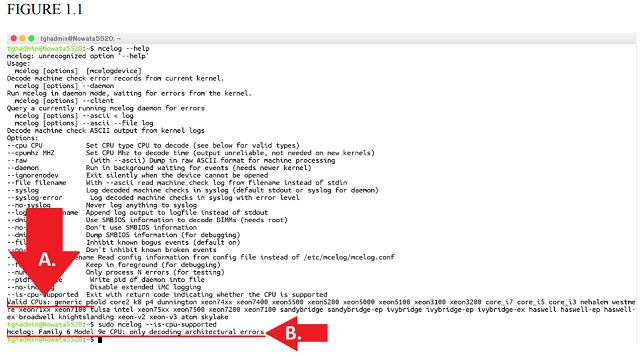
In Root Terminal Execute: $ mcelog –help
This command will return an output of all available commands followed with a list of "Valid CPU’s"
- Next run the command: $ mcelog –is-cpu-supported
This command will return a list of valid CPU generations. If the hardware is not supported you may see other outputs such as:
- "Mcelog: Family 6 Model 9e CPU: only decoding architectural errors"
Cause
Unsupported platforms.
Resolution
Do not accept any error logs from MCE logging tools unless the "—is-cpu-supported" (figure 1.1 part "A.") flag returns a value that matches with a value shown in the list of "Valid CPU’s" (Figure 1.1 part "B.").
The example below does not match and as such, is not a supported platform.
ADDITIONAL RESOURCES:
- The FAQ that addresses this issue specifically can be found here: http://www.mcelog.org/faq.html#17
- You can find out more at the MCELog website & FAQ or file bugreports on github.com. http://www.mcelog.org
https://github.com/andikleen/mcelog - The full Intel Corporation Memory Error handling 7 page white paper with refrences: http://halobates.de/lk10-mcelog.pdf
- Linux Machine Check Handling white paper (Produced by Suse Labs): http://halobates.de/mce.pdf
Affected Products
SoftwareArticle Properties
Article Number: 000133485
Article Type: Solution
Last Modified: 29 Apr 2026
Version: 5
Find answers to your questions from other Dell users
Support Services
Check if your device is covered by Support Services.