Latitude 5590: キーボード機能ガイド
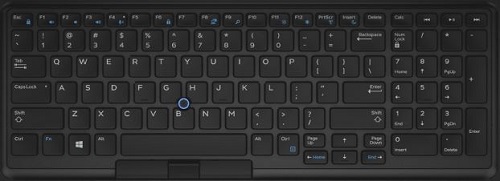
Summary: 次のガイドは、Dell Latitude 5590で使用可能なキーボード ショートカットと、それらが実行する機能のリストです。
This article applies to
This article does not apply to
This article is not tied to any specific product.
Not all product versions are identified in this article.
Symptoms
Cause
該当なし
Resolution
| ファンクション キーのコンボ | 結果 |
|---|---|
| Fn + F1 | スピーカーのミュート |
| Fn + F2 | ボリュームダウン |
| Fn + F3 | ボリュームアップ |
| Fn + F4 | マイクミュート |
| Fn + F5 | Number Lock |
| Fn + F6 | Scroll Lock |
| Fn + F8 | ディスプレイ切り替え(Win+P) |
| Fn + F9 | 検索 |
| Fn + F10(オプション) | キーボード バックライトの輝度を上げる(オプション) |
| Fn + F11 | LCD輝度を下げる |
| Fn + F12 | LCD輝度を上げる |
| Fn+Esc | Fnキー ロックの切り替え |
| Fn + Insert | スリープに移行 |
| Fn + Print Screen | ワイヤレスのオンとオフの切り替え |
| Fn + 右矢印 | End |
| Fn + 左矢印 | ホーム |
 その他のリソースと情報については、 キーボードのナレッジベースを参照してください。
 その他の記事や情報については、 タッチパッド サポート ページ を参照してください。
 その他の記事や情報は、 マウスのサポート ページにも記載されています。
Affected Products
Latitude 5590Article Properties
Article Number: 000143256
Article Type: Solution
Last Modified: 01 May 2026
Version: 6
Find answers to your questions from other Dell users
Support Services
Check if your device is covered by Support Services.