Precision 5530 2-in-1: Toetsenbordfunctiehandleiding
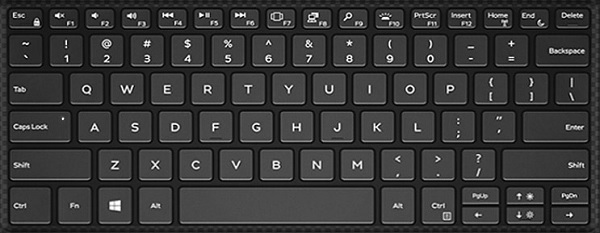
Summary: De volgende handleiding bevat de beschikbare sneltoetsen en de functies die ze uitvoeren op het Dell Precision 5530 2-in-1 mobiele workstation.
This article applies to
This article does not apply to
This article is not tied to any specific product.
Not all product versions are identified in this article.
Symptoms
Sneltoetsfuncties
De onderstaande tabel bevat een lijst met gecombineerde sneltoetsfuncties die beschikbaar zijn op het Precision 5530 2-in-1 mobiele workstation
Cause
| Functietoetsencombinatie | Resultaat |
|---|---|
| Fn + F1 | Luidspreker dempen |
| Fn + F2 | Volume omlaag |
| Fn + F3 | Volume omhoog |
| Fn + F4 | Terugspoelen |
| Fn + F5 | Afspelen/pauzeren |
| Fn + F6 | Vooruit |
| Fn + F7 | Taakweergave starten |
| Fn + F8 | Beeldscherm in-/uitschakelen (Windows + P) |
| Fn + F9 | Zoeken |
| Fn + F10 | Achtergrondverlichting in-/uitschakelen |
| Fn + F11 | PrtScr |
| Fn + F12 | Insert |
| Fn + Esc | Functietoetsvergrendeling in-/uitschakelen |
| Fn + Home | Draadloos in-/uitschakelen |
| Fn + End | Slaapstand |
| Fn + pijltoets omhoog | LCD-helderheid verhogen |
| Fn + pijltoets omlaag | LCD-helderheid verlagen |
Resolution
 Ga naar onze Knowledge Base voor toetsenborden voor aanvullende bronnen en informatie.
 Ga voor meer artikelen en informatie naar onze pagina Touchpadsupport.
 U kunt ook meer artikelen en informatie vinden op onze Supportpagina voor de muis.
Affected Products
Precision 5530 2 in 1Article Properties
Article Number: 000148637
Article Type: Solution
Last Modified: 03 May 2026
Version: 6
Find answers to your questions from other Dell users
Support Services
Check if your device is covered by Support Services.