Windows10 Hello在外星人笔记本电脑上无法实现人脸识别
Summary: Windows10 Hello在外星人笔记本电脑上无法实现人脸识别
This article applies to
This article does not apply to
This article is not tied to any specific product.
Not all product versions are identified in this article.
Symptoms
.

Cause
N/A
Resolution
故障现象
Windows10 Hello 中自带的人脸识别功能在外星人笔记本电脑上无法使用。而部分灵越机器可以使用。
解决方案
Windows10 hello的人脸识别功能需要Intel Real Sense 或 3D摄像头支持人脸解锁功能。
而外星人笔记本目前所配置的摄像头只是普通的全高清摄像头,非3D摄像头,不支持Intel Real Sense。
所以外星人笔记本上,客户如果需要 使用 人脸识别,请使用Dell Digital Deliver 联网下载 Fast Access 软件。
注 1:今年开售的产品目前仅下列有选配 配置3D 摄像头
- Inspiron灵越2350
- Inspiron灵越5457
- Inspiron灵越5557
- Inspiron灵越5459
- Inspiron灵越7459
- Inspiron灵越5548(与仅触摸屏幕)
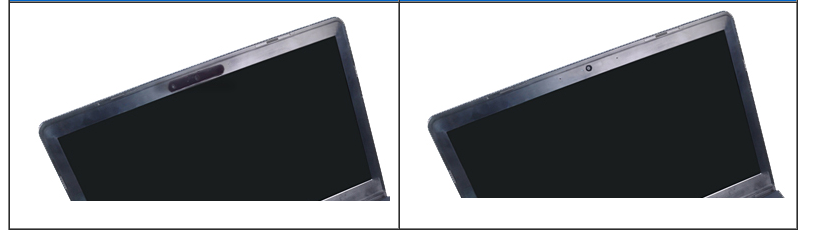
注 2: 如何判定摄像头是否3D的,从外观判定
如下图:左侧为3D 摄像头,右侧为普通高清或则非高清摄像头(图片仅供快速查询参考,今后新款可能会有变化,最终信息请以官方文档数据为准)
注 3:参考信息
微软官方 针对 Windows Hello 和隐私的 常见问题说明
http://windows.microsoft.com/zh-cn/windows-10/windows-hello-privacy-faq#
Affected Products
AlienwareArticle Properties
Article Number: 000155237
Article Type: Solution
Last Modified: 04 May 2026
Version: 5
Find answers to your questions from other Dell users
Support Services
Check if your device is covered by Support Services.