ViPR SRM: Errors appear during the VNX discovery test.
Summary: VNX discovery test completes with errors.
This article applies to
This article does not apply to
This article is not tied to any specific product.
Not all product versions are identified in this article.
Symptoms
The NavisecCLI was not installed in the default path. Updating the NavisecCLI path in the SolutionPack configuration resolved the issue.
VNX array discovery test completes with errors.
The expanded test result displays an error on line 53, as shown below: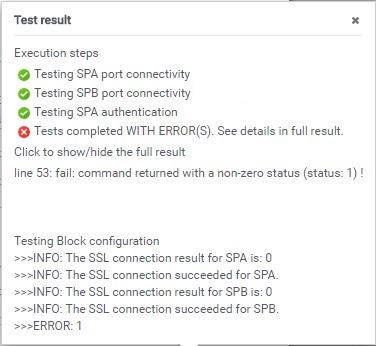
Cause
NavisecCLI was installed in a different location which was causing the issue.
After saving the configuration (despite the test result), you should see an error similar to the following in the collecting logs:SEVERE -- [2018-03-25 18:21:40 EDT] -- LocalCommandRetriever::execute(): Error while executing primary command @{command}java.io.IOException: Cannot run program "C:\Program Files (x86)\EMC\Navisphere CLI\NaviSECCli.exe" (in directory "D:\Program Files\APG\Collecting\Stream-Collector\emc-vnx\."): CreateProcess error=2, The system cannot find the file specifiedCaused by: java.io.IOException: CreateProcess error=2, The system cannot find the file specified
Resolution
To address this issue:
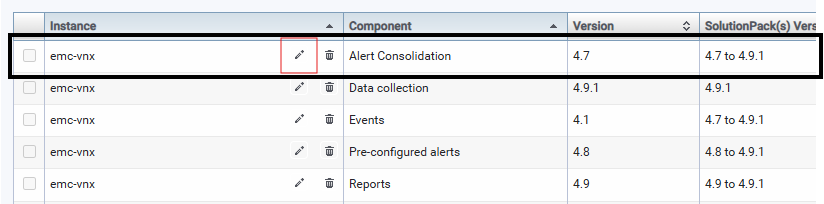
- Navigate to Centralized Management >> SolutionPacks >> EMC Unity/VNX/VNXe
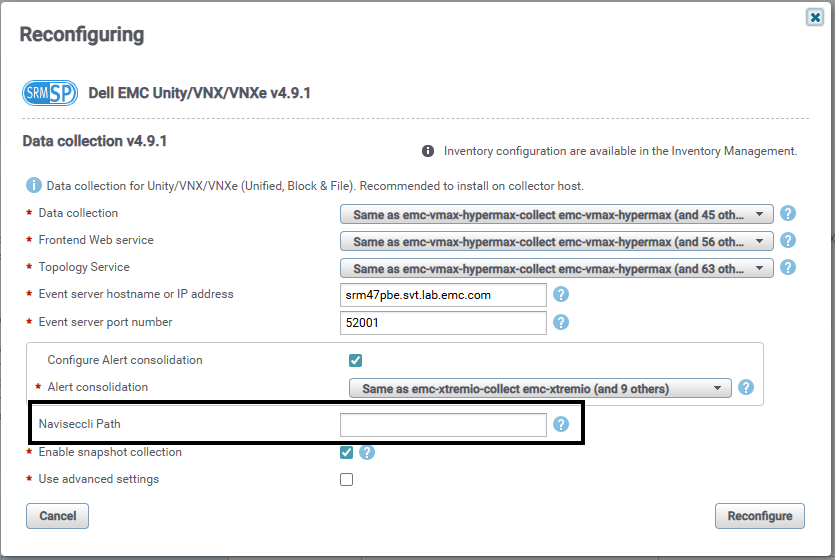
- Edit (pencil icon) the Data collection component. The option to mention the NavisecCLI path is found here.
- Add the location of NavisecCLI and reconfigure the SolutionPack.
- Rediscover the array and it should complete successfully.
Affected Products
SRMProducts
SRMArticle Properties
Article Number: 000168425
Article Type: Solution
Last Modified: 28 Oct 2025
Version: 3
Find answers to your questions from other Dell users
Support Services
Check if your device is covered by Support Services.