배포 KB: AppSync: AppSync 콘솔에서 VMAX/PowerMAX 스토리지를 추가하지 못했습니다.
Summary: AppSync에 VMAX 스토리지를 추가하려면 SMI-S Provider가 올바르게 설치되어 있어야 합니다.
This article applies to
This article does not apply to
This article is not tied to any specific product.
Not all product versions are identified in this article.
Symptoms
AppSync 콘솔에서 VMAX/PowerMAX 스토리지를 추가하지 못했습니다.
오류 메시지:
AppSync 콘솔에서 VMAX/PowerMax 스토리지를 추가할 때 AppSync가 SMI-S Provider에 연결을 시도하지만 위의 오류 메시지와 함께 실패합니다.
오류 메시지:
오류: 500 호스트 xx.xx.xx.xx에서 SMI-S Provider에 연결할 수 없습니다. 오류로 인한 실패: 연결할 수 없습니다.
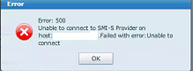
AppSync 콘솔에서 VMAX/PowerMax 스토리지를 추가할 때 AppSync가 SMI-S Provider에 연결을 시도하지만 위의 오류 메시지와 함께 실패합니다.
Cause
SMI-S Provider가 관리 서버에 설치되지 않았거나 Solutions Enabler가 설치되었지만 사용자가 TestSmiprovider.exe를 실행하여 SMI-S Provider 설치를 완료하지 않았습니다.
Resolution
SMI-S Provider가 설치 및 구성되지 않은 경우 위 오류가 발생합니다.
이 문제를 해결하려면 다음을 수행합니다.
이 문제를 해결하려면 다음을 수행합니다.
- 필요한 SMI-S/SE 버전을 다운로드하여 관리 서버에 설치합니다.
- 명령 프롬프트를 열고 C:\Program Files\emc\ecim\ecom\bin으로 이동합니다.
- TestSmiprovider.exe 실행
- 모든 기본값을 선택합니다.
- AppSync 콘솔을 열고 스토리지를 추가합니다.
Article Properties
Article Number: 000168564
Article Type: Solution
Last Modified: 10 Sep 2025
Version: 4
Find answers to your questions from other Dell users
Support Services
Check if your device is covered by Support Services.