部署 KB:AppSync:無法在 AppSync 主控台中新增 VMAX/PowerMAX 儲存裝置。
Summary: 必須正確安裝 SMI-S 提供者,才能將 VMAX 儲存裝置新增至 AppSync。
This article applies to
This article does not apply to
This article is not tied to any specific product.
Not all product versions are identified in this article.
Symptoms
無法在 AppSync 主控台中新增 VMAX/PowerMAX 儲存裝置。
錯誤訊息:
在 AppSync 主控台中新增 VMAX/PowerMax 儲存裝置時,AppSync 會嘗試連線至 SMI-S 提供者,但失敗並顯示上述錯誤訊息。
錯誤訊息:
Error: 500 無法連線至主機 xx.xx.xx.xx 上的 SMI-S 提供者。失敗並出現錯誤:無法連線。
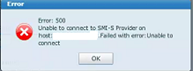
在 AppSync 主控台中新增 VMAX/PowerMax 儲存裝置時,AppSync 會嘗試連線至 SMI-S 提供者,但失敗並顯示上述錯誤訊息。
Cause
管理伺服器上未安裝 SMI-S 提供者,或已安裝 Solutions Enabler,但使用者未透過執行TestSmiprovider.exe完成 SMI-S 提供者安裝。
Resolution
如果未安裝和配置 SMI-S 提供者,則會發生上述錯誤。
若要解決這個問題:
若要解決這個問題:
- 下載所需的 SMI-S/SE 版本並安裝在管理伺服器上。
- 開啟命令提示字元,並前往 C:\Program Files\emc\ecim\ecom\bin
- 執行TestSmiprovider.exe
- 選取所有預設值。
- 開啟 AppSync 主控台並新增儲存裝置。
Article Properties
Article Number: 000168564
Article Type: Solution
Last Modified: 10 Sep 2025
Version: 4
Find answers to your questions from other Dell users
Support Services
Check if your device is covered by Support Services.