Windows 更新后,Dell Encryption 显示登录过程初始化失败
Summary: 在 2020 年 7 月或之后发布 Windows 10 更新后,当端点重新启动时,如果设备具有 Dell Encryption 和加密 C:\Windows\System32 内的可执行文件的策略,则会显示一条消息,指示可能会出现登录过程失败。
This article applies to
This article does not apply to
This article is not tied to any specific product.
Not all product versions are identified in this article.
Symptoms
受影响的产品:
- Dell Encryption Enterprise
- Dell Encryption Personal
受影响的操作系统:
- Windows 10 v1809 及更高版本
Cause
在应用 2020 年 7 月或之后发布的 Windows 10 功能更新后重新启动时,设备可能会遇到错误。如果安装了 Dell Encryption,并且配置了加密 C:\Windows\System32 中的可执行文件的策略,则可能会显示错误消息。黑屏上显示错误,指出 登录过程初始化失败 - 初始化中的交互式登录过程失败:
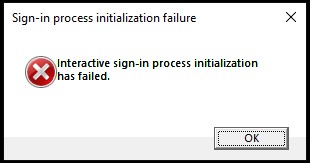
图 1:(仅限英文)登录过程初始化失败
此提示可防止这些设备正确启动至 Windows,并且 系统数据加密恢复 如何运行 Dell Encryption Enterprise/Dell Encryption Personal 恢复包如何运行 Dell Encryption Enterprise/Dell Encryption Personal 恢复包无法解决该故障。
Resolution
较早的 Dell Encryption 实施(以前称为 Dell Data Protection |加密)可能包含策略元素,这些元素将加密 Windows 的 System32 目录中的可执行文件。反映这些加密规则的策略类似于文本:
^3@%ENV:SYSTEMROOT%\SYSTEM32\;exe
Dell Technologies 建议删除对 C:\Windows\System32 或其任何子文件夹中扩展名为 EXE、DLL 或 SYS 的文件进行加密的任何策略元素。
这些文件夹是 受保护的系统文件夹,只能由本地管理员或预定义帐户访问。尽管这些文件仍处于解密状态,但在管理 Dell Security Management Server 中启用 Secure Windows Credentials策略时,Dell Encryption 会验证这些文件在两次启动之间未被篡改。
处于不良状态的设备必须将 C:\Windows\System32\ 中的 logonui.exe替换为已知良好的计算机中的拷贝。完成此操作后,必须执行系统数据加密恢复 如何运行 Dell Encryption Enterprise/Dell Encryption Personal 恢复包 。然后,端点应正确启动。
要联系支持部门,请参阅 Dell Data Security 国际支持电话号码。
转至 TechDirect,在线生成技术支持请求。
要获得更多见解和资源,请加入戴尔安全社区论坛。
Additional Information
Videos
Affected Products
Dell EncryptionArticle Properties
Article Number: 000184661
Article Type: Solution
Last Modified: 09 May 2026
Version: 6
Find answers to your questions from other Dell users
Support Services
Check if your device is covered by Support Services.