Alienware Update, Dell Update, and Dell Command Update Cannot Check for Updates
Summary: Learn more about update errors when using Alienware Update, Dell Update, or Dell Command Update.
This article applies to
This article does not apply to
This article is not tied to any specific product.
Not all product versions are identified in this article.
Symptoms
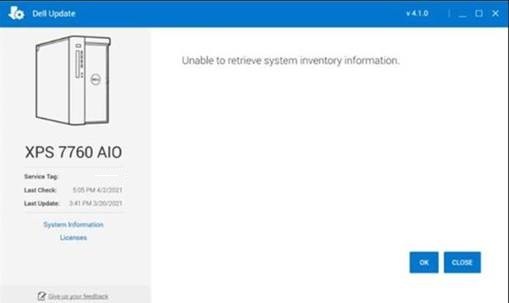
The following error is seen after clicking "Check for Updates" in Alienware Update, Dell Update, or Dell Command Update:
"Unable to retrieve system inventory information"An example of the message is shown in the following image:
Cause
This happens because an integral component of the software is experiencing an issue completing a scan of the desktop.
Resolution
Dell Update Recovery Utility
To resolve this issue, install and run the: Dell Update Recovery Utility
This must be done on every affected desktop that is receiving the message.
Affected Products
Alienware Update, Alienware, Dell All-in-One, Dell Pro All-in-One, Dell Pro Max Micro, Dell Pro Max Slim, Dell Pro Max Tower, Dell Pro Micro, Dell Pro Slim, Dell Pro Tower, Dell Slim, Dell Tower, Inspiron, OptiPlex, Vostro, XPS, G Series, G Series
, Alienware, Dell Plus, Dell Pro, Dell Pro Max, Dell Pro Plus, Dell Pro Premium, Inspiron, Latitude, Dell Pro Rugged, Vostro, XPS, Fixed Workstations, Mobile Workstations, Dell Command | Update, Dell Pro Max Micro XE FCM2250, Dell Pro Max Slim XE FCS1250, Dell Pro Max Tower T2 XE FCT2250, Dell Pro Max 16 XE MC16250, Dell Pro Micro Plus XE QBM1250, Dell Pro Slim Plus XE5 QBS1250, Dell Pro Tower Plus XE5 QBT1250, Dell Update
...
Article Properties
Article Number: 000185515
Article Type: Solution
Last Modified: 11 May 2026
Version: 6
Find answers to your questions from other Dell users
Support Services
Check if your device is covered by Support Services.