DLm8500 - DLm 主控台的可捲動視窗無法要求原始顯示畫面的更多行
Summary: 登入 DLm 並從左側清單中選取命令介面,然後選取 Virtuent 主控台 VTE1 並輸入特定時間的日期後,無法要求原始顯示畫面的額外行。
This article applies to
This article does not apply to
This article is not tied to any specific product.
Not all product versions are identified in this article.
Symptoms
沒有地方要求原始顯示的其他線條。
Cause
這些是已知的 5.3.x 版本問題。我們僅在 5.4.0.0 中解決了這些問題,其中引入了新的日誌和控制台頁面。
Resolution
可用時升級到 5.4。
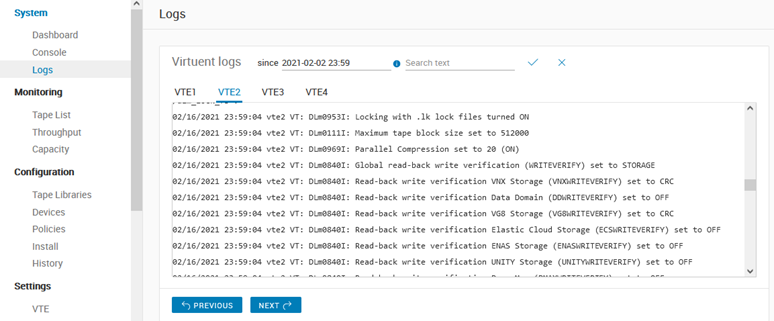
- 記錄頁面可讓您使用「下一個」和「上一個」按鈕,以及 10 000 行步長 + 行搜尋功能,逐步查覽每個 VTE 的記錄 (反映 Web 控制台中記錄按鈕的行為):
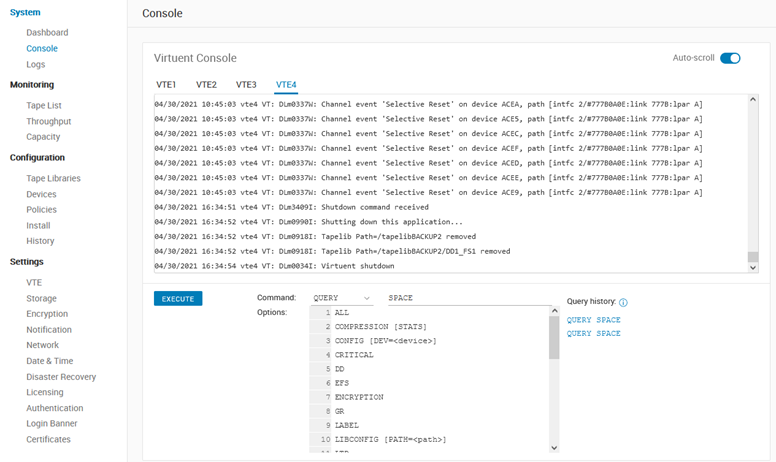
- 控制台頁面允許執行 VT 命令(就像上一個命令介面頁面一樣)並查看這些命令輸出的最後 1 500 行,並嘗試使用一些新功能複製 VTCON 終端實用程式的行為,例如 – 最後 10 個命令歷史記錄、命令 + 選項幫助、自動滾動等。提到的更新問題也應該得到修復。
Affected Products
Disk Library for mainframe DLm8500Article Properties
Article Number: 000187560
Article Type: Solution
Last Modified: 10 May 2026
Version: 4
Find answers to your questions from other Dell users
Support Services
Check if your device is covered by Support Services.