OpenManage Server Administrator: Basic introduction to the Command-Line Interface
Summary: Systems Management How to Video that covers the basics of using the Command-Line Interface of OpenManage Server Administrator.
This article applies to
This article does not apply to
This article is not tied to any specific product.
Not all product versions are identified in this article.
Instructions
Link to the Dell Technologies YouTube channel video:
Dell OpenManage Server Administrator Command-Line Interfaces
Information
• Familiarize with OMCLI tools for querying and setting values.
• Identify paths to omreport.exe and omconfig.exe.
• Use integrated help and Command-Line Reference Documentation.
• When OMSA is installed, OMREPORT and OMCONFIG are set as global commands for the CLI shell.
• Use integrated help and Command-Line Reference Documentation. OMReport
This utility can be used to query information that OMSA inventories from the system. OMConfig
This utility can be used to configure settings that OMSA can manage.
Example in a Windows Command prompt:
- In Windows, open an Administrator command prompt.
- At the prompt, type report about
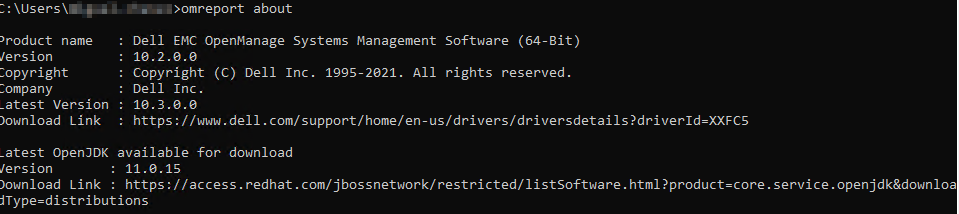
Example of running a system summary query using omreport system summary
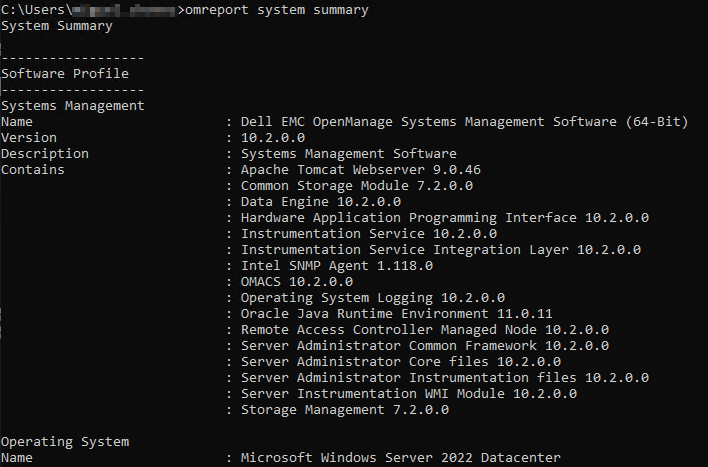
Settings can be reviewed using OMreport and adjusted using OMCONFIG
Affected Products
OpenManage Server AdministratorArticle Properties
Article Number: 000189326
Article Type: How To
Last Modified: 24 Feb 2026
Version: 10
Find answers to your questions from other Dell users
Support Services
Check if your device is covered by Support Services.