OpenManage Server Administrator: Basic Overview on TLS and SSL security Option
Summary: Systems Management How to Video that provides an overview on the TLS and SSL security options in OpenManage Administrator.
This article applies to
This article does not apply to
This article is not tied to any specific product.
Not all product versions are identified in this article.
Instructions
This video provides an overview on the TLS and SSL security options in OpenManage Administrator.
Link to the Dell Technologies YouTube channel video:
Overview on TLS and SSL security Option in OpenManage Server Administrator
How to Troubleshoot OMSA Connection issue after Security Hardening in Windows:
Troubleshooting Workflow:
Step 1: Uninstall OMSA and reinstall OMSA.
NOTE: Each version of OMSA uses specific Ciphers and are upgraded to current security standards with each release so an older release may not work on a hardened server.
Step 2: Check the registry configuration for Ciphers, Hashes, and Protocols configuration.
NOTE: Compare working registry and non-working if available
Step 3: Check the server.xml at C:\Program Files\Dell\SysMgt\apache-tomcat\conf for the supported ciphers.

Step 4: Ensure that the Registry has at least one of those ciphers enabled.
Step 5: If not, backup the registry and then enable one of the ciphers. Reboot if configuration changes were made.
How to Check Ciphers, Hashes and Protocols:
-
Open up regedit
-
Expand
HKLM\SYSTEM\CurrentControlSet\Control\SecurityProviders\SCHANNEL
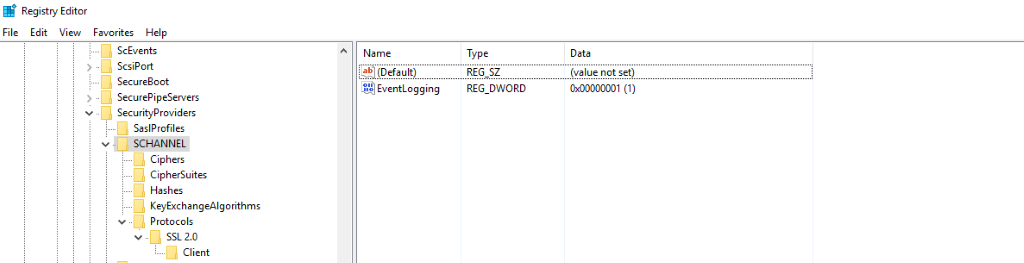
-
Ciphers show any specific Cipher enabled/disabled
-
CipherSuitescovers the same but for groups of ciphers -
Hashes will show anything Disabled like SHA, SHA2, and so on
-
Under Protocols there will be a separate section for SSL 2.0, SSL 3.0, TLS 1.0 and so on
-
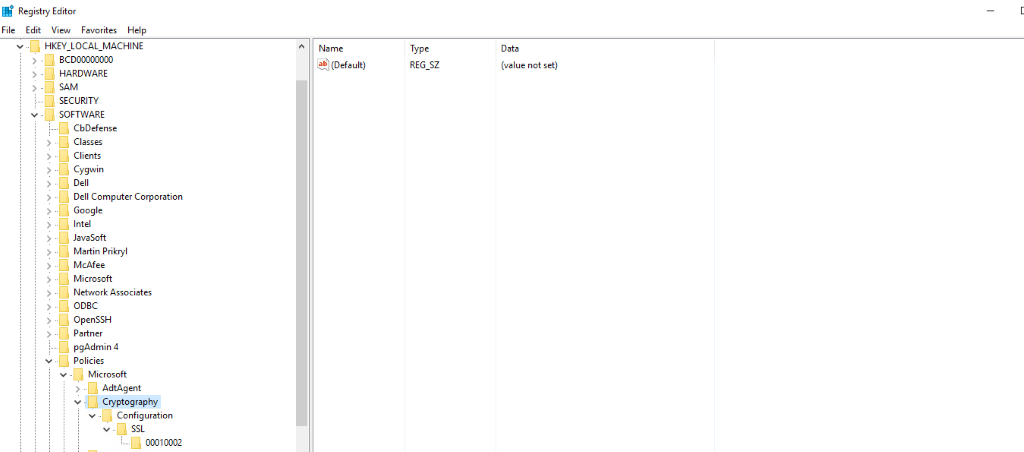
More Config can sometimes be found on
HKLM\Software\Policies\Microsoft\Cryptography
Affected Products
C Series, HS Series, Modular Infrastructure, Rack Servers, Tower Servers, XR Servers, Dell OpenManage Server Administrator Version 8.5, Dell OpenManage Server Administrator Version 9.0.1, Dell OpenManage Server Administrator Version 9.0.2
, Dell OpenManage Server Administrator Version 9.1, Dell OpenManage Server Administrator Version 9.1.1, Dell OpenManage Server Administrator Version 10.0.1, Dell OpenManage Server Administrator Version 9.1.2, Dell OpenManage Server Administrator Version 9.2, Dell OpenManage Server Administrator Version 9.2.1, Dell OpenManage Server Administrator Version 9.3, Dell OpenManage Server Administrator Version 9.3.1, Dell OpenManage Server Administrator Version 9.3.2, Dell OpenManage Server Administrator Version 9.4, Dell OpenManage Server Administrator Version 9.5, PowerEdge XR2, Poweredge C4140, PowerEdge C6400, PowerEdge C6420, PowerEdge C6520, PowerEdge C6525, PowerEdge C6600, PowerEdge C6615, PowerEdge C6620, PowerEdge FC640, PowerEdge HS5610, PowerEdge HS5620, PowerEdge M640, PowerEdge M640 (for PE VRTX), PowerEdge M7701, PowerEdge M7725, PowerEdge MX5016s, PowerEdge MX7000, PowerEdge MX740C, PowerEdge MX750c, PowerEdge MX760c, PowerEdge MX840C, PowerEdge R240, PowerEdge R250, PowerEdge R260, PowerEdge R340, PowerEdge R350, PowerEdge R360, PowerEdge R440, PowerEdge R450, PowerEdge R470, PowerEdge R540, PowerEdge R550, PowerEdge R570, PowerEdge R640, PowerEdge R6415, PowerEdge R650, PowerEdge R650xs, PowerEdge R6515, PowerEdge R6525, PowerEdge R660, PowerEdge R660xs, PowerEdge R6615, PowerEdge R6625, PowerEdge R670, PowerEdge R740, PowerEdge R740XD, PowerEdge R740XD2, PowerEdge R7415, PowerEdge R7425, PowerEdge R750, PowerEdge R750XA, PowerEdge R750xs, PowerEdge R7515, PowerEdge R7525, PowerEdge R760, PowerEdge R760XA, PowerEdge R760xd2, PowerEdge R760xs, PowerEdge R7615, PowerEdge R7625, PowerEdge R770, PowerEdge R7715, PowerEdge R7725, PowerEdge R840, PowerEdge R860, PowerEdge R940, PowerEdge R940xa, PowerEdge R960, PowerEdge T140, PowerEdge T150, PowerEdge T160, PowerEdge T340, PowerEdge T350, PowerEdge T360, PowerEdge T40, PowerEdge T440, PowerEdge T550, PowerEdge T560, PowerEdge T640, PowerEdge XR11, PowerEdge XR12, PowerEdge XR4000r, PowerEdge XR4000w, PowerEdge XR4000z, PowerEdge XR4510c, PowerEdge XR4520c, PowerEdge XR5610, PowerEdge XR7620, PowerEdge XR8000r, PowerEdge XR8610t, PowerEdge XR8620t
...
Article Properties
Article Number: 000189329
Article Type: How To
Last Modified: 03 Jul 2025
Version: 7
Find answers to your questions from other Dell users
Support Services
Check if your device is covered by Support Services.