Dell EMC Unity: VMware VASA registration fails on Unity when using VMware vCenter v7.0 Update 2
Summary: VMware vCenter v7.0 Update 2 (7.0.2.00200) when used with Dell EMC Unity OE 5.0.x and 5.1.0 has been determined to cause a problem with VASA registration failing when adding vCenter to Unity or attempting to register the Unity VASA Provider from vCenter Storage Providers Add option. As a result vVols are not usable. ...
This article applies to
This article does not apply to
This article is not tied to any specific product.
Not all product versions are identified in this article.
Symptoms
IMPORTANT: If Virtual Volumes (vVols) are being used in the environment with Unity, a Data Unavailable state can occur because VASA is needed to function with vVols.
A typical scenario may be if a customer who has a VMware vCenter v6.7 server that is attached and decides to move Unity to a vCenter 7.0 Update 2 server.
A second scenario may occur if a customer is using an older vCenter such as vCenter 6.5 or 6.7 which has been upgraded to vCenter 7.0 Update 2 and a condition occurs where the vCenter is removed from Unity and re-added in Unisphere or via UEMCLI. VASA registration will fail at this point.
Additionally, if an ESX host is also "added" to vCenter in this 2nd scenario, this also will cause VASA errors from vCenter and the host will not be allowed to be added. The error seen in vCenter is: "Unable to sync VASA vendor provider with vCenter. Please review the event logs on the VMware hypervisor side. (Error Code: 0x5c00015) Reload Unisphere UI? Note: Check your available support options if this error continues to occur." Note: the only option is to RELOAD or Cancel.
During the first scenario:
The customer will remove the old vCenter from Unity and add a new vCenter 7.0.2 server from Unisphere or UEMCLI
During the ADD process the registration of VASA will fail with the following errors:
Failed: Unable to register VASA vendor provider on the VMware vCenter. Please review the event logs on the VMware hypervisor side. (Error Code:0x5c00013)
Rollback Result: Task was rolled back and marked as failed. This is because some tasks failed or SP rebooted during task execution. (Error Code:0x100a)
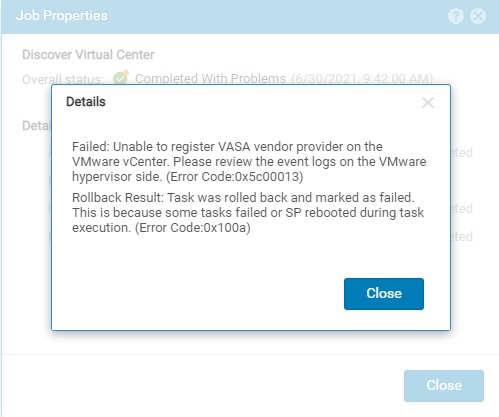
The vCenter will ADD to Unity but show as "unregistered" for VASA.

If VASA is attempted to be registered in the vCenter Storage Providers it fails also with the following errors:
"A problem was encountered while provisioning a VMware Certificate Authority (VMCA) signed certificate for the provider."
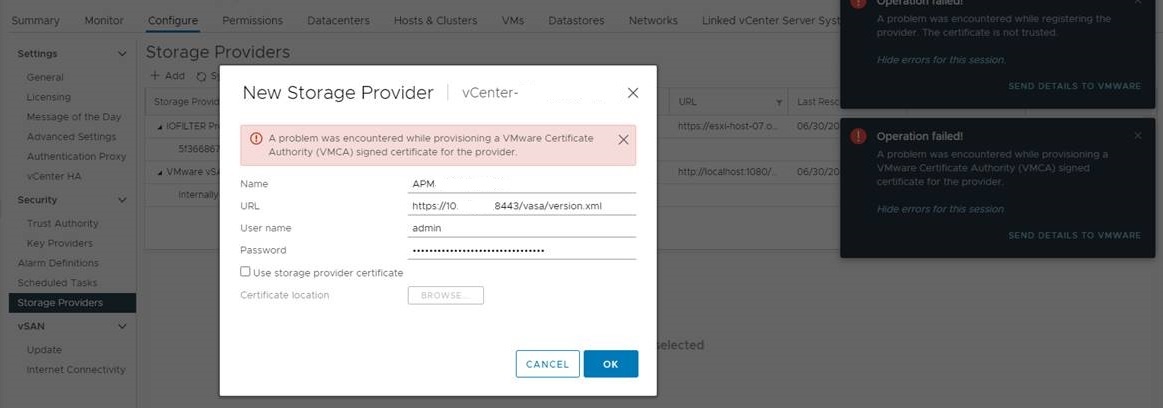
A review of the vCenter vasaService.log shows errors similar to the following:
2021-06-24T14:58:03,546 INFO - [ajp-nio-127.0.0.1-8009-exec-8][VASAServiceInvocationHandler] 3.0 null registerCACertificatesAndCRLs
2021-06-24T14:58:03,567 DEBUG - [ajp-nio-127.0.0.1-8009-exec-8][RestTemplateFactory] Generated auhorization header: Local/admin:administrator&f2874165af859e573769074310db4ccad608638a1918c6c940c23edd253a8b48
2021-06-24T14:58:04,242 INFO - [ajp-nio-127.0.0.1-8009-exec-3][VASAServiceInvocationHandler] 3.0 null requestCSR
2021-06-24T14:58:04,242 ERROR - [ajp-nio-127.0.0.1-8009-exec-3][VASAServiceInvocationHandler] VASA Service exception caught: No SSL Client Certificate attached to HTTPS session
com.emc.unisphere.vasa.exceptions.InvalidSession: No SSL Client Certificate attached to HTTPS session
at com.emc.unisphere.vasa.session.VASASessionManagerImpl.checkSSLSession(Unknown Source) ~[vasaService-common.jar:?]
at com.emc.unisphere.vasa.session.VASA20SessionInitializer.requestCSR(Unknown Source) ~[vasaService-common.jar:?]
at com.emc.unisphere.vasa.mandatory.VASA20MandatoryFunctionsImpl.requestCSR(Unknown Source) ~[vasaService-common.jar:?]
2021-06-22T15:41:04.814Z [pool-29-thread-3] WARN opId=kpzvnlsb-252030-auto-5egv-h5:70030088 com.vmware.vim.sms.provider.vasa.VasaProviderUtils - [isValidatorexception]: Unknown certificate
2021-06-22T15:41:04.814Z [pool-29-thread-3] WARN opId=kpzvnlsb-252030-auto-5egv-h5:70030088 com.vmware.vim.sms.provider.vasa.version.Version3Strategy - [isVPCertTrusted] validation exception: certificate_unknown(46)
2021-06-22T15:41:04.963Z [pool-138-thread-1] ERROR opId=kpzvnlsb-252030-auto-5egv-h5:70030088 com.vmware.vim.sms.client.VasaClientImpl - Setcontext() Exception :
com.vmware.vim.vasa.InvalidSession: com.vmware.vim.vasa._3_0.InvalidSession: InvalidSession
Also the following can be seen in the vCenter sps.log output:

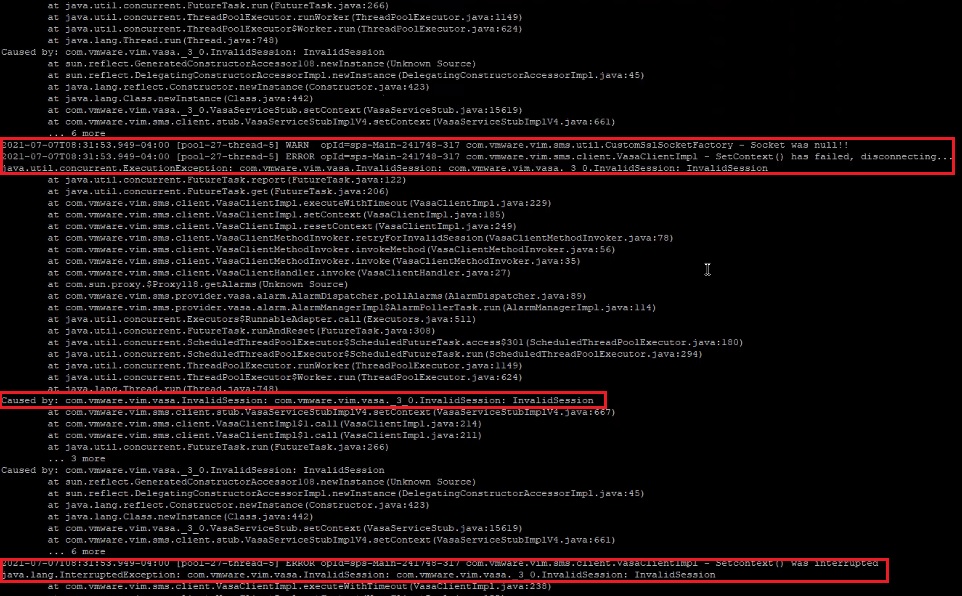
The workaround described in this KB does not help in this case:
https://docs.vmware.com/en/VMware-vSphere/7.0/rn/vsphere-vcenter-server-702-release-notes.html#storage-issues-known
A typical scenario may be if a customer who has a VMware vCenter v6.7 server that is attached and decides to move Unity to a vCenter 7.0 Update 2 server.
A second scenario may occur if a customer is using an older vCenter such as vCenter 6.5 or 6.7 which has been upgraded to vCenter 7.0 Update 2 and a condition occurs where the vCenter is removed from Unity and re-added in Unisphere or via UEMCLI. VASA registration will fail at this point.
Additionally, if an ESX host is also "added" to vCenter in this 2nd scenario, this also will cause VASA errors from vCenter and the host will not be allowed to be added. The error seen in vCenter is: "Unable to sync VASA vendor provider with vCenter. Please review the event logs on the VMware hypervisor side. (Error Code: 0x5c00015) Reload Unisphere UI? Note: Check your available support options if this error continues to occur." Note: the only option is to RELOAD or Cancel.
During the first scenario:
The customer will remove the old vCenter from Unity and add a new vCenter 7.0.2 server from Unisphere or UEMCLI
During the ADD process the registration of VASA will fail with the following errors:
Failed: Unable to register VASA vendor provider on the VMware vCenter. Please review the event logs on the VMware hypervisor side. (Error Code:0x5c00013)
Rollback Result: Task was rolled back and marked as failed. This is because some tasks failed or SP rebooted during task execution. (Error Code:0x100a)
The vCenter will ADD to Unity but show as "unregistered" for VASA.
If VASA is attempted to be registered in the vCenter Storage Providers it fails also with the following errors:
"A problem was encountered while provisioning a VMware Certificate Authority (VMCA) signed certificate for the provider."
A review of the vCenter vasaService.log shows errors similar to the following:
2021-06-24T14:58:03,546 INFO - [ajp-nio-127.0.0.1-8009-exec-8][VASAServiceInvocationHandler] 3.0 null registerCACertificatesAndCRLs
2021-06-24T14:58:03,567 DEBUG - [ajp-nio-127.0.0.1-8009-exec-8][RestTemplateFactory] Generated auhorization header: Local/admin:administrator&f2874165af859e573769074310db4ccad608638a1918c6c940c23edd253a8b48
2021-06-24T14:58:04,242 INFO - [ajp-nio-127.0.0.1-8009-exec-3][VASAServiceInvocationHandler] 3.0 null requestCSR
2021-06-24T14:58:04,242 ERROR - [ajp-nio-127.0.0.1-8009-exec-3][VASAServiceInvocationHandler] VASA Service exception caught: No SSL Client Certificate attached to HTTPS session
com.emc.unisphere.vasa.exceptions.InvalidSession: No SSL Client Certificate attached to HTTPS session
at com.emc.unisphere.vasa.session.VASASessionManagerImpl.checkSSLSession(Unknown Source) ~[vasaService-common.jar:?]
at com.emc.unisphere.vasa.session.VASA20SessionInitializer.requestCSR(Unknown Source) ~[vasaService-common.jar:?]
at com.emc.unisphere.vasa.mandatory.VASA20MandatoryFunctionsImpl.requestCSR(Unknown Source) ~[vasaService-common.jar:?]
2021-06-22T15:41:04.814Z [pool-29-thread-3] WARN opId=kpzvnlsb-252030-auto-5egv-h5:70030088 com.vmware.vim.sms.provider.vasa.VasaProviderUtils - [isValidatorexception]: Unknown certificate
2021-06-22T15:41:04.814Z [pool-29-thread-3] WARN opId=kpzvnlsb-252030-auto-5egv-h5:70030088 com.vmware.vim.sms.provider.vasa.version.Version3Strategy - [isVPCertTrusted] validation exception: certificate_unknown(46)
2021-06-22T15:41:04.963Z [pool-138-thread-1] ERROR opId=kpzvnlsb-252030-auto-5egv-h5:70030088 com.vmware.vim.sms.client.VasaClientImpl - Setcontext() Exception :
com.vmware.vim.vasa.InvalidSession: com.vmware.vim.vasa._3_0.InvalidSession: InvalidSession
Also the following can be seen in the vCenter sps.log output:
The workaround described in this KB does not help in this case:
https://docs.vmware.com/en/VMware-vSphere/7.0/rn/vsphere-vcenter-server-702-release-notes.html#storage-issues-known
Cause
The cause is due to missing VASA communication between vCenter v7.0.2 and the Unity VASA provider registration process.
Resolution
VMware has released a fix for the issue with vCenter 7.0 update 2c. Please use this version.
https://docs.vmware.com/en/VMware-vSphere/7.0/rn/vsphere-vcenter-server-70u2c-release-notes.html
Storage Issues
https://docs.vmware.com/en/VMware-vSphere/7.0/rn/vsphere-vcenter-server-70u2c-release-notes.html
Storage Issues
- You cannot register Dell EMC Unity 500 or 600 vSphere API for Storage Awareness (VASA) provider to a vCenter Server system
Attempts to register a Dell EMC Unity 500 or 600 VASA provider to a vCenter Server system from Configure > Security > Storage Providers persistently fail with an error. In the vSphere Client, you see the message
A problem was encountered while provisioning a VMware Certificate Authority (VMCA) signed certificate for the provider.The issue occurs in both fresh installations and upgraded environments.This issue is resolved in this release.
Additional Information
References:
The following VMware KB article:
https://docs.vmware.com/en/VMware-vSphere/7.0/rn/vsphere-vcenter-server-702-release-notes.html#storage-issues-known
The following VMware KB article:
https://docs.vmware.com/en/VMware-vSphere/7.0/rn/vsphere-vcenter-server-702-release-notes.html#storage-issues-known
Affected Products
Dell EMC Unity Family, VMware vCenter ServerArticle Properties
Article Number: 000189440
Article Type: Solution
Last Modified: 21 May 2026
Version: 5
Find answers to your questions from other Dell users
Support Services
Check if your device is covered by Support Services.