Windows에서 자동 설치를 사용하여 NetWorker 클라이언트 및 NetWorker 확장 클라이언트 소프트웨어 설치
Summary: 이 KB는 명령줄에서 Windows 시스템의 NetWorker 클라이언트 및 확장 클라이언트 패키지를 설치하는 지침을 제공합니다.
This article applies to
This article does not apply to
This article is not tied to any specific product.
Not all product versions are identified in this article.
Instructions
- 온라인 지원 웹사이트 https://www.dell.com/support/home/product-support/product/networker/drivers에서 NetWorker 소프트웨어 패키지를 다운로드합니다.
- Windows 클라이언트 시스템에서 관리 명령 프롬프트를 열고 설치 바이너리가 있는 경로로 이동합니다.
디렉토리 콘텐츠의 예:
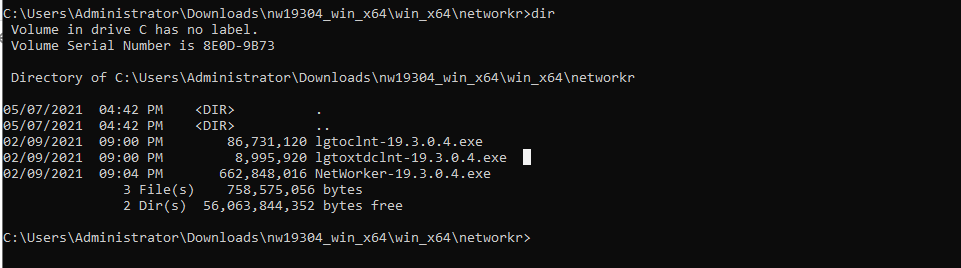
- 다음 명령을 실행합니다.
lgtoclnt-x.x.x.x.exe /v /s /q ConfigureFirewall=1 StartServices=1 /norestart
- /s /q는 모든 UI 출력을 표시하지 않습니다.
- /v는 세부 정보 표시 모드를 사용합니다.
- /norestart는 설치를 다시 시작해야 하는 경우 설치 완료 후 재시작하지 않습니다.
예:

- 설치된 클라이언트 패키지가 프로그램 및 기능 아래에 표시됩니다.

자동 옵션을 사용한 NetWorker 확장 클라이언트 설치:
- 다음 명령을 실행합니다.
lgtoxtdclnt-x.x.x.x.exe /v /s /q ConfigureFirewall=1 StartServices=1 /norestart
예:

- 설치된 확장 클라이언트 패키지가 프로그램 및 기능 아래에 표시됩니다.

- NetWorker Client Services는 설치 후 자동으로 재시작됩니다.
net stop nsrexecd /y && net start nsrexecd
Affected Products
NetWorkerArticle Properties
Article Number: 000192023
Article Type: How To
Last Modified: 12 May 2026
Version: 6
Find answers to your questions from other Dell users
Support Services
Check if your device is covered by Support Services.