Windows'da sessiz kurulum kullanarak NetWorker İstemci ve NetWorker Genişletilmiş İstemci Yazılımını kurma
Summary: Bu KB, komut satırından bir Windows sistemine NetWorker istemci ve genişletilmiş istemci paketlerini yüklemeye yönelik talimatlar sağlar.
This article applies to
This article does not apply to
This article is not tied to any specific product.
Not all product versions are identified in this article.
Instructions
- Çevrimiçi Destek web sitesinden (https://www.dell.com/support/home/product-support/product/networker/drivers.) NetWorker yazılım paketini indirin.
- Windows istemci sisteminde, bir yönetici komut istemi açın ve ikili dosyaların bulunduğu yola cd komutunu yazın.
Dizin içeriği örneği:
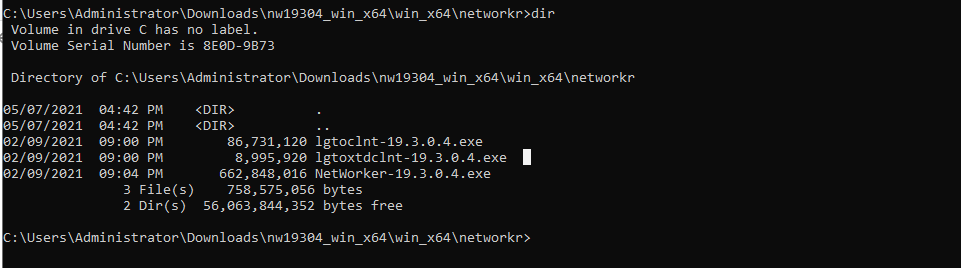
- Şu komutu çalıştırın:
lgtoclnt-x.x.x.x.exe /v /s /q ConfigureFirewall=1 StartServices=1 /norestart
- /s /q tüm kullanıcı arayüzü çıkışlarını durdurur.
- /v, ayrıntılı modu etkinleştirir.
- /norestart, yükleme yeniden başlatma gerekirse yükleme tamamlandıktan sonra yeniden başlatmayı durdurur.
Örnek:

- Programlar ve Özellikler altında yüklü olan istemci paketi görüntülenir:

Sessiz seçenekler kullanarak NetWorker Genişletilmiş İstemci Kurulumu:
- Şu komutu çalıştırın:
lgtoxtdclnt-x.x.x.x.exe /v /s /q ConfigureFirewall=1 StartServices=1 /norestart
Örnek:

- Programlar ve Özellikler altında yüklü olan Extended client package (Genişletilmiş istemci paketi) görüntülenir:

- NetWorker İstemci Hizmetleri, kurulumdan sonra otomatik olarak yeniden başlatılmalıdır.
net stop nsrexecd /y && net start nsrexecd
Affected Products
NetWorkerArticle Properties
Article Number: 000192023
Article Type: How To
Last Modified: 12 May 2026
Version: 6
Find answers to your questions from other Dell users
Support Services
Check if your device is covered by Support Services.