在 Windows 上使用無訊息安裝來安裝 NetWorker 用戶端和 NetWorker 擴充式用戶端軟體
Summary: 本 KB 文章提供從命令列在 Windows 系統上安裝 NetWorker 用戶端和擴充式用戶端套件的指示。
This article applies to
This article does not apply to
This article is not tied to any specific product.
Not all product versions are identified in this article.
Instructions
- 從線上支援網站下載 NetWorker 軟體套件 https://www.dell.com/support/home/product-support/product/networker/drivers。
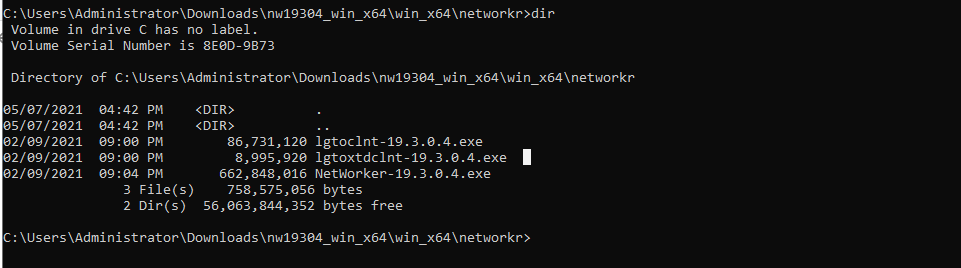
- 從 Windows 用戶端系統,開啟系統管理命令提示字元,然後 cd 至安裝二進位檔案所在的路徑。
目錄內容的範例:
- 執行命令:
lgtoclnt-x.x.x.x.exe /v /s /q ConfigureFirewall=1 StartServices=1 /norestart
- /s /q 會抑制所有 UI 輸出。
- /v 啟用詳細資料模式。
- 如果安裝需要重新開機,/norestart 會在安裝完成後抑制重新開機。
範例:

- 在「程式與功能」下,您會看到已安裝的用戶端套件:

使用無訊息選項安裝 NetWorker 擴充式用戶端:
- 執行命令:
lgtoxtdclnt-x.x.x.x.exe /v /s /q ConfigureFirewall=1 StartServices=1 /norestart
範例:

- 在「程式與功能」下,您會看到已安裝的擴充式用戶端套件:

- NetWorker 用戶端服務應在安裝後自動重新開機。
net stop nsrexecd /y && net start nsrexecd
Affected Products
NetWorkerArticle Properties
Article Number: 000192023
Article Type: How To
Last Modified: 12 May 2026
Version: 6
Find answers to your questions from other Dell users
Support Services
Check if your device is covered by Support Services.