通过在 Windows 上使用静默安装来安装 NetWorker 客户端和 NetWorker 扩展客户端软件
Summary: 本知识库文章提供了在 Windows 系统上从命令行安装 NetWorker 客户端和扩展客户端软件包的说明。
This article applies to
This article does not apply to
This article is not tied to any specific product.
Not all product versions are identified in this article.
Instructions
- 从在线支持网站 https://www.dell.com/support/home/product-support/product/networker/drivers 下载 NetWorker 软件包。
- 在 Windows 客户端系统中,打开管理命令提示符,并使用 cd 命令将目录切换到安装二进制文件所在的路径。
目录内容示例:
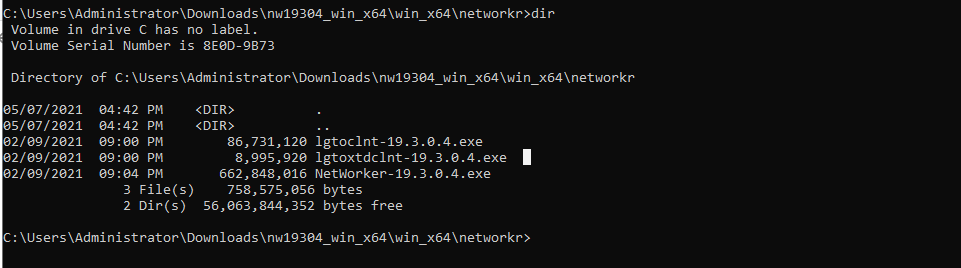
- 运行命令:
lgtoclnt-x.x.x.x.exe /v /s /q ConfigureFirewall=1 StartServices=1 /norestart
- /s /q 禁止所有 UI 输出。
- /v 启用详细模式。
- 如果安装需要重新启动,/norestart 会在安装完成后禁止重新启动。
示例:

- 在“程序和功能”下,您会看到已安装的客户端软件包:

使用静默选项安装 NetWorker 扩展客户端:
- 运行命令:
lgtoxtdclnt-x.x.x.x.exe /v /s /q ConfigureFirewall=1 StartServices=1 /norestart
示例:

- 在“程序和功能”下,您会看到已安装的扩展客户端软件包:

- NetWorker 客户端服务应该会在安装后自动重新启动。
net stop nsrexecd /y && net start nsrexecd
Affected Products
NetWorkerArticle Properties
Article Number: 000192023
Article Type: How To
Last Modified: 12 May 2026
Version: 6
Find answers to your questions from other Dell users
Support Services
Check if your device is covered by Support Services.