PowerStore: Replication session goes into system_pause state due to MTU mismatch.
Summary: Replication session goes into system_pause state when user has set different MTU values on the appliances used for replication in between or when the network between the appliances does not support the MTU(9000) value as set on appliance itself. ...
This article applies to
This article does not apply to
This article is not tied to any specific product.
Not all product versions are identified in this article.
Symptoms
Replication session is paused.
Cause
By default MTU for replication is inherited from the Local Storage Network Settings. Users usually configure MTU for local storage first and only later will configure replication sessions. If MTU for Local Storage Network setting is configured to MTU 9000, it is essential that before configurating any replication session the user verifies the MTU along the path and destination is 9000 as well. Failing to do so might cause unexpected issues in the replication sessions.
Resolution
There are two options:
Recommend upgrading to PowerStore 2.0.1.3 or greater which has a fix for the issue discussed in this article.
- If using a MTU greater than 1500, ensure the same MTU configuration is used for the entire path, end-to-end.
- In PowerStore v2.0.x and above, there is an option to configure specific ports for replication and set a dedicated VLAN with a different MTU. Separate the replication ports and configure the MTU to 1500 (which is the default MTU).
Recommend upgrading to PowerStore 2.0.1.3 or greater which has a fix for the issue discussed in this article.
Additional Information
Follow below procedure to set dedicated ports for replication with different MTU:
In PowerStore Manager, go to Cluster → Settings → Network IPs → Create:

Configure at least 2 IPs as recommended
Press Next and Map the network to relevant ports

After creating the network - choose the network and click reconfigure

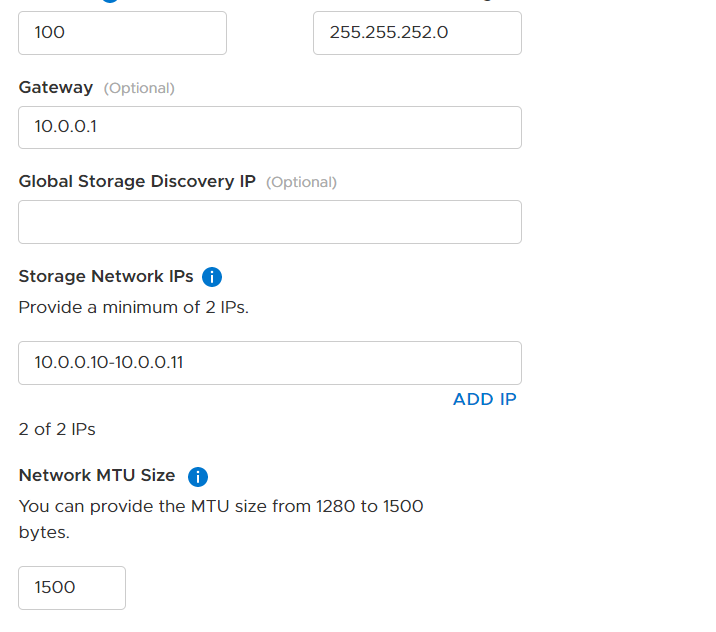
On the configure screen - scroll down and change the MTU to the required size
In PowerStore Manager, go to Cluster → Settings → Network IPs → Create:
Configure at least 2 IPs as recommended
Press Next and Map the network to relevant ports
After creating the network - choose the network and click reconfigure
On the configure screen - scroll down and change the MTU to the required size
Affected Products
PowerStoreArticle Properties
Article Number: 000194044
Article Type: Solution
Last Modified: 24 Mar 2022
Version: 3
Find answers to your questions from other Dell users
Support Services
Check if your device is covered by Support Services.