Rapportering og analyse (DPA) viser Application Service og Application Server Admin-brugergrænsefladen som rød i ACM efter opgradering til IDPA 2.7 eller 2.7.1
Summary: Denne KB beskriver, hvordan du omgår DPA-programtjenester, der ikke starter efter IDPA 2.7- eller 2.7.1-opgradering.
This article applies to
This article does not apply to
This article is not tied to any specific product.
Not all product versions are identified in this article.
Symptoms
Efter opgradering til IDPA 2.7 eller 2.7.1 starter DPA-programtjenesterne (Reporting and Analytics) ikke og viser røde mærker i ACM-brugergrænsefladen. 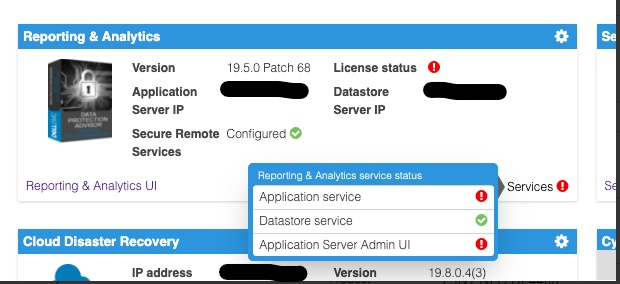
Undersøgelse af DPA-programmets serverlogfil, der er placeret i <dpa_install_path>/services/logs/server.log Følgende meddelelser vises.
2021-12-27 14:14:07,113 INFO  [com.emc.apollo.serverstart.pre.PreApolloStartupBean] (ServerService Thread Pool -- 62) Server starting
2021-12-27 14:14:07,114 INFO  [com.emc.apollo.services.container.ApolloClusterServicesJbossImpl] (ServerService Thread Pool -- 62) initIsMaster set to true
2021-12-27 14:14:07,115 INFO  [com.emc.apollo.serverstart.pre.PreApolloStartupBean] (ServerService Thread Pool -- 62) Apollo Version: 19.5.0.1634796815
2021-12-27 14:14:07,117 WARN  [org.jboss.jca.core.connectionmanager.pool.strategy.PoolBySubject] (ServerService Thread Pool -- 62) IJ000604: Throwable while attempting to get a new connection: null: javax.resource.ResourceException: Could not create connection
...
Caused by: org.postgresql.util.PSQLException: Connection to <ip_address_of_DS>:9003 refused. Check that the hostname and port are correct and that the postmaster is accepting TCP/IP connections.
...
Caused by: java.net.ConnectException: Connection refused (Connection refused)
at java.net.PlainSocketImpl.socketConnect(Native Method) [rt.jar:1.8.0_301]
Og
2021-12-27 14:14:07,120 ERROR [com.emc.apollo.serverstart.pre.PreApolloStartupBean] (ServerService Thread Pool -- 62) exception trying to obtain a connection to the database: com.emc.apollo.jdbc.ApolloSQLException: Could not obtain connection: javax.resource.ResourceException: IJ000453: Unable to get managed connection for java:jboss/datasources/ApolloDSFor at bekræfte problemet skal du til sidst logge på DPA DS-serveren ved hjælp af PUTTY/SSH som root og køre følgende kommando:
dpa.sh ds con
Hvis DPA APP-tjenesten ikke starter, svarer outputtet til nedenfor:
dpa.sh ds con

EMC Data Protection Advisor

[INFO] Service Bind Address(es)    : 127.0.0.1
       Client(s) Address(es)       : 127.0.0.1/32
                                     ::1/128
                                     127.0.0.1/32
                                     ::1/128
                                     <DS_ip_addresss>/32

Command completed successfully.

Where <DS_ip_addresss> is the IP Address of the DPA Datastore, example 10.0.0.20.
Identifikationen af problemet har en af eller begge følgende komponenter:
- I servicebindadresse(r) er DPA-datalagerets IP-adresse ikke angivet.
- I klientadresse(r) er DPA-programmets IP-adresse ikke angivet.
I dette eksempel er begge problemer til stede.
Et korrekt output fra denne kommando skal være som nedenfor:
dpa.sh ds con

EMC Data Protection Advisor

[INFO] Service Bind Address(es)    : <DS_ip_addresss>
       Client(s) Address(es)       : 127.0.0.1/32
                                     ::1/128
                                     127.0.0.1/32
                                     ::1/128
                                     <App_ip_addresss>/32
                                     <DS_ip_addresss>/32

Command completed successfully.

Where <DS_ip_addresss> is the IP Address of the DPA Datastore, example 10.0.0.20.

Where <App_ip_addresss> is the IP Address of the DPA Application, example 10.0.0.21.
Cause
Dette er et kendt problem/defekt i Data Protection Advisor.
Resolution
Der er ingen løsning på dette problem.
Der findes en løsning på dette problem. Følg nedenstående trin.
BEMÆRK: Den bedste fremgangsmåde er at tage kopier af og sikkerhedskopiere alle DPA Datastore-konfigurationsfiler, før du kører disse kommandoer.
Et af følgende punkter skal udføres. I nogle tilfælde er det kun DPA Datastore-bindeadressen, der skal rettes, og i andre skal både DPA Datastore-bindadressen og klientadressen for DPA-programmet være faste.
Rettelse af DPA-datalagerets "bind"-adresse.
1. Kør følgende kommando på DPA Datastore-serveren fra biblioteket /opt/emc/epa/services/bin:
dpa.sh ds con -b <ip_address_of_the_datastore>
2. Genstart DPA Datastore-tjenesterne.
Kør følgende kommando på DPA Datastore-serveren fra/:
opt/emc/epa/services/bin mappe:
dpa.sh ds restart3. Genstart DPA-programtjenesterne.
Kør følgende kommando på DPA APP-serveren fra
/opt/emc/epa/services/bin mappe:
dpa.sh app restart
Rettelse af DPA-programmets klientadresse
1. Kør følgende kommando på DPA Datastore-serveren fra /opt/emc/epa/services/bin mappe:
dpa.sh ds con -a <ip_address_of_the_dpa_application>
2. Genstart DPA Datastore-tjenesterne.
Kør følgende kommando på DPA Datastore-serveren fra
/opt/emc/epa/services/bin mappe:
dpa.sh ds restart
3. Genstart DPA-programtjenesterne.
Kør følgende kommando på DPA APP-serveren fra
/opt/emc/epa/services/bin mappe:
dpa.sh app restart
Fjernelse af konfigurations-IP, hvis den findes
Hvis du i outputtet af dpa.sh ds con ser følgende IP opført, skal den fjernes:
10.63.62.242/32
Hvis du vil fjerne denne post, skal du køre følgende kommando på DPA Datastore-serveren fra /opt/emc/epa/services/bin mappe:
dpa.sh ds con -d 10.63.62.242
Kontakt Dells tekniske support for at få flere oplysninger eller oplysninger.
Article Properties
Article Number: 000195087
Article Type: Solution
Last Modified: 16 Apr 2025
Version: 3
Find answers to your questions from other Dell users
Support Services
Check if your device is covered by Support Services.