Reporting and Analytics (DPA) näyttää sovelluspalvelun ja sovelluspalvelimen järjestelmänvalvojan käyttöliittymän punaisina ACM:ssä IDPA 2.7- tai 2.7.1-päivityksen jälkeen
Summary: Tässä tietämyskannan artikkelissa kerrotaan, miten voit kiertää DPA-sovelluspalvelut, jotka eivät käynnisty IDPA 2.7- tai 2.7.1-päivityksen jälkeen.
This article applies to
This article does not apply to
This article is not tied to any specific product.
Not all product versions are identified in this article.
Symptoms
IDPA 2.7- tai 2.7.1-päivityksen jälkeen Reporting and Analytics (DPA) -sovelluspalvelut eivät käynnisty ja ACM-käyttöliittymässä näkyy punaisia merkkejä. 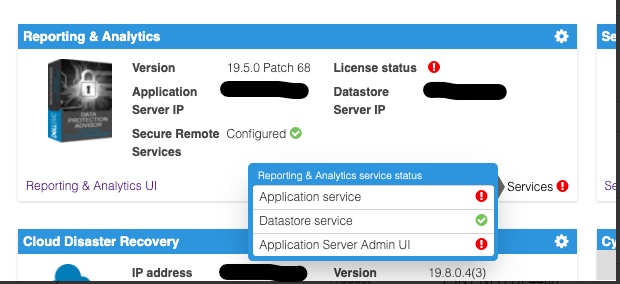
DPA-sovelluspalvelimen lokin tutkiminen <dpa_install_path>/services/logs/server.log Seuraavat viestit näkyvät.
2021-12-27 14:14:07,113 INFO  [com.emc.apollo.serverstart.pre.PreApolloStartupBean] (ServerService Thread Pool -- 62) Server starting
2021-12-27 14:14:07,114 INFO  [com.emc.apollo.services.container.ApolloClusterServicesJbossImpl] (ServerService Thread Pool -- 62) initIsMaster set to true
2021-12-27 14:14:07,115 INFO  [com.emc.apollo.serverstart.pre.PreApolloStartupBean] (ServerService Thread Pool -- 62) Apollo Version: 19.5.0.1634796815
2021-12-27 14:14:07,117 WARN  [org.jboss.jca.core.connectionmanager.pool.strategy.PoolBySubject] (ServerService Thread Pool -- 62) IJ000604: Throwable while attempting to get a new connection: null: javax.resource.ResourceException: Could not create connection
...
Caused by: org.postgresql.util.PSQLException: Connection to <ip_address_of_DS>:9003 refused. Check that the hostname and port are correct and that the postmaster is accepting TCP/IP connections.
...
Caused by: java.net.ConnectException: Connection refused (Connection refused)
at java.net.PlainSocketImpl.socketConnect(Native Method) [rt.jar:1.8.0_301]
ja
2021-12-27 14:14:07,120 ERROR [com.emc.apollo.serverstart.pre.PreApolloStartupBean] (ServerService Thread Pool -- 62) exception trying to obtain a connection to the database: com.emc.apollo.jdbc.ApolloSQLException: Could not obtain connection: javax.resource.ResourceException: IJ000453: Unable to get managed connection for java:jboss/datasources/ApolloDSVahvista ongelma kirjautumalla DPA DS -palvelimeen pääkäyttäjänä PUTTY/SSH ja suorittamalla seuraava komento:
dpa.sh ds con
Jos DPA APP -palvelu ei käynnisty, tulos on alla olevan kaltainen:
dpa.sh ds con

EMC Data Protection Advisor

[INFO] Service Bind Address(es)    : 127.0.0.1
       Client(s) Address(es)       : 127.0.0.1/32
                                     ::1/128
                                     127.0.0.1/32
                                     ::1/128
                                     <DS_ip_addresss>/32

Command completed successfully.

Where <DS_ip_addresss> is the IP Address of the DPA Datastore, example 10.0.0.20.
Ongelman tunnistamisessa on jompikumpi tai molemmat seuraavista osista:
- Palvelun sidontaosoitteissa (-osoitteissa) DPA-tietosäilön IP-osoitetta ei ole lueteltu.
- DPA-sovelluksen IP-osoitetta ei ole lueteltu asiakkaan osoitteessa (osoitteissa).
Tässä esimerkissä molemmat ongelmat ovat olemassa.
Tämän komennon oikean tuloksen pitäisi olla seuraava:
dpa.sh ds con

EMC Data Protection Advisor

[INFO] Service Bind Address(es)    : <DS_ip_addresss>
       Client(s) Address(es)       : 127.0.0.1/32
                                     ::1/128
                                     127.0.0.1/32
                                     ::1/128
                                     <App_ip_addresss>/32
                                     <DS_ip_addresss>/32

Command completed successfully.

Where <DS_ip_addresss> is the IP Address of the DPA Datastore, example 10.0.0.20.

Where <App_ip_addresss> is the IP Address of the DPA Application, example 10.0.0.21.
Cause
Tämä on tunnettu ongelma/vika Data Protection Advisorissa.
Resolution
Tähän ongelmaan ei ole ratkaisua.
Ongelmaan on saatavilla kiertotapa. Noudata alla olevia ohjeita.
HUOMAUTUS: Paras käytäntö on kopioida ja varmuuskopioida kaikki DPA-tietosäilön määritystiedostot ennen näiden komentojen suorittamista.
Jompikumpi seuraavista on tehtävä. Joissakin tapauksissa vain DPA-tietosäilön sidontaosoite on korjattava, ja toisissa tapauksissa sekä DPA-tietosäilön sidontaosoite että DPA-sovelluksen asiakkaan osoite on korjattava.
DPA-tietosäilön sidontaosoitteen korjaaminen.
1. Suorita seuraava komento DPA Datastore -palvelimessa hakemistosta /opt/emc/epa/services/bin:
dpa.sh ds con -b <ip_address_of_the_datastore>
2. Käynnistä DPA-tietosäilöpalvelut uudelleen.
Suorita seuraava komento DPA Datastore -palvelimessa /
opt/emc/epa/services/bin hakemisto:
dpa.sh ds restart3. Käynnistä DPA-sovelluspalvelut uudelleen.
Suorita seuraava komento DPA APP -palvelimessa
/opt/emc/epa/services/bin hakemisto:
dpa.sh app restart
DPA-sovelluksen asiakasosoitteen
korjaaminen1. Suorita seuraava komento DPA Datastore -palvelimessa /opt/emc/epa/services/bin hakemisto:
dpa.sh ds con -a <ip_address_of_the_dpa_application>
2. Käynnistä DPA-tietosäilöpalvelut uudelleen.
Suorita seuraava komento DPA Datastore -palvelimessa
/opt/emc/epa/services/bin hakemisto:
dpa.sh ds restart
3. Käynnistä DPA-sovelluspalvelut uudelleen.
Suorita seuraava komento DPA APP -palvelimessa
/opt/emc/epa/services/bin hakemisto:
dpa.sh app restart
Mahdollisen määrityksen IP-osoitteen
poistaminenJos näet dpa.sh ds conin tulosteessa seuraavan IP-osoitteen, se on poistettava:
10.63.62.242/32
Voit poistaa tämän merkinnän suorittamalla seuraavan komennon DPA Datastore -palvelimessa /opt/emc/epa/services/bin hakemisto:
dpa.sh ds con -d 10.63.62.242
Pyydä lisätietoja Dellin tekniseltä tuelta .
Article Properties
Article Number: 000195087
Article Type: Solution
Last Modified: 16 Apr 2025
Version: 3
Find answers to your questions from other Dell users
Support Services
Check if your device is covered by Support Services.