IDPA 2.7または2.7.1にアップグレードした後、Reporting and Analytics (DPA)でアプリケーション サービスとアプリケーション サーバー管理UIがACMで赤として表示される
Summary: このKBでは、IDPA 2.7または2.7.1のアップグレード後にDPAアプリケーション サービスが開始されない問題を回避する方法について説明します。
This article applies to
This article does not apply to
This article is not tied to any specific product.
Not all product versions are identified in this article.
Symptoms
IDPA 2.7または2.7.1にアップグレードした後、Reporting and Analytics (DPA)アプリケーション サービスが起動せず、ACM UIに赤いマークが表示されます。 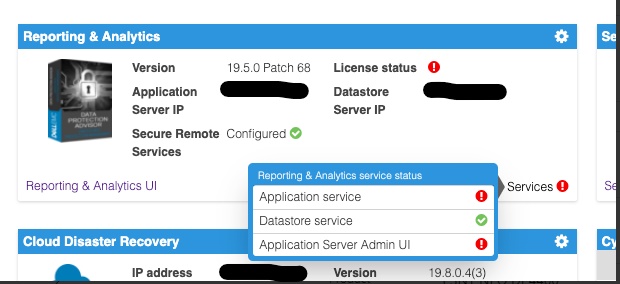
次の場所にあるDPAアプリケーション サーバー ログの調査 <dpa_install_path>/services/logs/server.log 次のメッセージが表示されます。
2021-12-27 14:14:07,113 INFO  [com.emc.apollo.serverstart.pre.PreApolloStartupBean] (ServerService Thread Pool -- 62) Server starting
2021-12-27 14:14:07,114 INFO  [com.emc.apollo.services.container.ApolloClusterServicesJbossImpl] (ServerService Thread Pool -- 62) initIsMaster set to true
2021-12-27 14:14:07,115 INFO  [com.emc.apollo.serverstart.pre.PreApolloStartupBean] (ServerService Thread Pool -- 62) Apollo Version: 19.5.0.1634796815
2021-12-27 14:14:07,117 WARN  [org.jboss.jca.core.connectionmanager.pool.strategy.PoolBySubject] (ServerService Thread Pool -- 62) IJ000604: Throwable while attempting to get a new connection: null: javax.resource.ResourceException: Could not create connection
...
Caused by: org.postgresql.util.PSQLException: Connection to <ip_address_of_DS>:9003 refused. Check that the hostname and port are correct and that the postmaster is accepting TCP/IP connections.
...
Caused by: java.net.ConnectException: Connection refused (Connection refused)
at java.net.PlainSocketImpl.socketConnect(Native Method) [rt.jar:1.8.0_301]
および
2021-12-27 14:14:07,120 ERROR [com.emc.apollo.serverstart.pre.PreApolloStartupBean] (ServerService Thread Pool -- 62) exception trying to obtain a connection to the database: com.emc.apollo.jdbc.ApolloSQLException: Could not obtain connection: javax.resource.ResourceException: IJ000453: Unable to get managed connection for java:jboss/datasources/ApolloDS最後に、問題を確認するには、rootとしてPUTTY/SSHを使用してDPA DSサーバーにログインし、次のコマンドを実行します。
dpa.sh ds con
DPA APPサービスが起動していない場合、出力は次のようになります。
dpa.sh ds con

EMC Data Protection Advisor

[INFO] Service Bind Address(es)    : 127.0.0.1
       Client(s) Address(es)       : 127.0.0.1/32
                                     ::1/128
                                     127.0.0.1/32
                                     ::1/128
                                     <DS_ip_addresss>/32

Command completed successfully.

Where <DS_ip_addresss> is the IP Address of the DPA Datastore, example 10.0.0.20.
問題の特定には、次のいずれかまたは両方のコンポーネントがあります。
- Service Bind Address (es)に、DPAデータストアのIPアドレスが記載されていません。
- [Client (s) Address (es)]に、DPAアプリケーションのIPアドレスが記載されていません。
この例では、両方の問題が存在します。
このコマンドの適切な出力は、次のようになります。
dpa.sh ds con

EMC Data Protection Advisor

[INFO] Service Bind Address(es)    : <DS_ip_addresss>
       Client(s) Address(es)       : 127.0.0.1/32
                                     ::1/128
                                     127.0.0.1/32
                                     ::1/128
                                     <App_ip_addresss>/32
                                     <DS_ip_addresss>/32

Command completed successfully.

Where <DS_ip_addresss> is the IP Address of the DPA Datastore, example 10.0.0.20.

Where <App_ip_addresss> is the IP Address of the DPA Application, example 10.0.0.21.
Cause
これは、Data Protection Advisorの既知の問題/欠陥です。
Resolution
この問題の解決策はありません
この問題には回避策があります。以下の手順に従ってください。
メモ: ベスト プラクティスは、これらのコマンドを実行する前に、すべてのDPAデータストア構成ファイルのコピーを作成してバックアップすることです。
次の各項目のいずれかを実施する必要があります。DPAデータストア バインド アドレスのみを固定する必要がある場合もあれば、DPAデータストア バインド アドレスとDPAアプリケーションのクライアント アドレスの両方を修正する必要がある場合もあります。
DPAデータストアの「バインド」アドレスを修正します。
1. DPAデータストア サーバーで、/opt/emc/epa/services/binディレクトリーから次のコマンドを実行します。
dpa.sh ds con -b <ip_address_of_the_datastore>
2. DPAデータストア サービスを再起動します。
DPAデータストア サーバーで/から次のコマンドを実行します。
opt/emc/epa/services/bin ディレクトリ:
dpa.sh ds restart3. DPAアプリケーション サービスを再起動します。
DPA APPサーバーで次のコマンドを実行します。
/opt/emc/epa/services/bin ディレクトリ:
dpa.sh app restart
DPAアプリケーション クライアント アドレスの修正
1. DPAデータストア サーバーで、次のコマンドを実行します。 /opt/emc/epa/services/bin ディレクトリ:
dpa.sh ds con -a <ip_address_of_the_dpa_application>
2. DPAデータストア サービスを再起動します。
DPAデータストア サーバーで、次のコマンドを実行します。
/opt/emc/epa/services/bin ディレクトリ:
dpa.sh ds restart
3. DPAアプリケーション サービスを再起動します。
DPA APPサーバーで次のコマンドを実行します。
/opt/emc/epa/services/bin ディレクトリ:
dpa.sh app restart
設定IPがある場合は削除しています
dpa.sh ds conの出力に次のIPが表示されている場合は、削除する必要があります。
10.63.62.242/32
このエントリーを削除するには、DPAデータストア サーバーで次のコマンドを実行します。 /opt/emc/epa/services/bin ディレクトリ:
dpa.sh ds con -d 10.63.62.242
詳細または情報については、 Dellテクニカル サポート にお問い合わせください。
Article Properties
Article Number: 000195087
Article Type: Solution
Last Modified: 16 Apr 2025
Version: 3
Find answers to your questions from other Dell users
Support Services
Check if your device is covered by Support Services.