IDPA 2.7 또는 2.7.1로 업그레이드한 후 ACM에서 DPA(Reporting and Analytics)에 애플리케이션 서비스 및 애플리케이션 서버 관리 UI가 빨간색으로 표시됨
Summary: 이 KB에서는 IDPA 2.7 또는 2.7.1 업그레이드 후 DPA 애플리케이션 서비스가 시작되지 않는 문제를 해결하는 방법에 대해 설명합니다.
This article applies to
This article does not apply to
This article is not tied to any specific product.
Not all product versions are identified in this article.
Symptoms
IDPA 2.7 또는 2.7.1로 업그레이드한 후 DPA(Reporting and Analytics) 애플리케이션 서비스가 시작되지 않고 ACM UI에 빨간색 표시가 나타납니다. 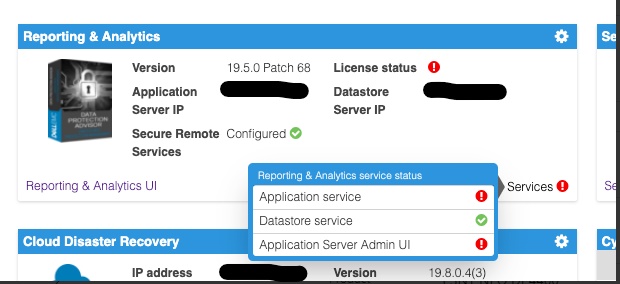
에 있는 DPA 애플리케이션 서버 로그 검사 <dpa_install_path>/services/logs/server.log 다음 메시지가 표시됩니다.
2021-12-27 14:14:07,113 INFO  [com.emc.apollo.serverstart.pre.PreApolloStartupBean] (ServerService Thread Pool -- 62) Server starting
2021-12-27 14:14:07,114 INFO  [com.emc.apollo.services.container.ApolloClusterServicesJbossImpl] (ServerService Thread Pool -- 62) initIsMaster set to true
2021-12-27 14:14:07,115 INFO  [com.emc.apollo.serverstart.pre.PreApolloStartupBean] (ServerService Thread Pool -- 62) Apollo Version: 19.5.0.1634796815
2021-12-27 14:14:07,117 WARN  [org.jboss.jca.core.connectionmanager.pool.strategy.PoolBySubject] (ServerService Thread Pool -- 62) IJ000604: Throwable while attempting to get a new connection: null: javax.resource.ResourceException: Could not create connection
...
Caused by: org.postgresql.util.PSQLException: Connection to <ip_address_of_DS>:9003 refused. Check that the hostname and port are correct and that the postmaster is accepting TCP/IP connections.
...
Caused by: java.net.ConnectException: Connection refused (Connection refused)
at java.net.PlainSocketImpl.socketConnect(Native Method) [rt.jar:1.8.0_301]
또한 다음 메시지가 표시됩니다.
2021-12-27 14:14:07,120 ERROR [com.emc.apollo.serverstart.pre.PreApolloStartupBean] (ServerService Thread Pool -- 62) exception trying to obtain a connection to the database: com.emc.apollo.jdbc.ApolloSQLException: Could not obtain connection: javax.resource.ResourceException: IJ000453: Unable to get managed connection for java:jboss/datasources/ApolloDS마지막으로 문제를 확인하려면 PUTTY/SSH를 루트로 사용하여 DPA DS 서버에 로그인하고 다음 명령을 실행합니다.
dpa.sh ds con
DPA APP 서비스가 시작되지 않는 경우 출력은 아래와 유사합니다.
dpa.sh ds con

EMC Data Protection Advisor

[INFO] Service Bind Address(es)    : 127.0.0.1
       Client(s) Address(es)       : 127.0.0.1/32
                                     ::1/128
                                     127.0.0.1/32
                                     ::1/128
                                     <DS_ip_addresss>/32

Command completed successfully.

Where <DS_ip_addresss> is the IP Address of the DPA Datastore, example 10.0.0.20.
문제 식별에는 다음 구성 요소 중 하나 또는 둘 모두가 포함됩니다.
- Service Bind Address (es)에 DPA 데이터 저장소의 IP 주소가 나열되지 않습니다.
- Client (s) Address (es)에 DPA 애플리케이션의 IP 주소가 나열되지 않습니다.
이 예에서는 두 가지 문제가 모두 있습니다.
이 명령의 적절한 출력은 다음과 같아야 합니다.
dpa.sh ds con

EMC Data Protection Advisor

[INFO] Service Bind Address(es)    : <DS_ip_addresss>
       Client(s) Address(es)       : 127.0.0.1/32
                                     ::1/128
                                     127.0.0.1/32
                                     ::1/128
                                     <App_ip_addresss>/32
                                     <DS_ip_addresss>/32

Command completed successfully.

Where <DS_ip_addresss> is the IP Address of the DPA Datastore, example 10.0.0.20.

Where <App_ip_addresss> is the IP Address of the DPA Application, example 10.0.0.21.
Cause
이는 Data Protection Advisor의 알려진 문제/결함입니다.
Resolution
이 문제에 대한 해결 방법은 없습니다.
이 문제에 대한 해결 방법을 사용할 수 있습니다. 아래 단계를 따르십시오.
참고: 모범 사례는 이러한 명령을 실행하기 전에 모든 DPA 데이터 저장소 구성 파일의 복사본을 만들고 백업하는 것입니다.
다음 항목 중 하나를 수행해야 합니다. DPA 데이터 저장소 바인딩 주소만 수정해야 하는 경우도 있고, DPA 애플리케이션의 DPA 데이터 저장소 바인딩 주소와 클라이언트 주소를 모두 수정해야 하는 경우도 있습니다.
DPA 데이터 저장소 "바인드" 주소
수정1. /opt/emc/epa/services/bin 디렉토리의 DPA 데이터 저장소 서버에서 다음 명령을 실행합니다.
dpa.sh ds con -b <ip_address_of_the_datastore>
2. DPA 데이터 저장소 서비스를 재시작합니다.
DPA 데이터 저장소 서버에서 다음 명령을 실행합니다.
opt/emc/epa/services/bin 디렉토리:
dpa.sh ds restart3. DPA 애플리케이션 서비스를 재시작합니다.
다음 DPA APP 서버에서 다음 명령을 실행합니다.
/opt/emc/epa/services/bin 디렉토리:
dpa.sh app restart
DPA 애플리케이션 클라이언트 주소
수정1. DPA 데이터 저장소 서버에서 다음 명령을 실행합니다. /opt/emc/epa/services/bin 디렉토리:
dpa.sh ds con -a <ip_address_of_the_dpa_application>
2. DPA 데이터 저장소 서비스를 재시작합니다.
DPA 데이터 저장소 서버에서 다음 명령을 실행합니다.
/opt/emc/epa/services/bin 디렉토리:
dpa.sh ds restart
3. DPA 애플리케이션 서비스를 재시작합니다.
다음 DPA APP 서버에서 다음 명령을 실행합니다.
/opt/emc/epa/services/bin 디렉토리:
dpa.sh app restart
있는
경우 구성 IP 제거dpa.sh ds con의 출력에 다음과 같은 IP가 나열되면 제거해야 합니다.
10.63.62.242/32
이 항목을 제거하려면 DPA 데이터 저장소 서버에서 다음 명령을 실행합니다. /opt/emc/epa/services/bin 디렉토리:
dpa.sh ds con -d 10.63.62.242
자세한 내용은 Dell 기술 지원 부서에 문의하십시오.
Article Properties
Article Number: 000195087
Article Type: Solution
Last Modified: 16 Apr 2025
Version: 3
Find answers to your questions from other Dell users
Support Services
Check if your device is covered by Support Services.