Rapportage en analytics (DPA) geven de beheerdersinterface van de applicatieservice en de applicatieserver weer als rood in ACM na een upgrade naar IDPA 2.7 of 2.7.1
Summary: In dit KB-artikel wordt beschreven hoe u DPA-applicatieservices kunt omzeilen die niet starten na upgrade naar IDPA 2.7 of 2.7.1.
This article applies to
This article does not apply to
This article is not tied to any specific product.
Not all product versions are identified in this article.
Symptoms
Na een upgrade naar IDPA 2.7 of 2.7.1 starten de Reporting and Analytics (DPA)-applicatieservices niet en worden rode markeringen weergegeven in de ACM-interface. 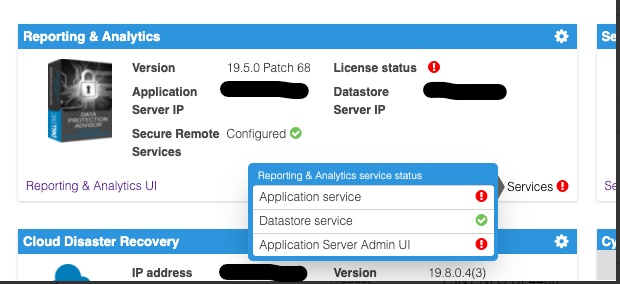
Het DPA-toepassingsserverlogboek in <dpa_install_path>/services/logs/server.log De volgende berichten worden weergegeven.
2021-12-27 14:14:07,113 INFO  [com.emc.apollo.serverstart.pre.PreApolloStartupBean] (ServerService Thread Pool -- 62) Server starting
2021-12-27 14:14:07,114 INFO  [com.emc.apollo.services.container.ApolloClusterServicesJbossImpl] (ServerService Thread Pool -- 62) initIsMaster set to true
2021-12-27 14:14:07,115 INFO  [com.emc.apollo.serverstart.pre.PreApolloStartupBean] (ServerService Thread Pool -- 62) Apollo Version: 19.5.0.1634796815
2021-12-27 14:14:07,117 WARN  [org.jboss.jca.core.connectionmanager.pool.strategy.PoolBySubject] (ServerService Thread Pool -- 62) IJ000604: Throwable while attempting to get a new connection: null: javax.resource.ResourceException: Could not create connection
...
Caused by: org.postgresql.util.PSQLException: Connection to <ip_address_of_DS>:9003 refused. Check that the hostname and port are correct and that the postmaster is accepting TCP/IP connections.
...
Caused by: java.net.ConnectException: Connection refused (Connection refused)
at java.net.PlainSocketImpl.socketConnect(Native Method) [rt.jar:1.8.0_301]
En
2021-12-27 14:14:07,120 ERROR [com.emc.apollo.serverstart.pre.PreApolloStartupBean] (ServerService Thread Pool -- 62) exception trying to obtain a connection to the database: com.emc.apollo.jdbc.ApolloSQLException: Could not obtain connection: javax.resource.ResourceException: IJ000453: Unable to get managed connection for java:jboss/datasources/ApolloDSOm het probleem te bevestigen, logt u ten slotte in op de DPA DS-server met PUTTY/SSH als root en voert u de volgende opdracht uit:
dpa.sh ds con
Als de DPA APP-service niet wordt gestart, is de uitvoer vergelijkbaar met de onderstaande:
dpa.sh ds con

EMC Data Protection Advisor

[INFO] Service Bind Address(es)    : 127.0.0.1
       Client(s) Address(es)       : 127.0.0.1/32
                                     ::1/128
                                     127.0.0.1/32
                                     ::1/128
                                     <DS_ip_addresss>/32

Command completed successfully.

Where <DS_ip_addresss> is the IP Address of the DPA Datastore, example 10.0.0.20.
De identificatie van het probleem bestaat uit één of beide van de volgende componenten:
- In het (de) Service Bind Address(es) wordt het IP-adres van de DPA Datastore niet vermeld.
- In het Klant(en)adres(sen) staat niet het IP-adres van de DPA-Applicatie vermeld.
In dit voorbeeld zijn beide problemen aanwezig.
Een juiste uitvoer van deze opdracht zou als volgt moeten zijn:
dpa.sh ds con

EMC Data Protection Advisor

[INFO] Service Bind Address(es)    : <DS_ip_addresss>
       Client(s) Address(es)       : 127.0.0.1/32
                                     ::1/128
                                     127.0.0.1/32
                                     ::1/128
                                     <App_ip_addresss>/32
                                     <DS_ip_addresss>/32

Command completed successfully.

Where <DS_ip_addresss> is the IP Address of the DPA Datastore, example 10.0.0.20.

Where <App_ip_addresss> is the IP Address of the DPA Application, example 10.0.0.21.
Cause
Dit is een bekend probleem/defect in Data Protection Advisor.
Resolution
Er is geen oplossing voor dit probleem.
Er is een tijdelijke oplossing beschikbaar voor dit probleem. Volg de onderstaande stappen.
OPMERKING: Het beste is om kopieën te maken van en een back-up te maken van alle DPA Datastore-configuratiebestanden voordat u deze opdrachten uitvoert.
Een van de volgende items moet worden uitgevoerd. In sommige gevallen moet alleen het DPA Datastore bindingsadres worden vastgesteld en in andere gevallen moet zowel het DPA Datastore bindingsadres als het Client Address voor de DPA-aanvraag worden vastgelegd.
Het "bindingsadres" van de DPA Datastore oplossen.
1. Voer de volgende opdracht uit op de DPA Datastore-server vanuit de directory /opt/emc/epa/services/bin:
dpa.sh ds con -b <ip_address_of_the_datastore>
2. Start de DPA Datastore-services opnieuw.
Voer de volgende opdracht uit op de DPA Datastore-server vanuit /
opt/emc/epa/services/bin map:
dpa.sh ds restart3. Start de DPA-applicatieservices opnieuw.
Voer de volgende opdracht uit op de DPA APP-server vanuit
/opt/emc/epa/services/bin map:
dpa.sh app restart
Het clientadres
van de DPA-applicatie oplossen1. Voer de volgende opdracht uit op de DPA Datastore server vanuit /opt/emc/epa/services/bin map:
dpa.sh ds con -a <ip_address_of_the_dpa_application>
2. Start de DPA Datastore-services opnieuw.
Voer de volgende opdracht uit op de DPA Datastore server vanuit
/opt/emc/epa/services/bin map:
dpa.sh ds restart
3. Start de DPA-applicatieservices opnieuw.
Voer de volgende opdracht uit op de DPA APP-server vanuit
/opt/emc/epa/services/bin map:
dpa.sh app restart
Configuratie-IP verwijderen, indien aanwezig
Als u in de uitvoer van dpa.sh ds con het volgende IP-adres ziet staan, moet het worden verwijderd:
10.63.62.242/32
Als u deze vermelding wilt verwijderen, voert u de volgende opdracht uit op de DPA Datastore-server van: /opt/emc/epa/services/bin map:
dpa.sh ds con -d 10.63.62.242
Neem contact op met Dell Technische Support voor meer informatie of informatie.
Article Properties
Article Number: 000195087
Article Type: Solution
Last Modified: 16 Apr 2025
Version: 3
Find answers to your questions from other Dell users
Support Services
Check if your device is covered by Support Services.