Raporty i analizy (DPA) wyświetlają usługę aplikacji i interfejs użytkownika administratora serwera aplikacji na czerwono w ACM po uaktualnieniu do IDPA 2.7 lub 2.7.1
Summary: W tym artykule bazy wiedzy opisano sposób obejścia problemu polegającego na tym, że usługi aplikacji DPA nie uruchamiają się po uaktualnieniu IDPA do wersji 2.7 lub 2.7.1.
This article applies to
This article does not apply to
This article is not tied to any specific product.
Not all product versions are identified in this article.
Symptoms
Po uaktualnieniu do wersji IDPA 2.7 lub 2.7.1 usługi aplikacji Reporting and Analytics (DPA) nie uruchamiają się i wyświetlają czerwone znaczniki w interfejsie użytkownika ACM. 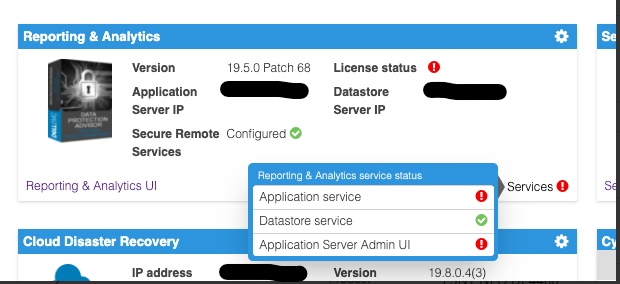
Sprawdzanie dziennika serwera aplikacji DPA znajdującego się w <dpa_install_path>/services/logs/server.log Wyświetlone zostaną następujące komunikaty.
2021-12-27 14:14:07,113 INFO  [com.emc.apollo.serverstart.pre.PreApolloStartupBean] (ServerService Thread Pool -- 62) Server starting
2021-12-27 14:14:07,114 INFO  [com.emc.apollo.services.container.ApolloClusterServicesJbossImpl] (ServerService Thread Pool -- 62) initIsMaster set to true
2021-12-27 14:14:07,115 INFO  [com.emc.apollo.serverstart.pre.PreApolloStartupBean] (ServerService Thread Pool -- 62) Apollo Version: 19.5.0.1634796815
2021-12-27 14:14:07,117 WARN  [org.jboss.jca.core.connectionmanager.pool.strategy.PoolBySubject] (ServerService Thread Pool -- 62) IJ000604: Throwable while attempting to get a new connection: null: javax.resource.ResourceException: Could not create connection
...
Caused by: org.postgresql.util.PSQLException: Connection to <ip_address_of_DS>:9003 refused. Check that the hostname and port are correct and that the postmaster is accepting TCP/IP connections.
...
Caused by: java.net.ConnectException: Connection refused (Connection refused)
at java.net.PlainSocketImpl.socketConnect(Native Method) [rt.jar:1.8.0_301]
i
2021-12-27 14:14:07,120 ERROR [com.emc.apollo.serverstart.pre.PreApolloStartupBean] (ServerService Thread Pool -- 62) exception trying to obtain a connection to the database: com.emc.apollo.jdbc.ApolloSQLException: Could not obtain connection: javax.resource.ResourceException: IJ000453: Unable to get managed connection for java:jboss/datasources/ApolloDSAby potwierdzić problem, zaloguj się do serwera DPA DS za pomocą PUTTY/SSH jako użytkownik root i uruchom następujące polecenie:
dpa.sh ds con
Jeśli usługa DPA APP nie jest uruchamiana, dane wyjściowe są podobne do poniższych:
dpa.sh ds con

EMC Data Protection Advisor

[INFO] Service Bind Address(es)    : 127.0.0.1
       Client(s) Address(es)       : 127.0.0.1/32
                                     ::1/128
                                     127.0.0.1/32
                                     ::1/128
                                     <DS_ip_addresss>/32

Command completed successfully.

Where <DS_ip_addresss> is the IP Address of the DPA Datastore, example 10.0.0.20.
Identyfikacja problemu składa się z jednego lub obu z następujących elementów:
- W polu Service Bind Address (es) nie ma adresu IP magazynu danych DPA.
- W polu Client (s) Address(s) nie ma adresu IP aplikacji DPA.
W tym przykładzie występują oba problemy.
Prawidłowe dane wyjściowe tego polecenia powinny wyglądać tak, jak poniżej:
dpa.sh ds con

EMC Data Protection Advisor

[INFO] Service Bind Address(es)    : <DS_ip_addresss>
       Client(s) Address(es)       : 127.0.0.1/32
                                     ::1/128
                                     127.0.0.1/32
                                     ::1/128
                                     <App_ip_addresss>/32
                                     <DS_ip_addresss>/32

Command completed successfully.

Where <DS_ip_addresss> is the IP Address of the DPA Datastore, example 10.0.0.20.

Where <App_ip_addresss> is the IP Address of the DPA Application, example 10.0.0.21.
Cause
Jest to znany problem/usterka w Data Protection Advisor.
Resolution
Nie ma rozwiązania tego problemu.
Dostępne jest obejście tego problemu. Postępuj zgodnie z poniższymi instrukcjami.
UWAGA: Najlepszą praktyką jest wykonanie kopii zapasowych wszystkich plików konfiguracyjnych magazynu danych DPA przed uruchomieniem tych poleceń.
Należy wykonać jedną z poniższych czynności. W niektórych przypadkach należy ustalić tylko adres powiązania magazynu danych DPA, a w innych zarówno adres powiązania magazynu danych DPA, jak i adres klienta aplikacji DPA.
Rozwiązanie problemu z adresem "powiązania" magazynu danych DPA.
1. Uruchom następujące polecenie na serwerze DPA Datastore z katalogu /opt/emc/epa/services/bin:
dpa.sh ds con -b <ip_address_of_the_datastore>
2. Uruchom ponownie usługi magazynu danych DPA.
Uruchom następujące polecenie na serwerze magazynu danych DPA z /
opt/emc/epa/services/bin katalog:
dpa.sh ds restart3. Uruchom ponownie usługi aplikacji DPA.
Uruchom następujące polecenie na serwerze aplikacji DPA z
/opt/emc/epa/services/bin katalog:
dpa.sh app restart
Naprawianie adresu
klienta aplikacji DPA1. Uruchom następujące polecenie na serwerze magazynu danych DPA z /opt/emc/epa/services/bin katalog:
dpa.sh ds con -a <ip_address_of_the_dpa_application>
2. Uruchom ponownie usługi magazynu danych DPA.
Uruchom następujące polecenie na serwerze magazynu danych DPA z
/opt/emc/epa/services/bin katalog:
dpa.sh ds restart
3. Uruchom ponownie usługi aplikacji DPA.
Uruchom następujące polecenie na serwerze aplikacji DPA z
/opt/emc/epa/services/bin katalog:
dpa.sh app restart
Usuwanie adresu IP konfiguracji, jeśli jest obecny
Jeśli w danych wyjściowych dpa.sh ds con widoczny jest następujący adres IP, należy go usunąć:
10.63.62.242/32
Aby usunąć ten wpis, uruchom następujące polecenie na serwerze magazynu danych DPA z /opt/emc/epa/services/bin katalog:
dpa.sh ds con -d 10.63.62.242
W celu uzyskania dalszych szczegółów lub informacji skontaktuj się z działem pomocy technicznej firmy Dell .
Article Properties
Article Number: 000195087
Article Type: Solution
Last Modified: 16 Apr 2025
Version: 3
Find answers to your questions from other Dell users
Support Services
Check if your device is covered by Support Services.