Dell ThinOS Devices Cannot Detect Second Storage Drive in System Information
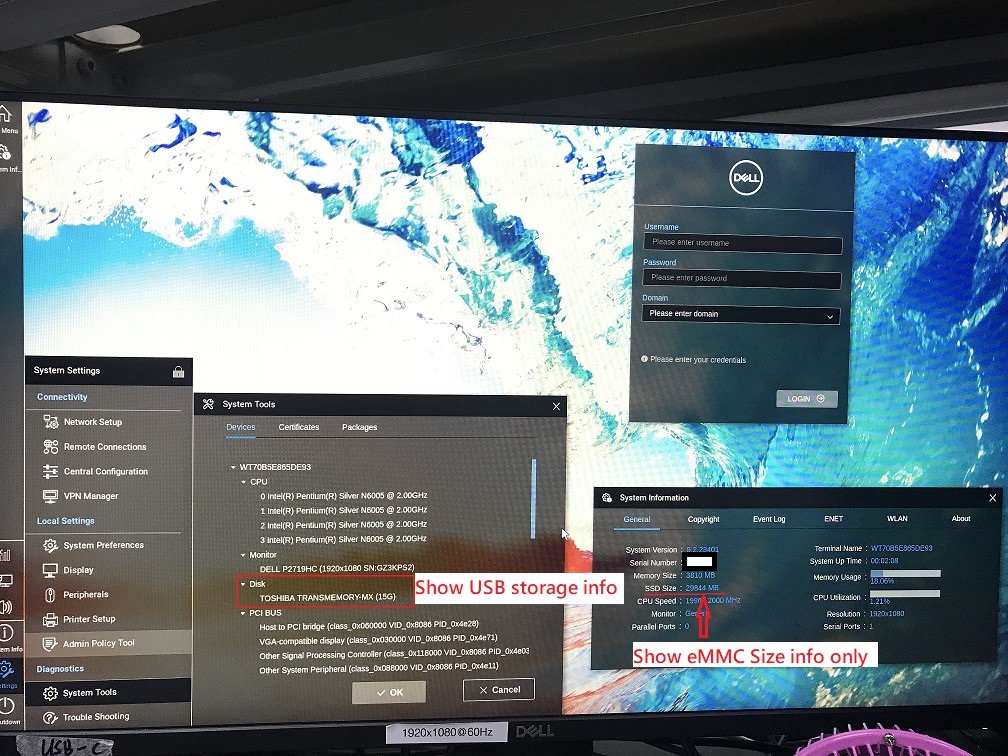
Summary: If an M.2 SSD is installed into a unit running Dell ThinOS with eMMC storage on the motherboard, the computer fails to display any storage information for that SSD.
This article applies to
This article does not apply to
This article is not tied to any specific product.
Not all product versions are identified in this article.
Symptoms
Affected Platforms:
- OptiPlex 3000 Thin Client
- Wyse 3040
- Wyse 5070
- Wyse 5470 Thin Client
- Wyse 5470 All-in-One
Affected Operating Systems:
- Dell ThinOS
After an M.2 SSD is installed into a unit with eMMC storage, no additional storage will be recognized in System Information.
Cause
This is working as designed for all ThinOS versions. In ThinOS, the storage information is not shown in the device list, except for USB drives. System information only shows the storage size of the hard drive that ThinOS is installed.
Resolution
For example:
- If ThinOS v9.1.1 is installed on eMMC drive, then the computer shows the eMMC size in System Information.
- If ThinOS v9.1.1 is installed on M.2 PCIE SSD, then the computer shows the SSD size in System Information.
Affected Products
Wyse 3040 Thin Client, Wyse 5070 Thin Client, Wyse 5470 All-In-One, Wyse 5470, Dell ThinOSProducts
OptiPlex 3000 Thin ClientArticle Properties
Article Number: 000196552
Article Type: Solution
Last Modified: 13 May 2026
Version: 7
Find answers to your questions from other Dell users
Support Services
Check if your device is covered by Support Services.