PowerEdge:如何使用 Lifecycle Controller 重新调整用途流程清除 NVRAM
Summary: 有关如何通过停用和重新调整用途流程通过 Lifecycle Controller 远程清除 NVRAM 的步骤。
This article applies to
This article does not apply to
This article is not tied to any specific product.
Not all product versions are identified in this article.
Instructions
如何使用 LifeCycle Controller 清除 NVRAM
当您没有物理访问权限或无法关闭系统以使用 NVRAM 跳线时,您可以按照以下步骤使用停用或重新调整用途过程从 LCC 执行清除。
•在引导过程中使用 F10 键引导至 Lifecycle Controller。
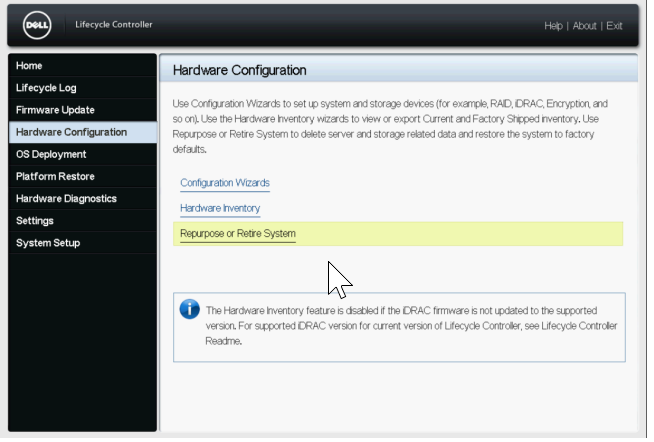
•进入 LCC 后,选择左侧 的硬件配置 ,然后选择 重新调整用途或报废系统。
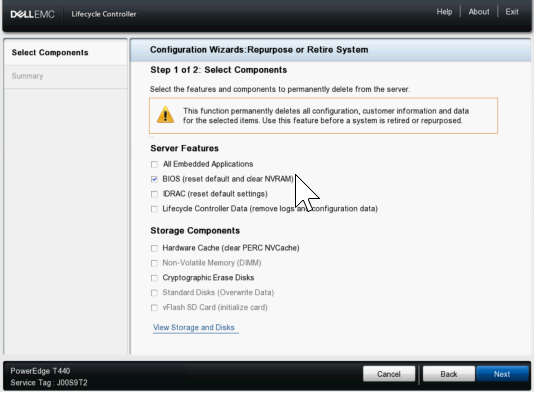
•在“选择组件”屏幕上,仅选中 BIOS 的框(重置默认值并清除 NVRAM)
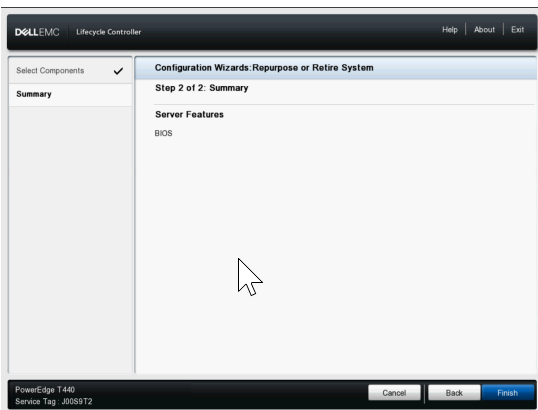
•接下来,单击“下一步”并确认下一页上仅列出了 BIOS,然后单击“完成”。
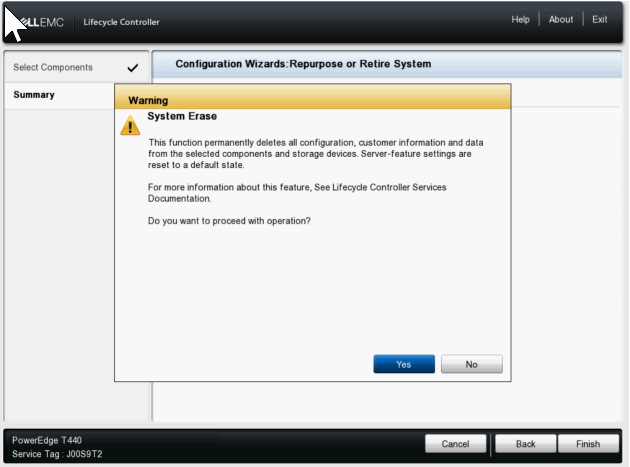
•选择 是 继续系统擦除过程。
•然后,服务器继续重新启动并启用 NVRAM 清除设置,然后再次重新启动以执行清除,最后关闭电源。
•接下来,它会在启动回 LCC 时重新开机,以将 NVRAM 设置更改回正常状态,然后在完成后再次关闭。
•此时,您必须手动打开服务器电源。您可以在 IDRAC 中检查生命周期日志,以确认显示的条目 System Erase job completed successfully。
Affected Products
C Series, Modular Infrastructure, Rack Servers, XE Servers, XR Servers, OEM Server Solutions, PowerEdge T130, PowerEdge T140, PowerEdge T150, PowerEdge T160, PowerEdge T330, PowerEdge T340, PowerEdge T350, PowerEdge T360, PowerEdge T430
, PowerEdge T440, PowerEdge T550, PowerEdge T560, PowerEdge T630, PowerEdge T640
...
Products
PowerFlex appliance R650, PowerFlex appliance R6525, PowerFlex appliance R660, PowerFlex appliance R6625, Powerflex appliance R750, PowerFlex appliance R760, PowerFlex appliance R7625, PowerFlex appliance R640, PowerFlex appliance R740XD
, PowerFlex appliance R7525, PowerFlex appliance R840
...
Article Properties
Article Number: 000198446
Article Type: How To
Last Modified: 13 May 2026
Version: 5
Find answers to your questions from other Dell users
Support Services
Check if your device is covered by Support Services.