PowerEdge:ESXiでのVMNicアップリンクの追加と削除
Summary: VSS(標準スイッチ)およびVDS(分散スイッチ)に対するVMNICSの追加と削除
This article applies to
This article does not apply to
This article is not tied to any specific product.
Not all product versions are identified in this article.
Instructions
- View 現在の
vSwitch設定とvmkernel次のコマンドを使用したインターフェイス設定:esxcli network vswitch standard list # list current vswitch configuration esxcli network vswitch dvs vmware list # list Distributed Switch configuration esxcli network ip interface list # list vmkernel interfaces and their configuration esxcli network nic list # display listing of physical adapters and their link state
- 次のコマンドを使用して、標準vSwitchとの間でネットワーク カード(vmnicと呼ばれる)を追加または削除します。
esxcli network vswitch standard uplink remove --uplink-name=vmnic --vswitch-name=vSwitch # unlink an uplink
esxcli network vswitch standard uplink add --uplink-name=vmnic --vswitch-name=vSwitch # add an uplink
- 次のコマンドを使用して、vDS(vNetwork Distributed Switch)との間でネットワーク カード(vmnicと呼ばれる)を追加または削除します。
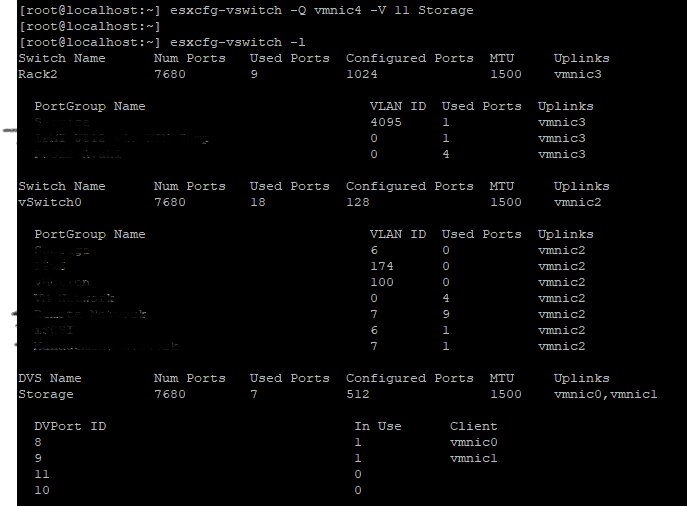
esxcfg-vswitch -Q vmnic -V dvPort_ID_of_vmnic dvSwitch # unlink/remove a vDS uplink esxcfg-vswitch -P vmnic -V unused_dvPort_ID dvSwitch # add a vDS uplink注:管理ネットワークを分散スイッチに移行するときに接続が失われた場合は、既存の管理VMkernelインターフェイスを削除または無効にして、同じIP構成の標準vSwitchポート グループに再作成する必要がある場合があります。
例:-
vmnci4 の
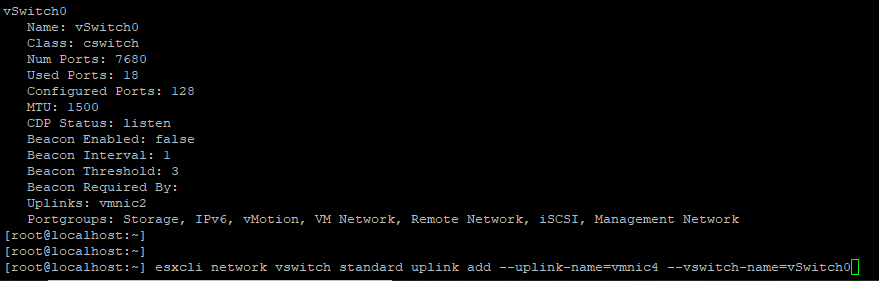
次のことを確認します。
アップリンクからのVMNICの削除

追加
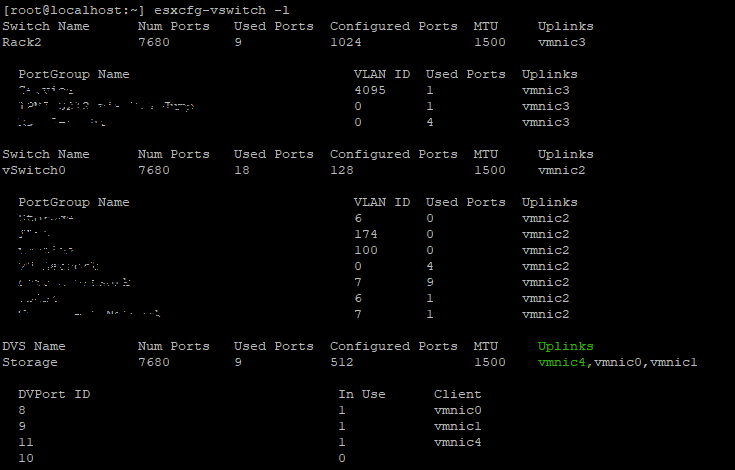
アップリンク ポートを追加する前に、DVS名と

VMNICがに追加されているかどうかを確認します
削除
vmnci4 の
vSwitch (標準)
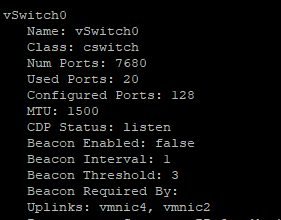
次のことを確認します。
vswitch これで、 vmnic 4 アップリンクに追加します。
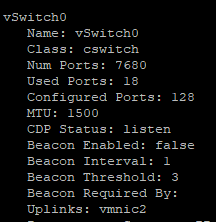
アップリンクからのVMNICの削除
vSwitch 0
追加
VMNIC4 VDS(分散スイッチ)へのアップリンクアップリンク ポートを追加する前に、DVS名と
DVPort IDは空きポートである必要があります。この例では、ポート番号11は使用されていませんでした。
VMNICがに追加されているかどうかを確認します
DVS アップリンク。
削除
VMNIC アップリンク元 VDS、
Affected Products
VMware ESXi 6.7.X, VMware ESXi 6.x, VMware ESXi 7.xArticle Properties
Article Number: 000198710
Article Type: How To
Last Modified: 02 Apr 2025
Version: 2
Find answers to your questions from other Dell users
Support Services
Check if your device is covered by Support Services.