PowerEdge:在 ESXi 中添加和删除 VMNic 上行链路
Summary: 在 VSS(标准交换机)和 VDS(分布式交换机)中添加和删除 VMNICS
This article applies to
This article does not apply to
This article is not tied to any specific product.
Not all product versions are identified in this article.
Instructions
- 查看当前
vSwitch配置和vmkernel使用以下命令进行接口配置:esxcli network vswitch standard list # list current vswitch configuration esxcli network vswitch dvs vmware list # list Distributed Switch configuration esxcli network ip interface list # list vmkernel interfaces and their configuration esxcli network nic list # display listing of physical adapters and their link state
- 使用以下命令在标准 vSwitch 中添加或删除网卡(称为 vmnic):
esxcli network vswitch standard uplink remove --uplink-name=vmnic --vswitch-name=vSwitch # unlink an uplink
esxcli network vswitch standard uplink add --uplink-name=vmnic --vswitch-name=vSwitch # add an uplink
- 使用以下命令在 vNetwork 分布式交换机 (vDS) 中添加或移除网卡(称为 vmnic):
esxcfg-vswitch -Q vmnic -V dvPort_ID_of_vmnic dvSwitch # unlink/remove a vDS uplink esxcfg-vswitch -P vmnic -V unused_dvPort_ID dvSwitch # add a vDS uplink提醒:如果在将管理网络迁移到分布式交换机时连接丢失,则可能需要删除或禁用现有管理 VMkernel 接口,并在具有相同 IP 配置的标准 vSwitch 端口组中重新创建该接口。
示例:-
将 vmnci4 添加到
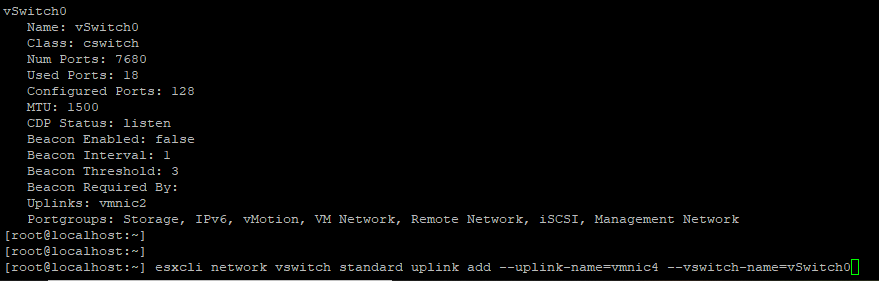
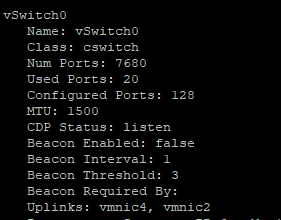
验证
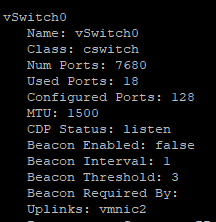
从上行链路移除 VMNIC

0 添加
在添加上行链路端口之前,请确保 DVS 名称和
验证 VMNIC 是否已添加到
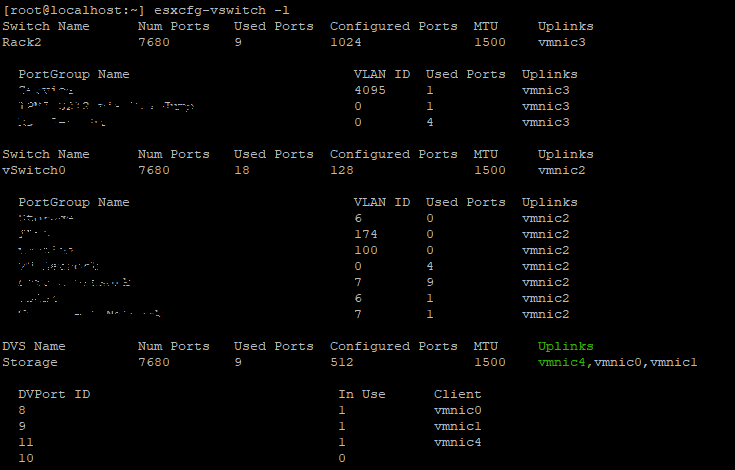
拔下
将 vmnci4 添加到
vSwitch (标准)
验证
vswitch 现在, vmnic 4 添加到上行链路。
从上行链路移除 VMNIC
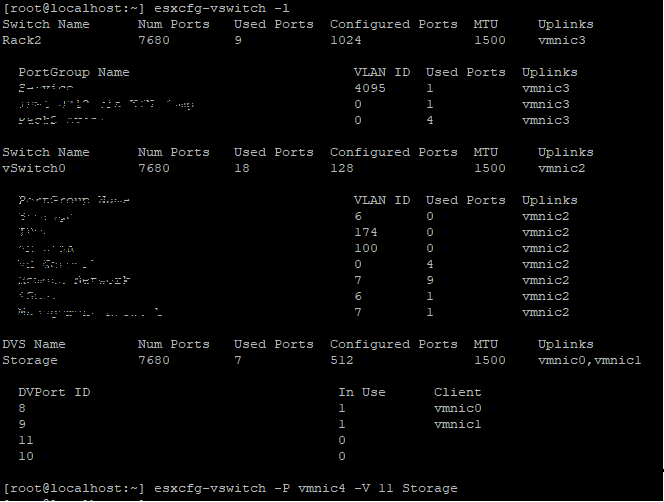
vSwitch 0 添加
VMNIC4 上行链路到 VDS(分布式交换机),在添加上行链路端口之前,请确保 DVS 名称和
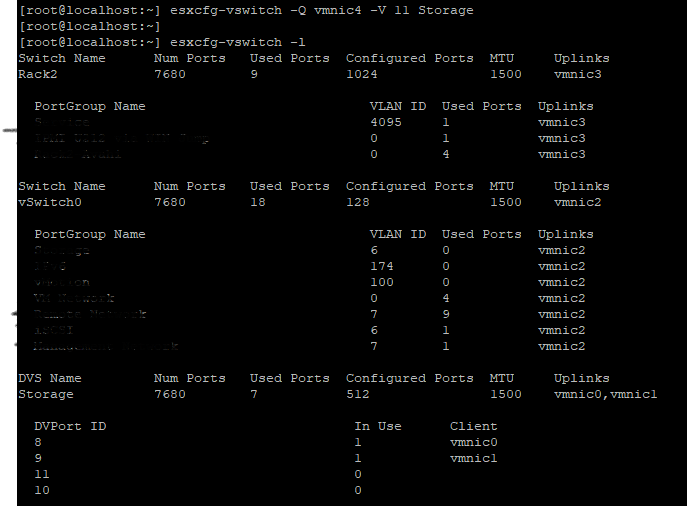
DVPort 在此示例中,ID 应为可用端口 11 未在使用中。
验证 VMNIC 是否已添加到
DVS 上行。
拔下
VMNIC 上行链路,来源于 VDS开始,
Affected Products
VMware ESXi 6.7.X, VMware ESXi 6.x, VMware ESXi 7.xArticle Properties
Article Number: 000198710
Article Type: How To
Last Modified: 02 Apr 2025
Version: 2
Find answers to your questions from other Dell users
Support Services
Check if your device is covered by Support Services.