AppSync: 사용 중인 버전을 확인하는 방법
Summary: 사용 중인 AppSync 버전을 확인하는 방법
This article applies to
This article does not apply to
This article is not tied to any specific product.
Not all product versions are identified in this article.
Instructions
사용 중인 AppSync 소프트웨어의 현재 버전을 확인하려면 아래 나열된 방법 중 하나를 따르십시오.
AppSync UI
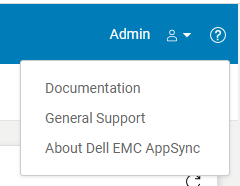
그림 2
AppSync 로그
참고: "제어판\프로그램\프로그램 및 기능"에 표시된 AppSync 버전은 AppSync 핫픽스의 설치 여부를 확인하지 않으므로 불충분합니다.
AppSync UI
- AppSync UI를 열고 로그인합니다.
- 창 오른쪽 상단의 "?"를 클릭합니다. (그림 1)
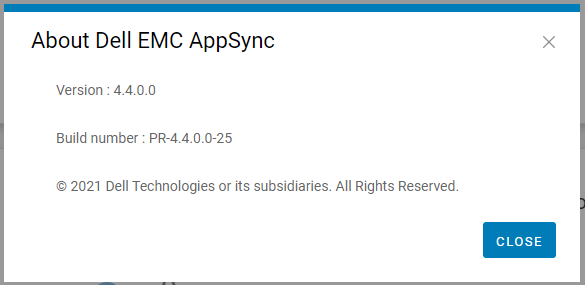
- "About Dell EMC AppSync"를 클릭합니다. (그림 2)
- Dell AppSync 기술 지원에 표시된 이 버전 및 빌드 번호를 인용하십시오.
그림 2
AppSync 로그
- AppSync 서버에서 설치 위치의 로그 디렉토리(일반적으로 C:\EMC\AppSync\jboss\logs)로 이동합니다.
- 텍스트 편집기를 사용하여 server.log를 엽니다.
- 처음 두 줄은 사용 중인 AppSync의 버전과 핫픽스의 설치 여부를 나타냅니다.
예: 샘플 server.log 일부(버전 = 4.3.0.0 및 핫픽스 3315_R1이 설치됨)
AppSync 서버의 현재 버전은 4.3.0.0_3315_R1입니다.
4. Dell AppSync 기술 지원에 표시된 이 버전과 핫픽스 상태를 인용하십시오.
AppSync 서버의 현재 버전은 4.3.0.0_3315_R1입니다.
참고: "제어판\프로그램\프로그램 및 기능"에 표시된 AppSync 버전은 AppSync 핫픽스의 설치 여부를 확인하지 않으므로 불충분합니다.
Affected Products
AppSync, AppSyncArticle Properties
Article Number: 000199464
Article Type: How To
Last Modified: 14 May 2026
Version: 7
Find answers to your questions from other Dell users
Support Services
Check if your device is covered by Support Services.