AppSync:如何判斷使用中的版本
Summary: 如何判斷使用中的 AppSync 版本
This article applies to
This article does not apply to
This article is not tied to any specific product.
Not all product versions are identified in this article.
Instructions
若要判斷目前使用的 AppSync 軟體版本,請遵循下列其中一種方法:
Appsync UI
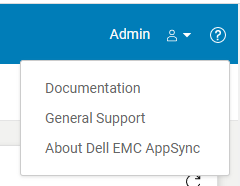
圖 2
AppSync 記錄
備註:「控制台\程式\程式與功能」中顯示的 AppSync 版本不足,因為它無法確認 AppSync hotfix 是否已安裝。
Appsync UI
- 開啟 Appsync UI 並登入。
- 按一下視窗右上角的「?」。(圖 1)
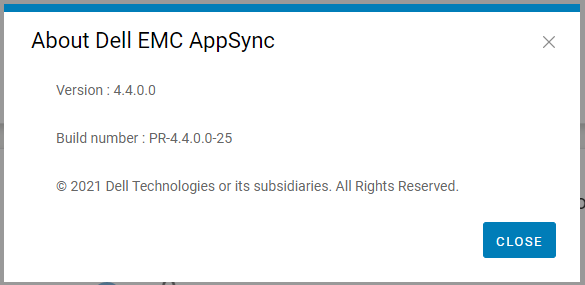
- 按一下「關於 Dell EMC Appsync」。(圖 2)
- 請提供此版本和顯示的組建編號給 Dell AppSync 技術支援。
圖 2
AppSync 記錄
- 在 Appsync 伺服器上,瀏覽至安裝位置中的記錄目錄 (通常是 C:\EMC\AppSync\jboss\logs)。
- 使用文字編輯器開啟 server.log。
- 前兩行表示使用中的 AppSync 版本,以及是否有安裝任何 hotfix。
例如:範例 server.log 程式碼片段 (版本 = 4.3.0.0 和 hotfix 3315_R1 已安裝)
目前版本的 AppSync 伺服器為 4.3.0.0_3315_R1
4.請提供此版本和顯示的 hotfix 狀態給 Dell AppSync 技術支援。
目前版本的 AppSync 伺服器為 4.3.0.0_3315_R1
備註:「控制台\程式\程式與功能」中顯示的 AppSync 版本不足,因為它無法確認 AppSync hotfix 是否已安裝。
Affected Products
AppSync, AppSyncArticle Properties
Article Number: 000199464
Article Type: How To
Last Modified: 14 May 2026
Version: 7
Find answers to your questions from other Dell users
Support Services
Check if your device is covered by Support Services.