PowerFlex 3.X: Encrypted device error "SDS device header is unavailable"
Summary: "SDS device header is unavailable" alarm occurs when raw device is added to PowerFlex instead of an encrypted mapper.
This article applies to
This article does not apply to
This article is not tied to any specific product.
Not all product versions are identified in this article.
Symptoms
- "SDS device header is unavailable" CloudLink alarm
- Device is listed in the CloudLink center as Unencrypted
- Encrypted Mapper is missing following a node reboot
Cause
When a PowerFlex device is encrypted by CloudLink, the new encryption mapper should be added to PowerFlex.
eg., /dev/mapper/svm_sdX for CloudLink 7.1.1 and earlier
eg., /dev/mapper/svm_wwn-XXXX for CloudLink 7.1.2 and later
If the user adds the raw device by mistake (eg. /dev/sdX), the CloudLink encryption header will be erased and the drive will appear as "Unencrypted" in CloudLink Center and the following alarm will occur "SDS device header is unavailable"
The encryption mapper will be available only until the next node reboot.
If the user tries to correct by removing the raw device from PowerFlex and adding the encryption header, there will be data loss if the node is rebooted because the encryption mapper will not survive a reboot in this state.
Example:
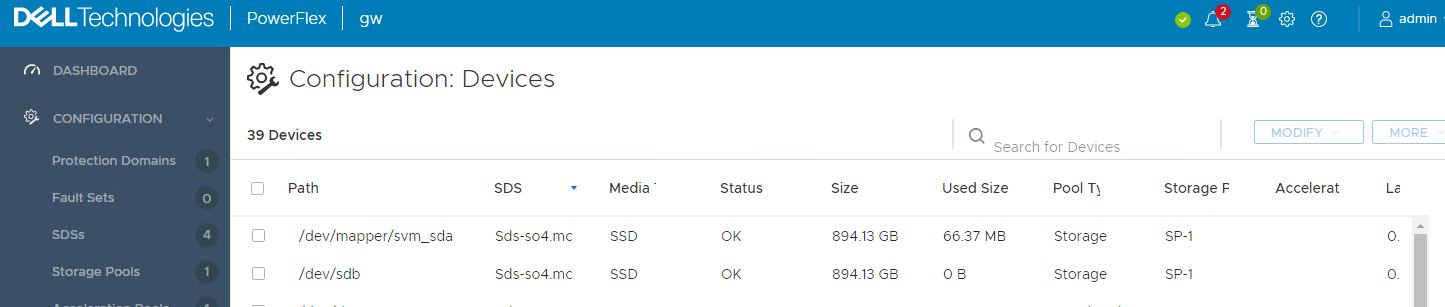
Raw device /dev/sdb added to PowerFlex instead of /dev/mapper/svm_sdb.
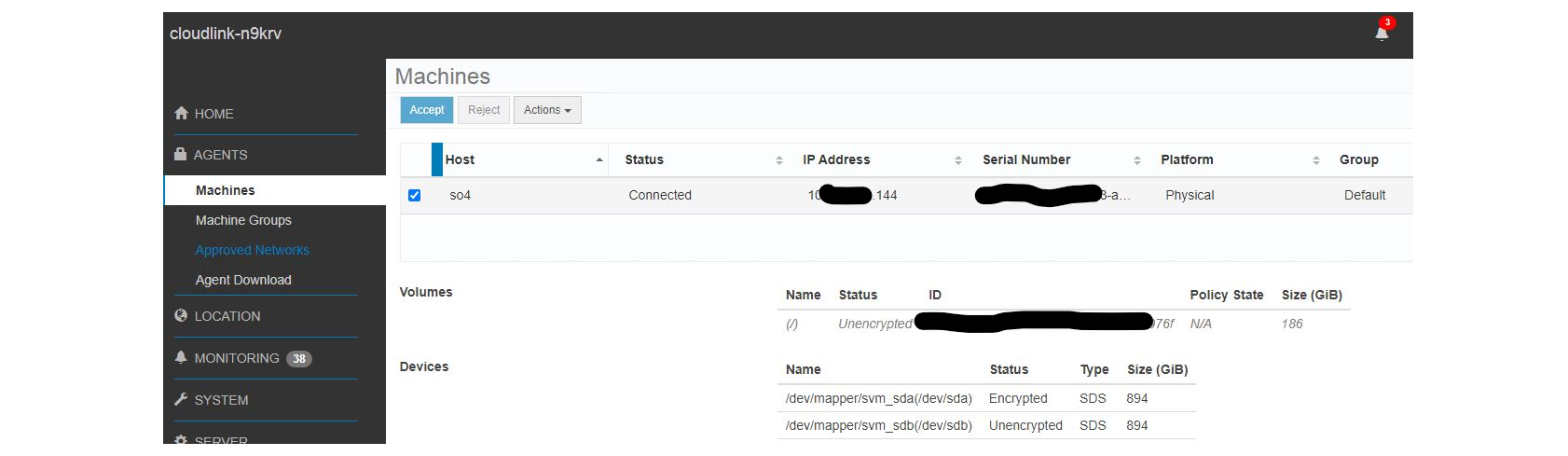
Mapper /dev/mapper/svm_sdb is listed in CloudLink Center as Unencrypted:
eg., /dev/mapper/svm_sdX for CloudLink 7.1.1 and earlier
eg., /dev/mapper/svm_wwn-XXXX for CloudLink 7.1.2 and later
If the user adds the raw device by mistake (eg. /dev/sdX), the CloudLink encryption header will be erased and the drive will appear as "Unencrypted" in CloudLink Center and the following alarm will occur "SDS device header is unavailable"
The encryption mapper will be available only until the next node reboot.
If the user tries to correct by removing the raw device from PowerFlex and adding the encryption header, there will be data loss if the node is rebooted because the encryption mapper will not survive a reboot in this state.
Example:
Raw device /dev/sdb added to PowerFlex instead of /dev/mapper/svm_sdb.
Mapper /dev/mapper/svm_sdb is listed in CloudLink Center as Unencrypted:
Resolution
To correct the CloudLink header on the drive perform the following steps for each effected node, one node at a time.
- Remove all the errored drives from PowerFlex for the node (both raw devices and encrypted mappers)
- Put the node in maintenance mode in PowerFlex
- Reboot the node (This removes the old encryption mapper, and clear the alarm)
- Exit maintenance mode
- Encrypt the Unencrypted devices to create new encryption mappers
svm encrypt /dev/XXXXX - Ensure that the devices are listed as Encrypted in CloudLink Center
- Ensure the "SDS device header is unavailable" CloudLink alarm is no longer present on the node
- Add the encrypted mappers to PowerFlex
- Ensure that the devices are listed as Encrypted in CloudLink Center
- Ensure the "SDS device header is unavailable" CloudLink alarm is not present on the node.
Affected Products
PowerFlex rack, PowerFlex Appliance, PowerFlex SoftwareArticle Properties
Article Number: 000199546
Article Type: Solution
Last Modified: 27 Nov 2025
Version: 6
Find answers to your questions from other Dell users
Support Services
Check if your device is covered by Support Services.