BIOSin Dell Security Manager -ponnahdusikkuna ja pyyntö toimia ennen seuraavaa prosessia
Summary: Tässä artikkelissa on tietoja Dell Security Managerin kehotteesta, joka saadaan järjestelmän ensimmäisen käynnistyskerran yhteydessä.
This article applies to
This article does not apply to
This article is not tied to any specific product.
Not all product versions are identified in this article.
Symptoms
Kun Dell-tietokone käynnistetään ensimmäisen kerran ja näyttöön tulee seuraava kehote (katso kuvaa 1):
A BIOS setup change was made to the Secure Boot configuration. Please accept the changes!
If the change are not accepted within the time remaining, the secure boot settings will be reverted to factory defaults, and the computer will reboot.
To accept the changes, please enter the number sequence as below.
Code - 0000
Time remaining (X) seconds
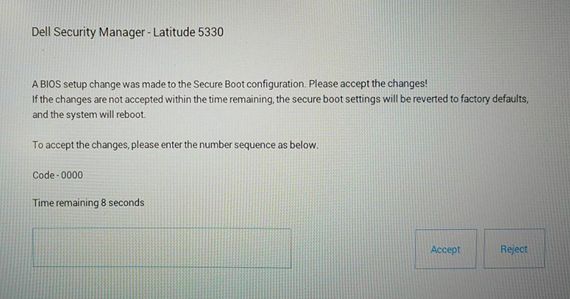
If the change are not accepted within the time remaining, the secure boot settings will be reverted to factory defaults, and the computer will reboot.
To accept the changes, please enter the number sequence as below.
Code - 0000
Time remaining (X) seconds
Kuva 1: Dell Security Manager
Cause
Tämä johtuu BIOS-asetuksesta. BIOSin Enable Microsoft UEFI CA -asetus on poissa käytöstä Vpro-määritystä käyttävissä tietokoneissa.
Resolution
Huomautus: Tämä toimii suunnitellusti järjestelmissä, joiden Enable Microsoft UEFI CA -asetus on valmiiksi poissa käytöstä.
- Tietokone käynnistyy käyttöjärjestelmään, kun Enable Microsoft UEFI CA -asetus pidetään poissa käytöstä antamalla PIN-koodi tätä kysyttäessä.
-
Jos et anna PIN-koodia 15 sekunnin kuluessa tai valitset Reject, tietokone käynnistyy uudelleen ja näyttää seuraavan ilmoituksen. (Katso kuvaa 2.) Järjestelmä pyytää siirtymään BIOSiin painamalla F2-näppäintä, jolloin Enable Microsoft UEFI CA -asetuksen arvoksi tulee automaattisesti ON eli käytössä.
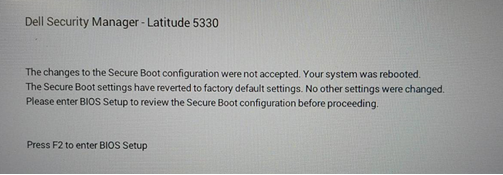
Kuva 2 Dell Security Managerin uudelleenkäynnistyskehote
Voit myös määrittää Enable Microsoft UEFI CAn manuaalisesti OFF-asetukseksi Secure Boot -sivulla. (Katso kuvaa 3.)
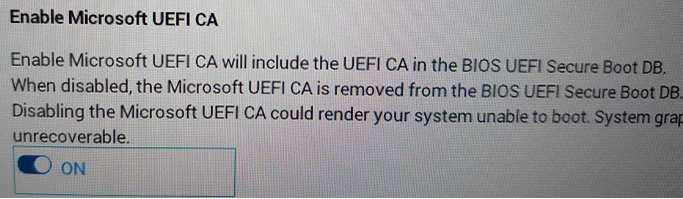
Kuva 3 Ota Microsoft UEFI CA käyttöön
Additional Information
Suositellut artikkelit
Seuraavassa on joitakin aiheeseen liittyviä suositeltuja artikkeleita, jotka saattavat kiinnostavat sinua.
Affected Products
Latitude 5330, Latitude 7330, Latitude 9430Article Properties
Article Number: 000199681
Article Type: Solution
Last Modified: 14 May 2026
Version: 8
Find answers to your questions from other Dell users
Support Services
Check if your device is covered by Support Services.