Okno wyskakujące „Dell Security Manager” testu POST w systemie BIOS i żądanie interakcji przed następnym procesem
Summary: Ten artykuł zawiera informacje na temat monitu programu Dell Security Manager przy pierwszym uruchomieniu systemu.
This article applies to
This article does not apply to
This article is not tied to any specific product.
Not all product versions are identified in this article.
Symptoms
Po pierwszym uruchomieniu komputera firmy Dell i zobaczeniu monitu na ekranie (patrz rysunek 1).
„A BIOS setup change was made to the Secure Boot configuration. Please accept the changes!
If the change are not accepted within the time remaining, the secure boot settings will be reverted to factory defaults, and the computer will reboot.
To accept the changes, please enter the number sequence as below.
Code - 0000
Time remaining (X) seconds”
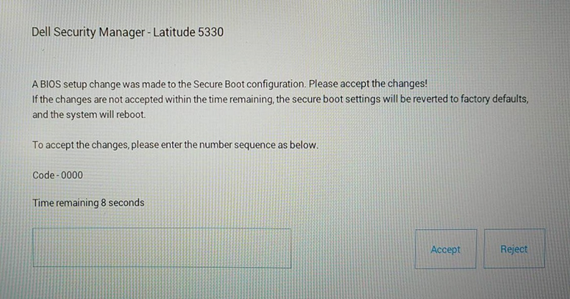
If the change are not accepted within the time remaining, the secure boot settings will be reverted to factory defaults, and the computer will reboot.
To accept the changes, please enter the number sequence as below.
Code - 0000
Time remaining (X) seconds”
Rysunek 1 Dell Security Manager
Cause
Jest to spowodowane ustawieniem systemu BIOS. Opcja „Enable Microsoft UEFI CA” w systemie BIOS jest ustawiona na opcję OFF na komputerze z włączoną konfiguracją Vpro.
Resolution
Uwaga: Działa w sposób zamierzony w przypadków systemów z opcją „Enable Microsoft UEFI CA” ustawioną wstępnie na OFF.
- Po wyświetleniu komunikatu o wprowadzeniu kodu PIN w celu utrzymania wyłączenia opcji „Enable Microsoft UEFI CA” komputer uruchomi system operacyjny.
-
Jeśli kod PIN nie zostanie wprowadzony w ciągu 15 sekund lub jeśli zostanie wybrana opcja Reject, komputer uruchomi się ponownie i po uruchomieniu wyświetli poniższy komunikat. (Patrz Rysunek 2) Zostanie wyświetlony monit Press F2 (naciśnij klawisz F2) w celu przejścia do BIOS Setup (konfiguracja systemu BIOS), a opcja „Enable Microsoft UEFI CA” zostanie automatycznie zmieniona na ON.
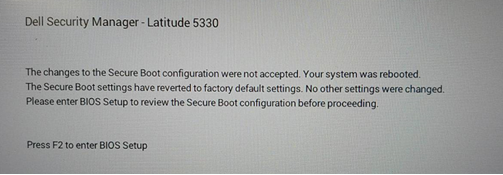
Rysunek 2 Monit
o ponowne uruchomienie programu Dell Security Manager Możesz też ręcznie wyłączyć opcję "Enable Microsoft UEFI CA" na stronie "Secure Boot". (Patrz Rysunek 3)
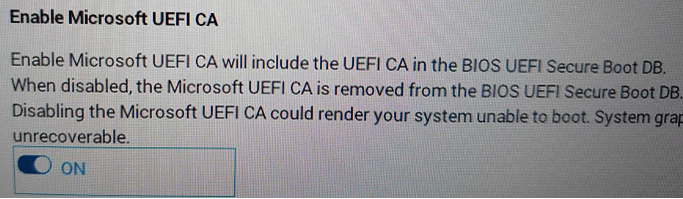
Rysunek 3.Włącz urząd certyfikacji Microsoft UEFI
Additional Information
Polecane artykuły
Poniżej przedstawiono niektóre polecane artykuły dotyczące tego tematu, które mogą Cię zainteresować.
Affected Products
Latitude 5330, Latitude 7330, Latitude 9430Article Properties
Article Number: 000199681
Article Type: Solution
Last Modified: 14 May 2026
Version: 8
Find answers to your questions from other Dell users
Support Services
Check if your device is covered by Support Services.