BIOS 快顯「Dell Security Manager」視窗後並要求在進行下一個程序前互動
Summary: 本文提供您第一次啟動系統時 Dell Security Manager 提示的相關資訊。
This article applies to
This article does not apply to
This article is not tied to any specific product.
Not all product versions are identified in this article.
Symptoms
當您第一次啟動 Dell 電腦,並看到畫面提示時 (請參閱圖 1)。
「Secure Boot 組態已進行 BIOS setup 變更。請接受變更!
如果未在剩餘時間內接受變更,安全開機設定將會還原為原廠預設值,電腦將重新開機。
若要接受變更,請輸入編號順序,如下所示。
代碼 - 0000
剩餘時間 (X) 秒」
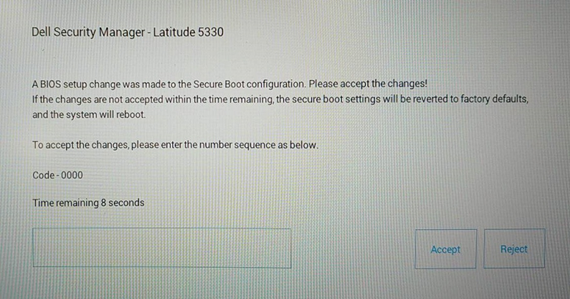
如果未在剩餘時間內接受變更,安全開機設定將會還原為原廠預設值,電腦將重新開機。
若要接受變更,請輸入編號順序,如下所示。
代碼 - 0000
剩餘時間 (X) 秒」
圖 1 Dell Security Manager
Cause
這是由 BIOS 設定所造成。「Enable Microsoft UEFI CA」的 BIOS 選項在 Vpro 啟用組態電腦上設定為 OFF。
Resolution
注意:它依設計運作,預先設定「Enable Microsoft UEFI CA」至 OFF 系統。
- 在輸入 PIN 碼以保持「Enable Microsoft UEFI CA」為「OFF」訊息後,電腦會開機進入作業系統。
-
如果您未在 15 秒內輸入 PIN 碼或選擇「拒絕」,電腦將會在開機後重新開機並顯示以下訊息。(請參閱圖 2) 系統會要求您 Press F2 進入 BIOS Setup,「Enable Microsoft UEFI CA」將自動變更為 ON。
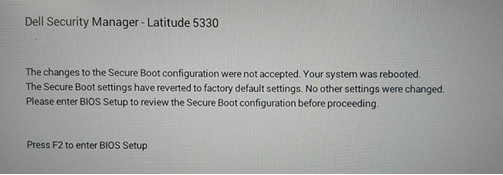
圖 2 Dell Security Manager 重新開機提示
或者,您可以在「Secure Boot」頁面中,手動將「Enable Microsoft UEFI CA」設為 OFF。(請參閱圖 3)
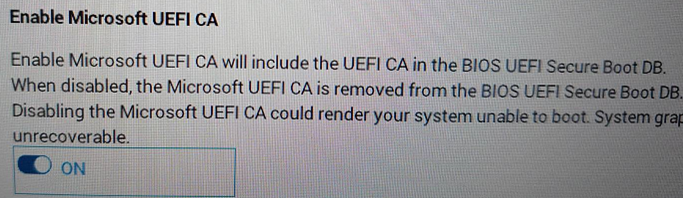
圖 3 啟用 Microsoft UEFI CA
Additional Information
Affected Products
Latitude 5330, Latitude 7330, Latitude 9430Article Properties
Article Number: 000199681
Article Type: Solution
Last Modified: 14 May 2026
Version: 8
Find answers to your questions from other Dell users
Support Services
Check if your device is covered by Support Services.