BIOS 开机自检弹出“Dell Security Manager”窗口并在执行下一个过程之前请求交互
Summary: 本文提供首次启动系统时 Dell Security Manager 提示的相关信息。
This article applies to
This article does not apply to
This article is not tied to any specific product.
Not all product versions are identified in this article.
Symptoms
当您首次启动戴尔计算机时,会看到该屏幕提示(请参阅图 1)。
“A BIOS setup change was made to the Secure Boot configuration.Please accept the changes!
If the change are not accepted within the time remaining, the secure boot settings will be reverted to factory defaults, and the computer will reboot.
To accept the changes, please enter the number sequence as below.
Code - 0000
Time remaining (X) seconds”
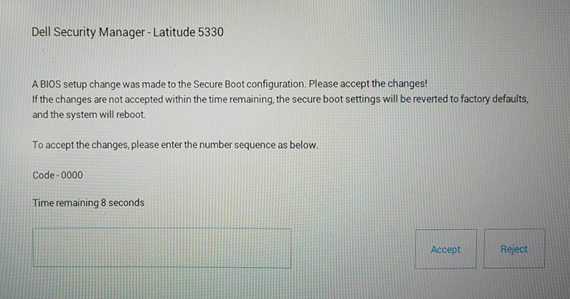
If the change are not accepted within the time remaining, the secure boot settings will be reverted to factory defaults, and the computer will reboot.
To accept the changes, please enter the number sequence as below.
Code - 0000
Time remaining (X) seconds”
图 1 Dell Security Manager
Cause
它由 BIOS 设置引起。在启用 Vpro 配置的计算机上,BIOS 选项“Enable Microsoft UEFI CA”已设置为 OFF。
Resolution
提醒:对于将“Enable Microsoft UEFI CA”预设为 OFF 的系统,它按照设计正常工作。
- 按照消息中的说明输入 PIN 码,使“Enable Microsoft UEFI CA”保持关闭状态,计算机将会启动至操作系统。
-
如果您在 15 秒内没有输入 PIN 码或选择“Reject”,则计算机将重新启动并在启动后显示以下消息。(请参阅图 2)它将要求您按 F2 键以进入 BIOS 设置,并且“Enable Microsoft UEFI CA”将自动更改为 ON。
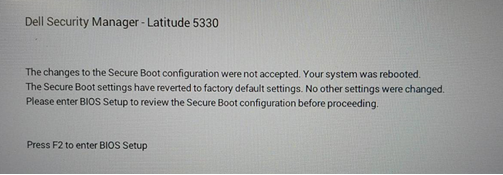
图 2 Dell Security Manager 重新启动提示
或者,您可以在“安全启动”页面中手动将“启用 Microsoft UEFI CA”设置为关闭。(请参见图 3)
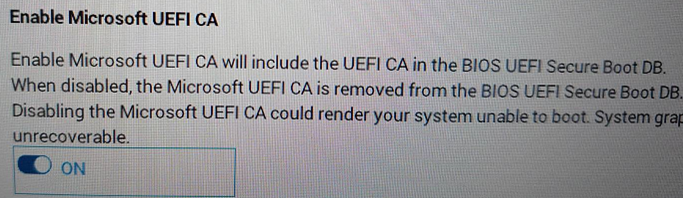
图 3 启用 Microsoft UEFI CA
Additional Information
Affected Products
Latitude 5330, Latitude 7330, Latitude 9430Article Properties
Article Number: 000199681
Article Type: Solution
Last Modified: 14 May 2026
Version: 8
Find answers to your questions from other Dell users
Support Services
Check if your device is covered by Support Services.