Windows Server:使用 PowerShell 进行 Active Directory GPO 管理
Summary: 下面的说明提供了可用于收集在特定 Windows Active Directory 域中找到的 GPO 列表的 PowerShell 命令示例。 TSDOMAIN。Local 是以下命令中的一个示例,应替换为我们在其中收集 GPO 信息的域名。
This article applies to
This article does not apply to
This article is not tied to any specific product.
Not all product versions are identified in this article.
Instructions
以下步骤使用 Windows PowerShell 管理 Active Directory Windows 组策略对象。
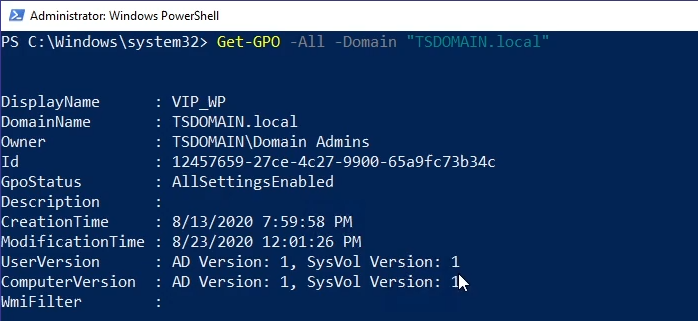


- 下面的命令示例返回在指定域中找到的所有 GPO:
Get-GPO -All -Domain “TSDOMAIN.local”
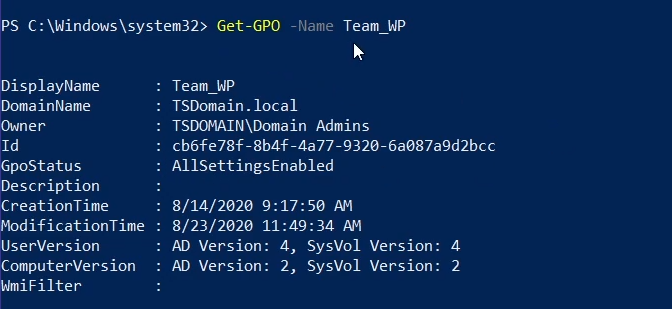
Get-GPO可用于返回特定 GPO 的常规信息。下面的示例返回“Team_WP”GPO 的常规信息:
Get-GPO -Name Team_WP
- 可以通过查询 GPO 的 GUID ID 返回 GPO 信息;以下命令是一个示例:
Get-GPO -Guid cb6fe78f-8b4f-4a77-9320-6a087a9d2bcc -Domain “TSDOMAIN.local”
Get-GPOReport命令返回找到的所有域 GPO 的综合报告,并以 HTML 格式编译信息以供审查。
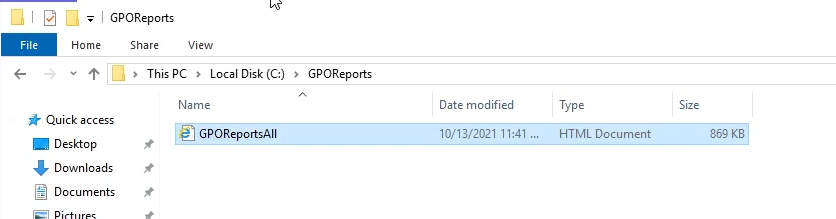
Get-GPOReport -All -Domain “TSDOMAIN.Local” -ReportType HTML -Path “C:\GPOReports\GPOReportsAll.html”
- 运行后
Get-GPOReport在上述命令中指定的文件路径下创建一个 HTML 文件。
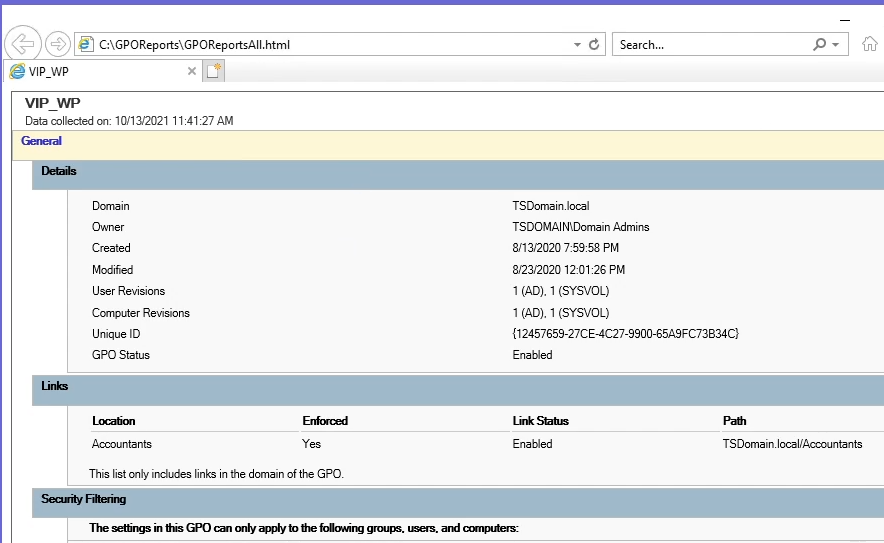
- 打开文件时,该文件将显示为浏览器页面,其中包含有关找到的所有域 GPO 的大量详细信息。
Additional Information
请观看此视频:
Affected Products
Microsoft Windows Server 2016, Microsoft Windows Server 2019, Microsoft Windows Server 2022Products
PowerEdge XR2, PowerEdge FC640, PowerEdge M640, PowerEdge M640 (for PE VRTX), PowerEdge MX5016s, PowerEdge MX740C, PowerEdge MX750c, PowerEdge MX760c, PowerEdge MX840C, PowerEdge R240, PowerEdge R250, PowerEdge R260, PowerEdge R340, PowerEdge R350
, PowerEdge R360, PowerEdge R440, PowerEdge R450, PowerEdge R540, PowerEdge R550, PowerEdge R640, PowerEdge R6415, PowerEdge R650, PowerEdge R650xs, PowerEdge R6515, PowerEdge R6525, PowerEdge R660, PowerEdge R660xs, PowerEdge R6615, PowerEdge R6625, PowerEdge R740, PowerEdge R740XD, PowerEdge R740XD2, PowerEdge R7415, PowerEdge R7425, PowerEdge R750, PowerEdge R750XA, PowerEdge R750xs, PowerEdge R7515, PowerEdge R7525, PowerEdge R760, PowerEdge R760XA, PowerEdge R760xd2, PowerEdge R760xs, PowerEdge R7615, PowerEdge R7625, PowerEdge R840, PowerEdge R860, PowerEdge R940, PowerEdge R940xa, PowerEdge R960, PowerEdge T140, PowerEdge T150, PowerEdge T160, PowerEdge T340, PowerEdge T350, PowerEdge T360, PowerEdge T440, PowerEdge T550, PowerEdge T560, PowerEdge T640, PowerEdge XR11, PowerEdge XR12
...
Article Properties
Article Number: 000200551
Article Type: How To
Last Modified: 14 May 2026
Version: 10
Find answers to your questions from other Dell users
Support Services
Check if your device is covered by Support Services.