Microsoft SQL Server Summary.txt 로그
Summary: Microsoft SQL Server 요약 .txt 파일 로그는 SQL Server 설치, 제거, 기능 변경 및 제품 업데이트가 적용될 때 생성됩니다. 이 문서에서는 이 파일에서 예상되는 사항에 대해 설명합니다.
This article applies to
This article does not apply to
This article is not tied to any specific product.
Not all product versions are identified in this article.
Symptoms
Microsoft SQL Server 설치 또는 제거를 완료할 수 없습니다.
Cause
Microsoft SQL Server 설치 또는 제거는 여러 가지 이유로 실패할 수 있습니다. SQL Server
Summary.txt 로그는 설치/제거 이벤트가 실패한 이유에 대한 정보를 제공할 수 있습니다.
Resolution
- 의 기본 파일 위치입니다.
Summary.txt로그인 SQL Server 2019 설치는 "C:\Program Files\Microsoft SQL Server\150\Setup Bootstrap\Log" 폴더에 있습니다. 설치 폴더는 다른 드라이브 위치에 있을 수 있으며 "Log" 폴더는 해당 설치 위치에 있습니다.
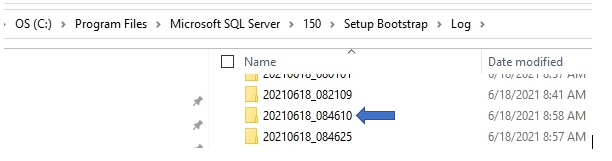
- "Log" 폴더에는 위의 개별 폴더에 표시된 과거 설치 정보가 포함되어 있습니다. 각 폴더에는 날짜와 설치 번호가 찍혀 있습니다. Summary.txt 로그는 일반적으로 폴더 및 파일 목록의 맨 아래에 있는 "Log" 폴더의 루트에 있습니다.
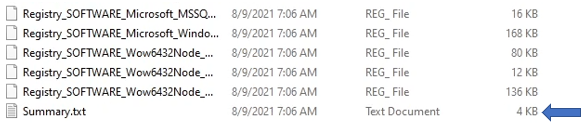
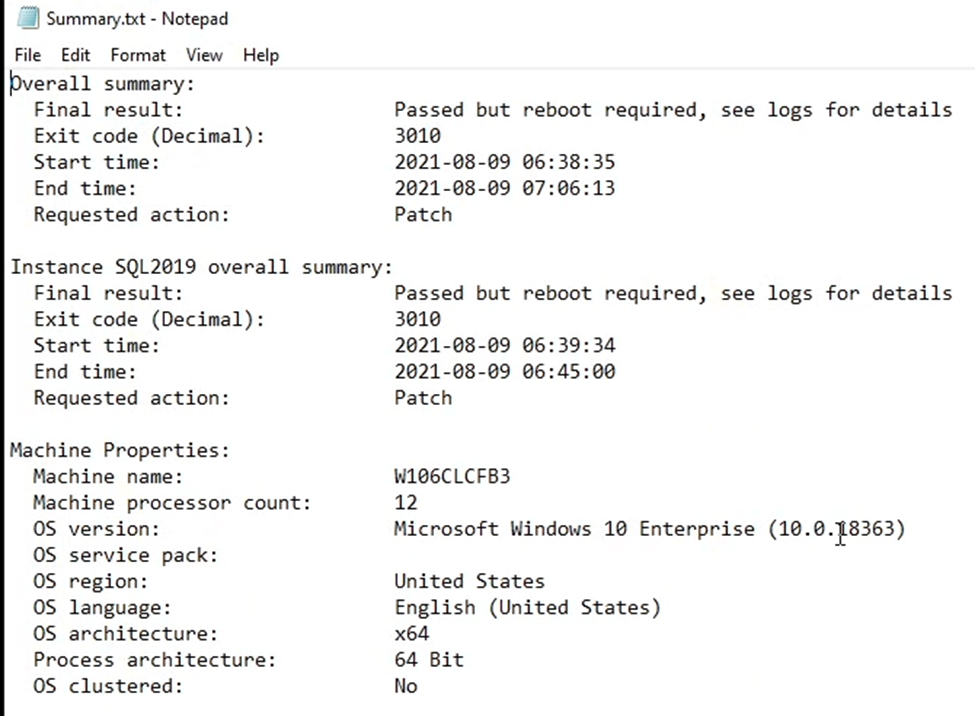
- SQL Server 설치 정보:
Summary.txt로그에는 성공적으로 설치되었는지 확인하거나 실패한 설치와 관련된 정보를 표시할 수 있는 여러 정보가 포함되어 있습니다.
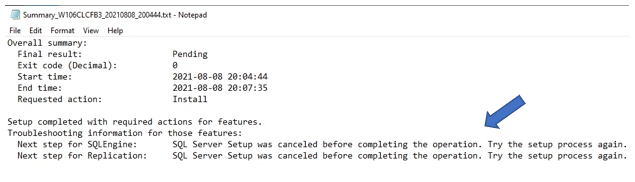
- 다음은 "SQLEngine 및 복제" 기능과 관련된 의도적인 강제 오류에 대한 정보를 보여 주는 예제입니다. 이는 예일 뿐이며, 강제되지 않은 오류는 이벤트의 추가 조사에 사용할 수 있는 오류에 대한 정보를 보여줍니다.
Affected Products
Dell Quickstart Data Warehouse Appliance, Microsoft Windows Server 2016, Microsoft Windows Server 2019, Microsoft Windows Server 2022, Microsoft Windows 2012 Server, Microsoft Windows 2012 Server R2, Prosupport for Microsoft SoftwareProducts
Dell Quickstart Data Warehouse Appliance, Microsoft Windows Server 2016, Microsoft Windows Server 2019, Microsoft Windows Server 2022, Microsoft Windows 2012 Server, Microsoft Windows 2012 Server R2, Prosupport for Microsoft SoftwareArticle Properties
Article Number: 000200565
Article Type: Solution
Last Modified: 14 May 2026
Version: 7
Find answers to your questions from other Dell users
Support Services
Check if your device is covered by Support Services.