PowerStore: SMTP Config Test Fails with Message "Reason: 530 5.7.0 Must issue a STARTTLS command first"
Summary: When configuring Simple Mail Transport Protocol (SMTP) mail alerting on PowerStore with a mail client that enforces encryption on tcp port 587, the test email fails with REASON 530 (User Correctable) ...
This article applies to
This article does not apply to
This article is not tied to any specific product.
Not all product versions are identified in this article.
Symptoms
Configuring for email alerts on the Simple Mail Transport Protocol (SMTP) Server settings fails with message:
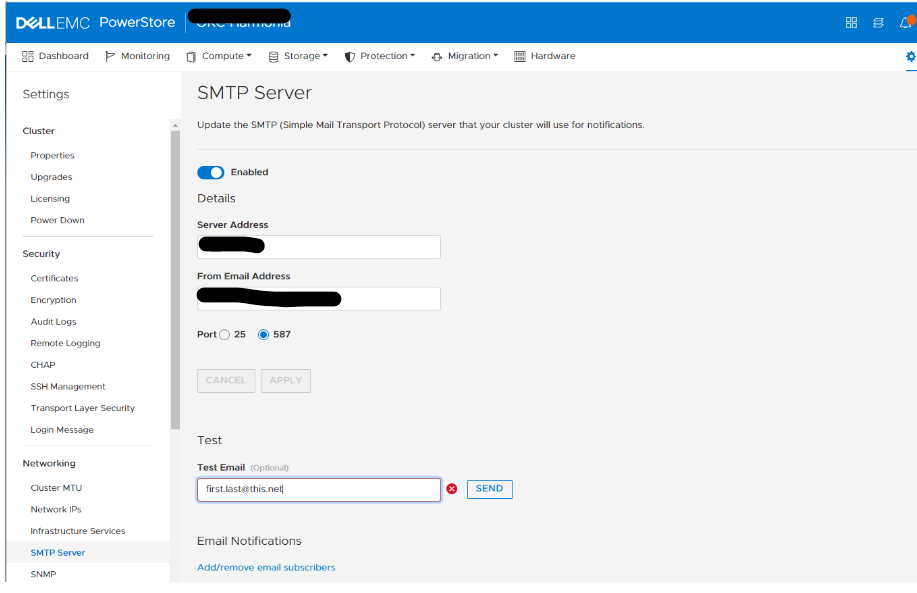 Other possible errors related to authenticated configurations:
Reason: 530 Must issue STARTTLS command first.
Failed SMTP config test Reason: 530 5.7.57 SMTP; Client was not authenticated to send anonymous mail.
SMTP test failing 530 5.7.57 SMTP; Client was not authenticated to send anonymous mail during MAIL FROM (0xE0FXXX1D000E) and (0xE0FXXX1D000E).
Cause
There is no support for authenticated SMTP configurations now.
Resolution
Fix:
This feature is being reviewed for inclusion in a future PowerStoreOS version. Watch this knowledge base article for updates.
Workaround:
Configure the Mail Transfer Agent (MTA) not to enforce TLS encryption. Use unauthenticated configuration.
This feature is being reviewed for inclusion in a future PowerStoreOS version. Watch this knowledge base article for updates.
Workaround:
Configure the Mail Transfer Agent (MTA) not to enforce TLS encryption. Use unauthenticated configuration.
Additional Information
The behavior of the mail alerting function of PowerStore is not contrary to the letter of Request for Comments (RFC) 8314. This RFC states in section 3.3 that both clients and servers should implement TLS on port 587 for this transition period.
See Internet Engineering Task Force (IETF) article Cleartext Considered Obsolete: Use of Transport Layer Security (TLS) for Email Submission and Access
See Internet Engineering Task Force (IETF) article Cleartext Considered Obsolete: Use of Transport Layer Security (TLS) for Email Submission and Access
Affected Products
PowerStore 1000X, PowerStore 1000T, PowerStore 3000X, PowerStore 3000T, PowerStore 5000X, PowerStore 5000T, PowerStore 500T, PowerStore 7000X, PowerStore 7000T, PowerStore 9000TProducts
PowerStore 9000XArticle Properties
Article Number: 000201019
Article Type: Solution
Last Modified: 14 May 2026
Version: 4
Find answers to your questions from other Dell users
Support Services
Check if your device is covered by Support Services.