Avamar: plug-in del file system di Windows mancante dalla scheda Backup/Ripristino
Summary: Windows Avamar Client mostra solo il plug-in VSS nella scheda Backup/Restore perché il plug-in del file system non è presente dopo il downgrade da 19.2 a 19.1, lasciando installato un plug-in precedente. ...
This article applies to
This article does not apply to
This article is not tied to any specific product.
Not all product versions are identified in this article.
Symptoms
Sintomi osservati
Nella console di Avamar Administrator, il plug-in Filesystem è assente dalla scheda Backup and Restore e viene visualizzato solo il plug-in VSS.
Il registro del client C:\Program Files\avs\var\avagent.log contiene un avviso che indica una mancata corrispondenza della versione tra il plug-in (avtar) e l'agente.
avagent Info : Reading pin file C:\Program Files\avs\bin\windows.pin
avagent Info : Finished READING xml file - starting parse
avagent Info : Checking version of plug-in 'Windows', executable name 'avtar' (mode:ctl)
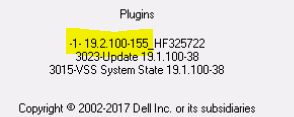
avagent Info : Plug-in version 19.2.100-155_HF325722 found for Windows plug-in
avagent Warning : Plug-in (avtar) and agent are different versions (19.2.100-155_HF325722 and 19.1.100-38).  ****** Current MCS name 'avamarserver.com' ******
avagent Info : Registration of client /clients/test.dell.com with MCS avamarserver,com:28001 successful.
avagent Info : Registration of plugin 3015 VSS successful.
avagent Info : Registration of plugin 3023 update successful.
avagent Info : Registration of plugin 3015 VSS successful.
avagent Info : Registration of plugin 3023 update successful.
avagent Info : Registration of client and plugins complete.
L'icona del client nell'area di notifica mostra un plug-in diverso.
Cause
Root cause:
Il problema è causato da una rimozione incompleta di una versione precedente del plug-in prima di installare una versione precedente. Il cliente aveva installato Avamar 19.2 con hotfix HF325722 (avtar.exe) e successivamente ne aveva eseguito il downgrade alla versione 19.1. Il file binario hotfix 19.2 non è stato rimosso, quindi solo il plug-in VSS è stato registrato.
Nota: Questo può accadere in qualsiasi versione se la disinstallazione dei plug-in precedenti viene eseguita in modo errato.
Resolution
Procedura di risoluzione
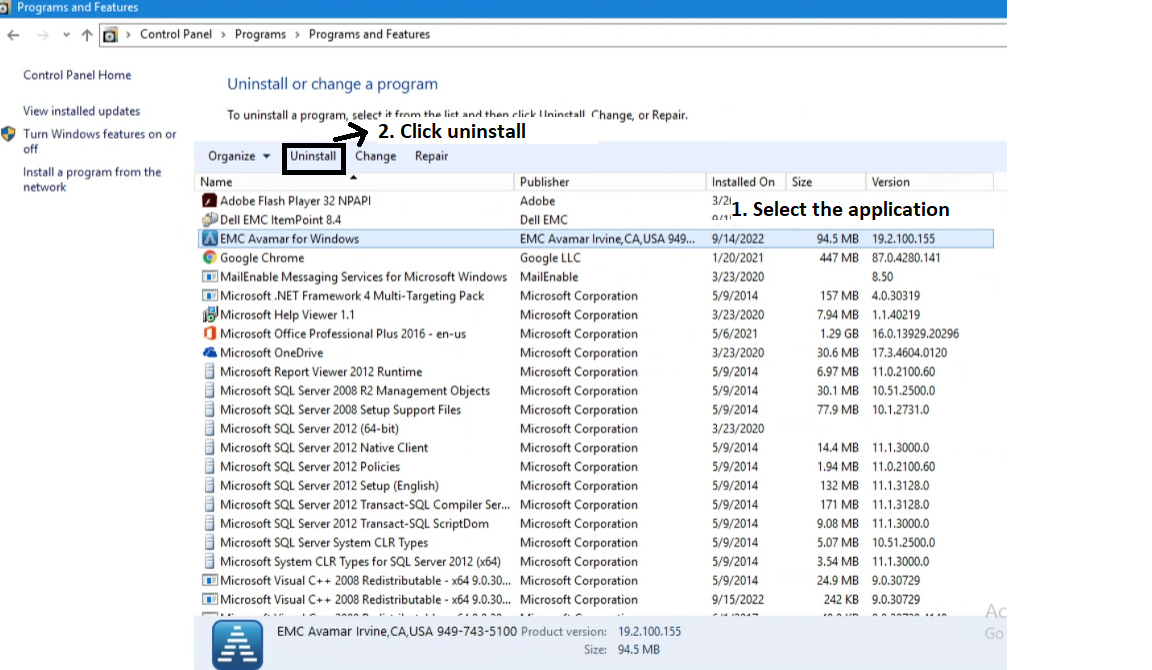
- Disinstallare completamente il plug-in Avamar esistente.
- Aprire il Pannello di controllo, selezionare EMC Avamar per Windows e cliccare su Disinstalla.
- Installare la versione del plug-in desiderata (ad esempio 19.1) dopo aver rimosso completamente la versione precedente.
Nota: Accertarsi che il file binario hotfix (avtar.exe) della versione precedente sia stato rimosso prima di reinstallare il plug-in.
Affected Products
Avamar, Avamar Client, Avamar Client for Windows, Avamar Plug-in, Microsoft Windows 2012 ServerArticle Properties
Article Number: 000201404
Article Type: Solution
Last Modified: 09 Sep 2026
Version: 5
Find answers to your questions from other Dell users
Support Services
Check if your device is covered by Support Services.