Avamar:Windowsファイル システム プラグインが[バックアップ/リストア]タブにない
Summary: 19.2から19.1にダウングレードした後、ファイル システム プラグインが見当たらず、以前のプラグインがインストールされたままになっているため、Windows Avamar Clientでは、[バックアップ/リストア]タブにVSSプラグインのみが表示されます。
This article applies to
This article does not apply to
This article is not tied to any specific product.
Not all product versions are identified in this article.
Symptoms
観察された症状
Avamar Administratorコンソールで、ファイルシステム プラグインがバックアップとリストアタブに表示されず、VSSプラグインのみが表示されます。
クライアント ログ C:\Program Files\avs\var\avagent.log プラグイン間のバージョン不一致を示す警告が含まれています (avtar)とエージェント。
avagent Info : Reading pin file C:\Program Files\avs\bin\windows.pin
avagent Info : Finished READING xml file - starting parse
avagent Info : Checking version of plug-in 'Windows', executable name 'avtar' (mode:ctl)
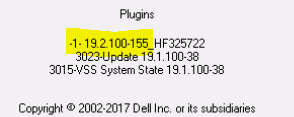
avagent Info : Plug-in version 19.2.100-155_HF325722 found for Windows plug-in
avagent Warning : Plug-in (avtar) and agent are different versions (19.2.100-155_HF325722 and 19.1.100-38).  ****** Current MCS name 'avamarserver.com' ******
avagent Info : Registration of client /clients/test.dell.com with MCS avamarserver,com:28001 successful.
avagent Info : Registration of plugin 3015 VSS successful.
avagent Info : Registration of plugin 3023 update successful.
avagent Info : Registration of plugin 3015 VSS successful.
avagent Info : Registration of plugin 3023 update successful.
avagent Info : Registration of client and plugins complete.
システムトレイ クライアント アイコンには、別のプラグインが表示されます。
Cause
根本的な原因
この問題は、古いバージョンをインストールする前に、以前のプラグイン バージョンを完全に削除しないことが原因で発生します。お客様は、Avamar 19.2とホットフィックスHF325722(avtar.exe)をインストールし、後で19.1にダウングレードしました。19.2ホットフィックス バイナリーは削除されなかったため、VSSプラグインのみが登録されました。
メモ: これは、以前のプラグインのアンインストールが正しく行われなかった場合に、どのバージョンでも発生する可能性があります。
Resolution
解決手順
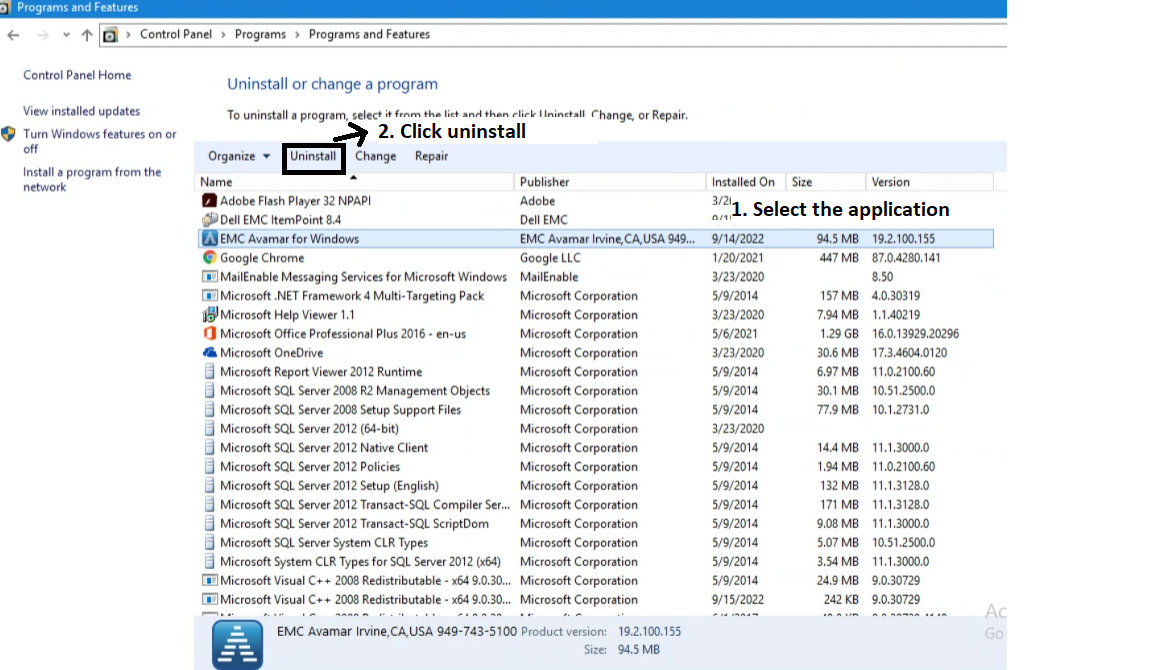
- 既存のAvamarプラグ インを完全にアンインストールします。
- コントロール パネルを開き、 EMC Avamar for Windowsを選択して、 アンインストールをクリックします。
- 以前のバージョンを完全に削除した後、目的のプラグイン バージョン(19.1など)をインストールします。
メモ: プラグインを再インストールする前に、以前のバージョンのホットフィックス バイナリ(avtar.exe)が削除されていることを確認してください。
Affected Products
Avamar, Avamar Client, Avamar Client for Windows, Avamar Plug-in, Microsoft Windows 2012 ServerArticle Properties
Article Number: 000201404
Article Type: Solution
Last Modified: 09 Sep 2026
Version: 5
Find answers to your questions from other Dell users
Support Services
Check if your device is covered by Support Services.