Avamar: Backup/Restore 탭에서 Windows File System 플러그인 누락
Summary: 19.2에서 19.1로 다운그레이드한 후 파일 시스템 플러그인이 누락되어 이전 플러그인은 설치된 상태로 유지되므로 Windows Avamar Client의 Backup/Restore 탭에 VSS 플러그인만 표시됩니다.
This article applies to
This article does not apply to
This article is not tied to any specific product.
Not all product versions are identified in this article.
Symptoms
관찰된 증상
Avamar Administrator 콘솔의 Backup and Restore 탭에는 Filesystem 플러그인이 없고 VSS 플러그인만 표시됩니다.
클라이언트 로그 C:\Program Files\avs\var\avagent.log 플러그인 간의 버전 불일치를 나타내는 경고(avtar) 및 에이전트.
avagent Info : Reading pin file C:\Program Files\avs\bin\windows.pin
avagent Info : Finished READING xml file - starting parse
avagent Info : Checking version of plug-in 'Windows', executable name 'avtar' (mode:ctl)
avagent Info : Plug-in version 19.2.100-155_HF325722 found for Windows plug-in
avagent Warning : Plug-in (avtar) and agent are different versions (19.2.100-155_HF325722 and 19.1.100-38).  ****** Current MCS name 'avamarserver.com' ******
avagent Info : Registration of client /clients/test.dell.com with MCS avamarserver,com:28001 successful.
avagent Info : Registration of plugin 3015 VSS successful.
avagent Info : Registration of plugin 3023 update successful.
avagent Info : Registration of plugin 3015 VSS successful.
avagent Info : Registration of plugin 3023 update successful.
avagent Info : Registration of client and plugins complete.
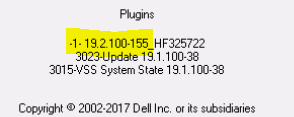
시스템 트레이 클라이언트 아이콘은 다른 플러그인을 표시합니다.
Cause
근본 원인
이 문제는 이전 버전을 설치하기 전에 이전 플러그인 버전을 완전히 제거하지 않아 발생합니다. 고객이 avtar.exe(Hot-fix HF325722)가 포함된 Avamar 19.2를 설치했으며 나중에 19.1로 다운그레이드했습니다. 19.2 핫픽스 바이너리가 제거되지 않았으므로 VSS 플러그인만 등록되었습니다.
참고: 이것은 이전 플러그인의 제거가 잘못 수행된 경우 모든 버전에서 발생할 수 있습니다.
Resolution
해결 단계
- 기존 Avamar 플러그인을 완전히 제거합니다.
- Control Panel을 열고 EMC Avamar for Windows를 선택한 다음 Uninstall을 클릭합니다.
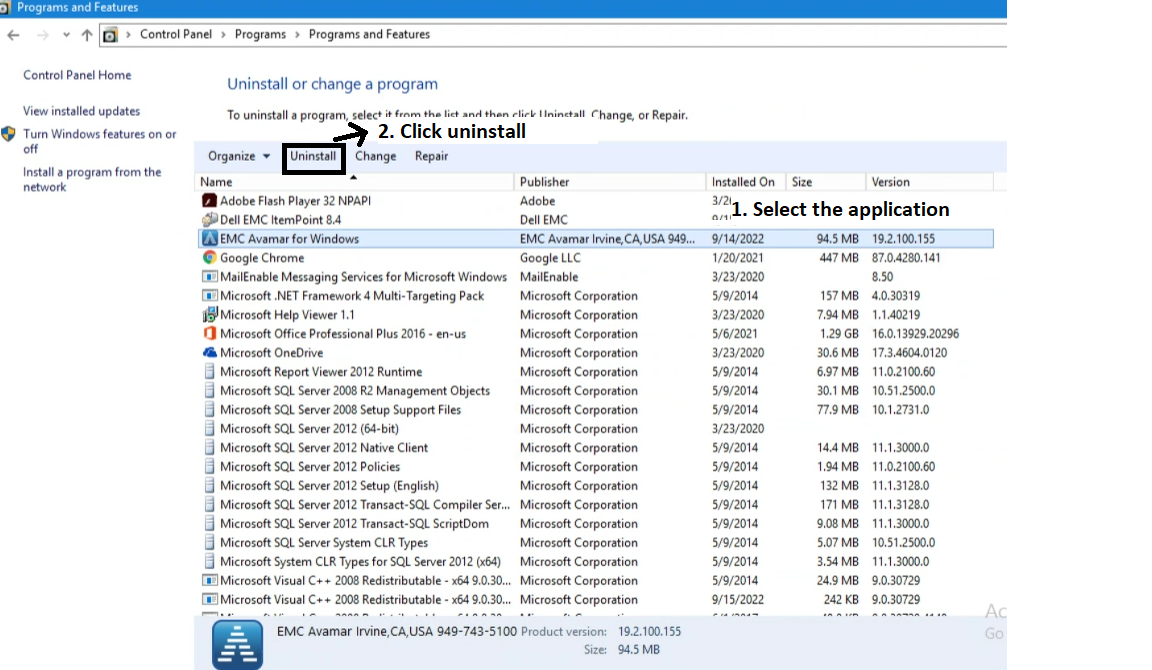
- 이전 버전이 완전히 제거된 후 원하는 플러그인 버전(예: 19.1)을 설치합니다.
참고: 플러그인을 재설치하기 전에 이전 버전의 avtar.exe(Hotfix Binary)이 제거되었는지 확인합니다.
Affected Products
Avamar, Avamar Client, Avamar Client for Windows, Avamar Plug-in, Microsoft Windows 2012 ServerArticle Properties
Article Number: 000201404
Article Type: Solution
Last Modified: 09 Sep 2026
Version: 5
Find answers to your questions from other Dell users
Support Services
Check if your device is covered by Support Services.