PowerStore: Management Network Reconfiguration does not validate NTP server provided as FQDN when changing IP protocol version
Summary: Management network IP protocol version change from IPv4 to IPv6 or from IPv6 to IPv4 using Management Network Reconfiguration (MNR) does not validate NTP server provided as Fully Qualified Domain Name. ...
This article applies to
This article does not apply to
This article is not tied to any specific product.
Not all product versions are identified in this article.
Symptoms
The Management Network Reconfiguration IP protocol version change (IPv4 > IPv6 or IPv6 > IPv4) operation does not accept NTP server value configured as FQDN with the following error message:
"The following NTP server addresses are invalid: 'NTP_SERVER_FQDN' (0xE0E400701002)"
"The following NTP server addresses are invalid: 'NTP_SERVER_FQDN' (0xE0E400701002)"
Cause
PowerStore supports changing management network IP protocol version from IPv4 to IPv6 and IPv6 to IPv4. This requires the change of configured environment services (NTP, DNS) to match the updated network.
Management Network Reconfiguration (MNR) wizard asks for new PowerStore addresses and for new addresses of network service. Multiple addresses can be provided for DNS and NTP for redundancy purposes.
If a user provides at least one FQDN for the NTP server, wizard does not validate the NTP server and gives an error of invalid NTP server:
"The following NTP server addresses are invalid: 'NTP_SERVER_FQDN' (0xE0E400701002)"
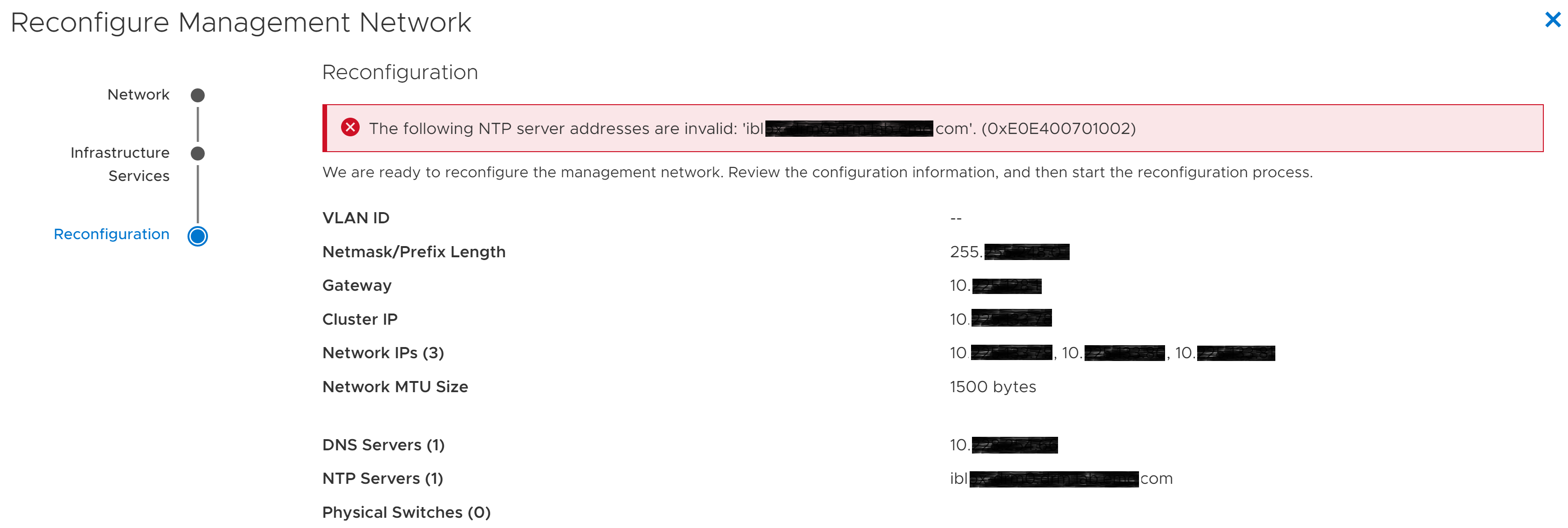
Figure 1: Management Network Reconfiguration wizard-Invalid NTP error
MNR wizard stops, newly provided settings are not applied, and management network is not reconfigured. The system is available with the old network settings.
Management Network Reconfiguration (MNR) wizard asks for new PowerStore addresses and for new addresses of network service. Multiple addresses can be provided for DNS and NTP for redundancy purposes.
If a user provides at least one FQDN for the NTP server, wizard does not validate the NTP server and gives an error of invalid NTP server:
"The following NTP server addresses are invalid: 'NTP_SERVER_FQDN' (0xE0E400701002)"
Figure 1: Management Network Reconfiguration wizard-Invalid NTP error
MNR wizard stops, newly provided settings are not applied, and management network is not reconfigured. The system is available with the old network settings.
Resolution
NTP server must be configured by specifying its IP address instead of a Fully Qualified Domain Name (FQDN).

Figure 2: NTP configured as FQDN

Figure 3: NTP configured with IP address
NTP validation should succeed now, and management network reconfiguration should finish. The system should be accessible at newly provided addresses.
* If Reconfigure Management Network wizard was closed, start it again and provide NTP server IP addresses (not FQDN) at Infrastructure Services step.
- If Reconfigure Management Network wizard is not closed (*), click Back button until the Infrastructure Services step.
Figure 2: NTP configured as FQDN
- Replace any provided NTP server FQDN values with corresponding IP addresses.
Figure 3: NTP configured with IP address
- Click Next and go through further steps until the end.
NTP validation should succeed now, and management network reconfiguration should finish. The system should be accessible at newly provided addresses.
* If Reconfigure Management Network wizard was closed, start it again and provide NTP server IP addresses (not FQDN) at Infrastructure Services step.
Affected Products
PowerStoreArticle Properties
Article Number: 000201823
Article Type: Solution
Last Modified: 13 Jun 2025
Version: 4
Find answers to your questions from other Dell users
Support Services
Check if your device is covered by Support Services.