PowerStore: File interface unplumb (removal) failure.
Summary: If file interface deletion fails in unplumbing of the corresponding bond, the File Interface cannot be rolled back as it no longer exists in NAS namespace. This will also block further deletion of the bond itself, since it would be considered in-use. ...
This article applies to
This article does not apply to
This article is not tied to any specific product.
Not all product versions are identified in this article.
Symptoms
Every file interface is associated with some bond (user/system). Upon creation of a file interface the bond is internally "plumbed" into NAS namespace (meaning, a child net device is created on top of it and moved into the namespace to be consumed by NAS). The bond gets unplumbed (removed) from NAS namespace only once the last File Interface sitting on top of it gets deleted.
The deletion of a file interface may fail, for example due to unplumb failure. At this time the file interface object is already deleted and only the unplumbing of the bond is pending. The failed unplumbing is gracefully rolled back, but the File Interface cannot be rolled back (re-created).
Thus, the file interface is gone, the bond is still there, and is still plumbed into the namespace - thus it's considered in-use and cannot be deleted.
Bond deletion failure:
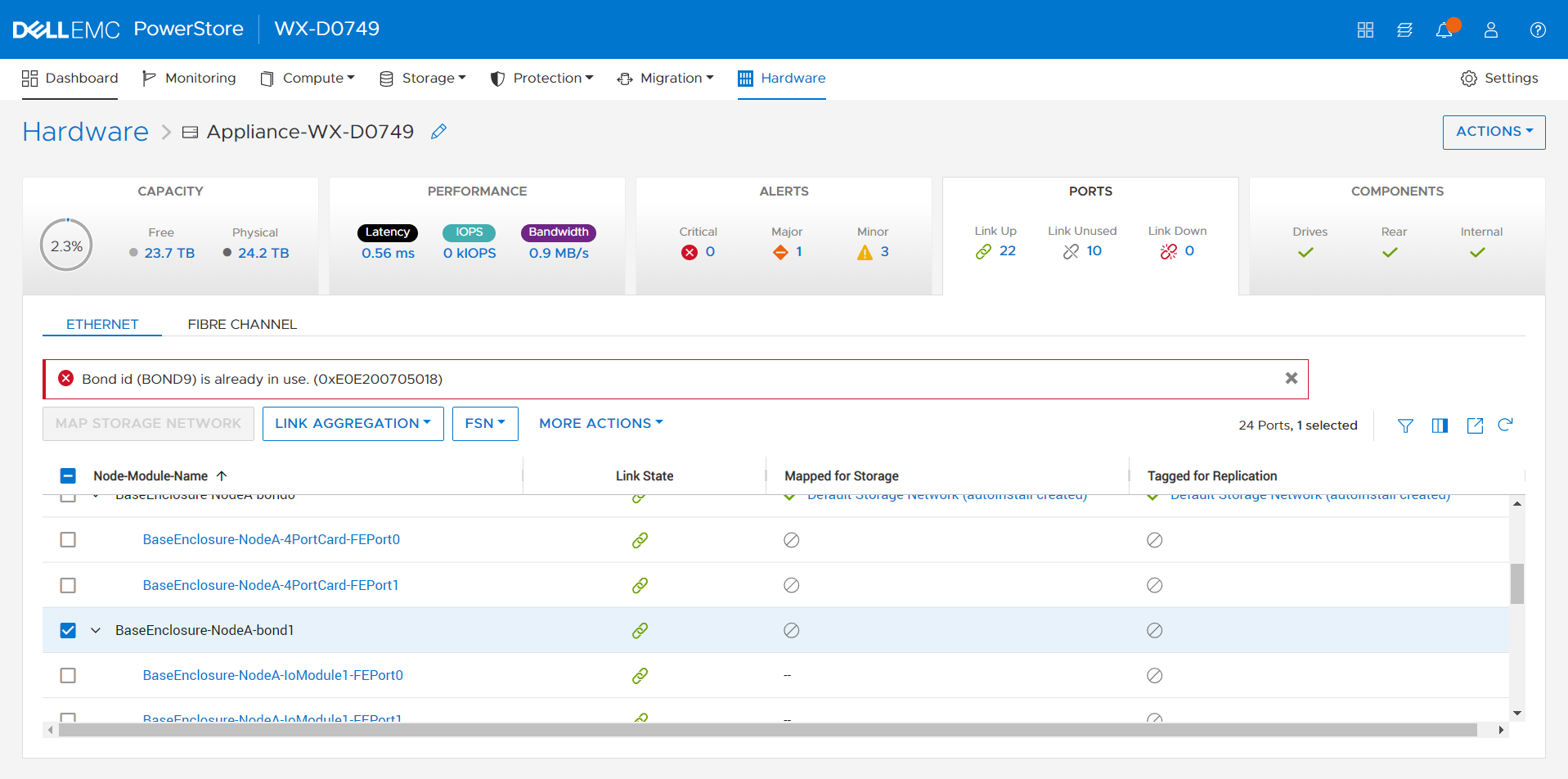
The deletion of a file interface may fail, for example due to unplumb failure. At this time the file interface object is already deleted and only the unplumbing of the bond is pending. The failed unplumbing is gracefully rolled back, but the File Interface cannot be rolled back (re-created).
Thus, the file interface is gone, the bond is still there, and is still plumbed into the namespace - thus it's considered in-use and cannot be deleted.
Bond deletion failure:
Cause
Due to various internal issues the unplumbing of a bond may fail on a node. As a result, the corresponding child net device does not get deleted from the NAS docker namespace. After successful roll back from the failure of the bond unplumb step, the corresponding net device will be kept in NAS docker namespace, even though the File Interface creation cannot be rolled back
Resolution
Workaround:
if you require additional assistance contact Technical Support.
- Create a dummy File Interface (for example, using some fake IP address) on top of the failed-to-unplumb bond.
- Delete the File Interface.
- Manually unplumb the net device through dummy file interface creation on the involved bond with subsequent file interface removal to trigger the unplumb.
if you require additional assistance contact Technical Support.
Affected Products
PowerStoreArticle Properties
Article Number: 000202169
Article Type: Solution
Last Modified: 15 May 2026
Version: 3
Find answers to your questions from other Dell users
Support Services
Check if your device is covered by Support Services.