Connectrix: San Nav: Switch status reports "Current seed switch is not recommended, change the seed switch"
Summary: This issue is seen when you try to add or modify the Fabric or re-discovery/delete the existing switches from Fabric.
This article applies to
This article does not apply to
This article is not tied to any specific product.
Not all product versions are identified in this article.
Symptoms
Below are the status error faced during switch discover /re-discovery.

Cause
This issue is caused due to:
- The seed switch is no longer running the highest Fabric OS version in the fabric. This might happen if newer switches join the fabric or the switch firmware version changes on any switch in the fabric.
- The seed switch is going to be taken down for maintenance or replacement.
Resolution
To change the seed switch, complete the following steps:
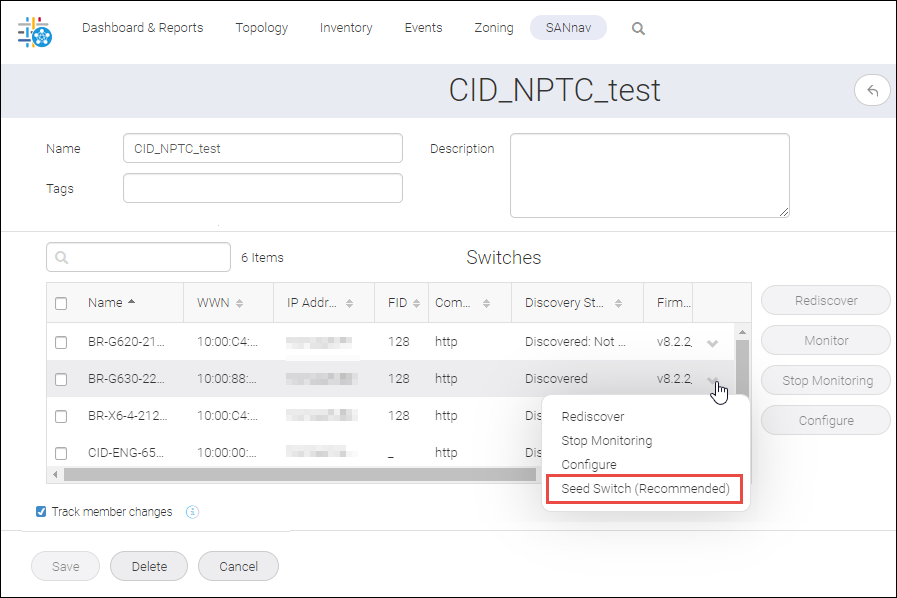
- Click SANnav in the navigation bar, and then select SAN Monitoring Fabric Discovery
The Discovered Fabrics page displays all fabrics that have been discovered. - Click the fabric name to open the fabric details page, which displays the list of switches in the fabric.
- Locate the switch that you want to make the seed switch.
- Click the down arrow in the right-most column to open the action menu for the switch, and click Seed Switch or Seed Switch (Recommended).
If the Seed Switch option includes (Recommended), the switch is recommended as a seed switch.
The Seed Switch option is available only if the switch can act as a seed switch and the switch is not already the seed switch.
Example:
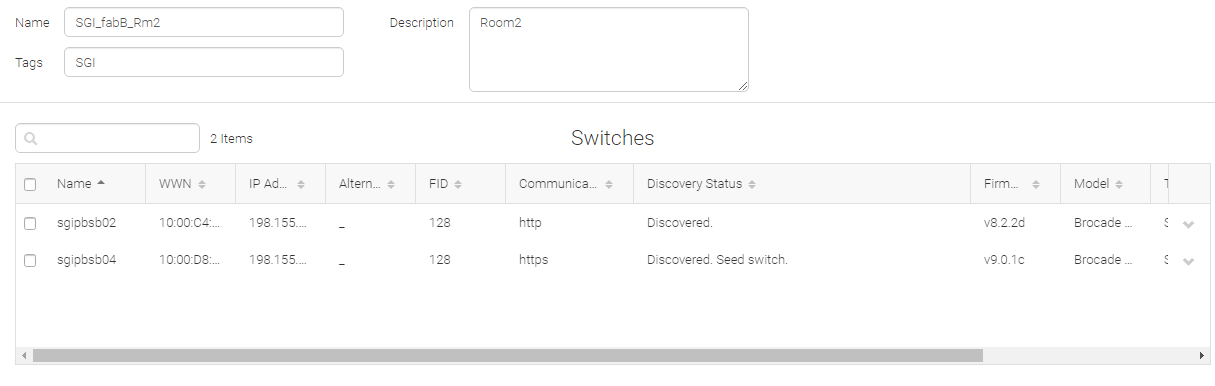
The new switch becomes the seed switch, and the switch status updates accordingly.
Affected Products
Connectrix SANnavArticle Properties
Article Number: 000204143
Article Type: Solution
Last Modified: 15 May 2026
Version: 5
Find answers to your questions from other Dell users
Support Services
Check if your device is covered by Support Services.