起動時のBitLockerリカバリーを引き起こすTPM PCR検証エラー
Summary: この記事では、Trusted Platform Module (TPM) Platform Configuration Register (PCR) Validation Errorが原因で起動時にBitLockerが回復する方法について説明します。
This article applies to
This article does not apply to
This article is not tied to any specific product.
Not all product versions are identified in this article.
Symptoms
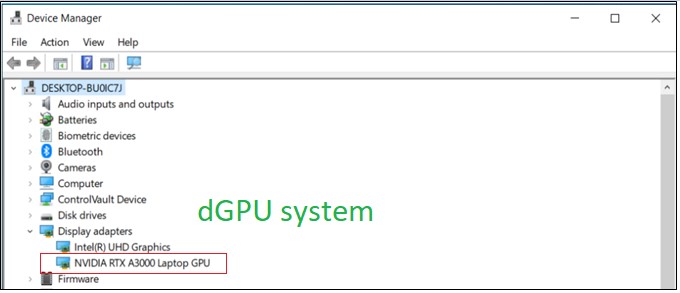
GFXカード コンピューターはPCR7バインディングを使用せず、バインディング不可として表示されます(0、2、4、11)。
テスト ステップ:
- 起動して セットアップ
- Enable Secure Boot(セキュアブートを有効にする)
- TPMを有効にする
- オペレーティング システムを起動します
- Win + Rの「Cmd」を押して、管理者として実行します。
- 入力コマンド "manage-bde-protectors-get c:"
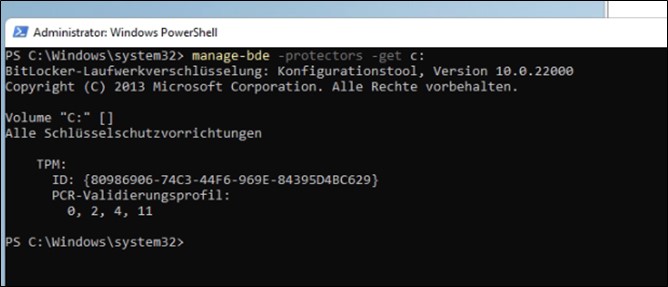
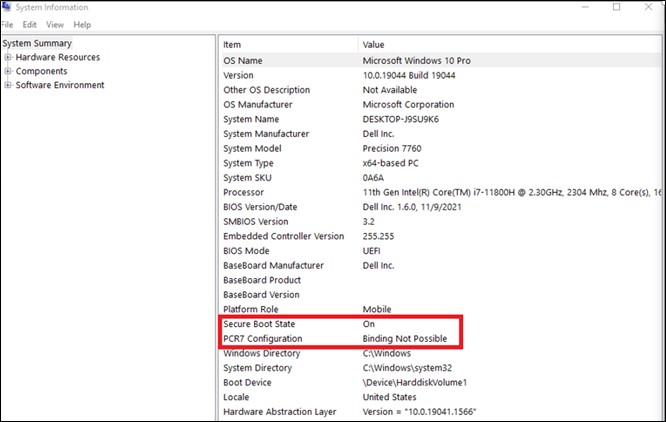
Cause
dGPU(拡張可能カード)とそのOROM/UEFIドライバーは、TPM PCR7を使用して署名および測定する必要があります。BIOS 1.6.0を使用して、TCGおよびMSFTの要件に従ったセキュリティ メカニズムを実装することにより、セキュリティの脆弱性に対処します。
TCG側から:
https://trustedcomputinggroup.org/wp-content/uploads/TCG_PCClient_PFP_r1p05_v23_pub.pdf

オペレーティング システム側から:
BitLockerドライブ暗号化に関するMicrosoft独自のドキュメント
OEM向けWindows 10でのBitLockerドライブ暗号化
拡張可能なカード(例:GFXカード)が存在すると、起動中にUEFI BIOSによってOROM UEFIドライバーがロードされる場合、BitLockerはPCR7バインディングを使用しません。
Resolution
Microsoftの情報によると、これは予期された動作であり、リカバリー計画はありません。
Affected Products
Precision 3571, Precision 7560, Precision 7670, Precision 7770Article Properties
Article Number: 000204144
Article Type: Solution
Last Modified: 07 Jul 2026
Version: 7
Find answers to your questions from other Dell users
Support Services
Check if your device is covered by Support Services.