부팅 시 BitLocker 복구를 유발하는 TPM PCR 유효성 검사 오류 발생
Summary: 이 문서에서는 부팅 시 BitLocker 복구를 유발하는 TPM(Trusted Platform Module) PCR(Platform Configuration Register) 유효성 검사 오류에 대한 정보를 제공합니다.
This article applies to
This article does not apply to
This article is not tied to any specific product.
Not all product versions are identified in this article.
Symptoms
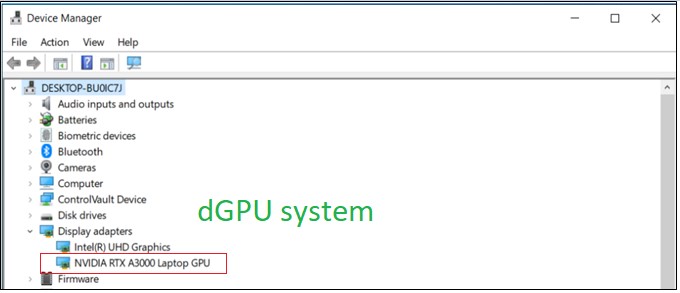
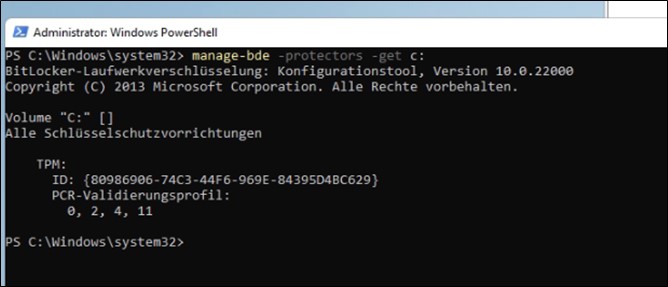
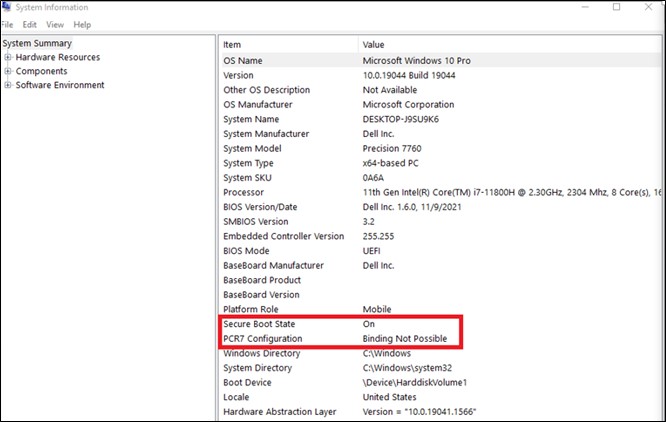
GFX 카드 컴퓨터는 PCR7 바인딩을 사용하지 않으며 바인딩 불가능(0, 2, 4, 11)으로 표시됩니다.
테스트 단계:
- 설정하여 부팅
- 보안 부팅 활성화
- TPM 활성화
- 운영 체제로 부팅합니다.
- Win + R "Cmd"를 눌러 관리자 권한으로 실행합니다.
- 입력 명령 "manage-bde-protectors-get c:"
Cause
dGPU(확장 가능 카드) 및 해당 OROM/UEFI 드라이버는 TPM PCR7을 통해 서명하고 측정해야 합니다. BIOS 1.6.0은 TCG 및 MSFT의 요구 사항을 따르는 보안 메커니즘을 구현하여 보안 취약성을 해결합니다.
TCG 측:
https://trustedcomputinggroup.org/wp-content/uploads/TCG_PCClient_PFP_r1p05_v23_pub.pdf

운영 체제 측:
BitLocker 드라이브 암호화에 대한 Microsoft의 자체 설명서
OEM용 Windows 10의 BitLocker 드라이브 암호화
확장 가능한 카드(예: GFX 카드)가 있는 경우 부팅 중에 UEFI BIOS에서 OROM UEFI 드라이버가 로드되는 경우 BitLocker는 PCR7 바인딩을 사용하지 않습니다.
Resolution
Microsoft 정보에 따르면 복구 계획 없이 예상되는 동작입니다.
Affected Products
Precision 3571, Precision 7560, Precision 7670, Precision 7770Article Properties
Article Number: 000204144
Article Type: Solution
Last Modified: 07 Jul 2026
Version: 7
Find answers to your questions from other Dell users
Support Services
Check if your device is covered by Support Services.