Dell Command |セキュア ブート モードを監査モードに設定すると、ツールキットの設定がエラーを返す
Summary: この記事では、Dell Command |Dell Command | Dellコマンドでセキュア ブート モードを監査モードに設定すると、Toolkitを構成するとエラーが返されるToolkit を設定します。
This article applies to
This article does not apply to
This article is not tied to any specific product.
Not all product versions are identified in this article.
Symptoms
Dell Command |ツールキットの構成がエラーを返す
Dell Command |Configure Toolkit (CCTK)は、セキュア ブート モードを監査モードに設定できず、エラー ログを返します。
XXXX/XX/XX XX:XX:XX cctk - Option : SecureBootMode
XXXX/XX/XX XX:XX:XX cctk - Error in Setting the Value
Cause
Resolution
BIOSセットアップに移動して、最初にカスタム モードを有効にしてすべてのキーを削除します。その後、CCTKはセキュア ブート モードを設定できます。
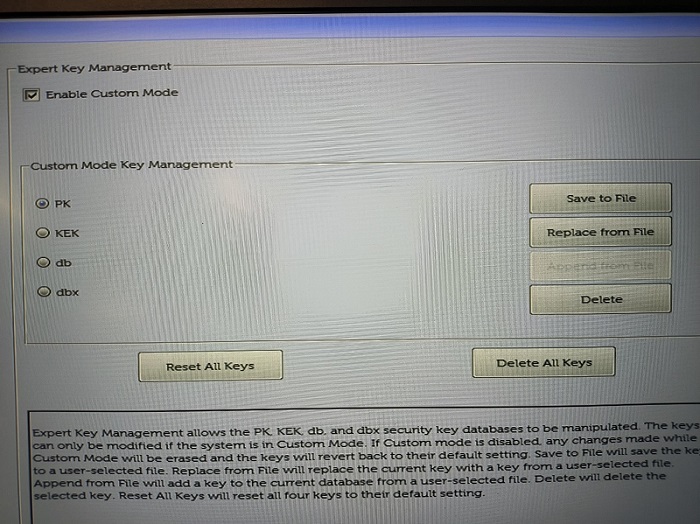
(図1 - BIOSセットアップ)
Affected Products
OptiPlex, Latitude, Dell Command | ConfigureArticle Properties
Article Number: 000205212
Article Type: Solution
Last Modified: 16 May 2026
Version: 10
Find answers to your questions from other Dell users
Support Services
Check if your device is covered by Support Services.