VxRail: Failed to generate iDRAC log bundle due to Internal Error
Summary: Failed to generate iDRAC log bundle on VxRail plugin due to iSM 4.3.0 issue.
This article applies to
This article does not apply to
This article is not tied to any specific product.
Not all product versions are identified in this article.
Symptoms
An internal error message appears in the UI when collecting iDRAC log from the VxRail plugin:
Check disk size on the ESXi host by the vdf -h command. The /tmp folder is 100% full.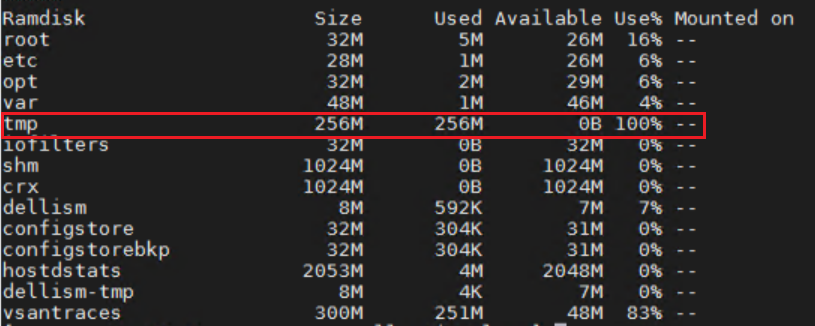
Cause
VxRail leverages the Dell iSM tool to collect iDRAC log files.
7.0.410 VxRail embedded iSM 4.3.0 which has a code defect that fills the ESXi /tmp folder and causes an iDRAC log collection failure.
Resolution
- SSH to the ESXi host and delete files under
/tmp/vmsupportcollection/logs/vm-support/ to release /tmp space. - Collect iDRAC logs from the iDRAC UI instead of from the VxRail plugin.
- Log in to the iDRAC UI from the browser.
- Navigate to Maintenance-> SupportAssist-> Start a collection then choose System Information and OS and Application Data or any other information you want to collect.
For example: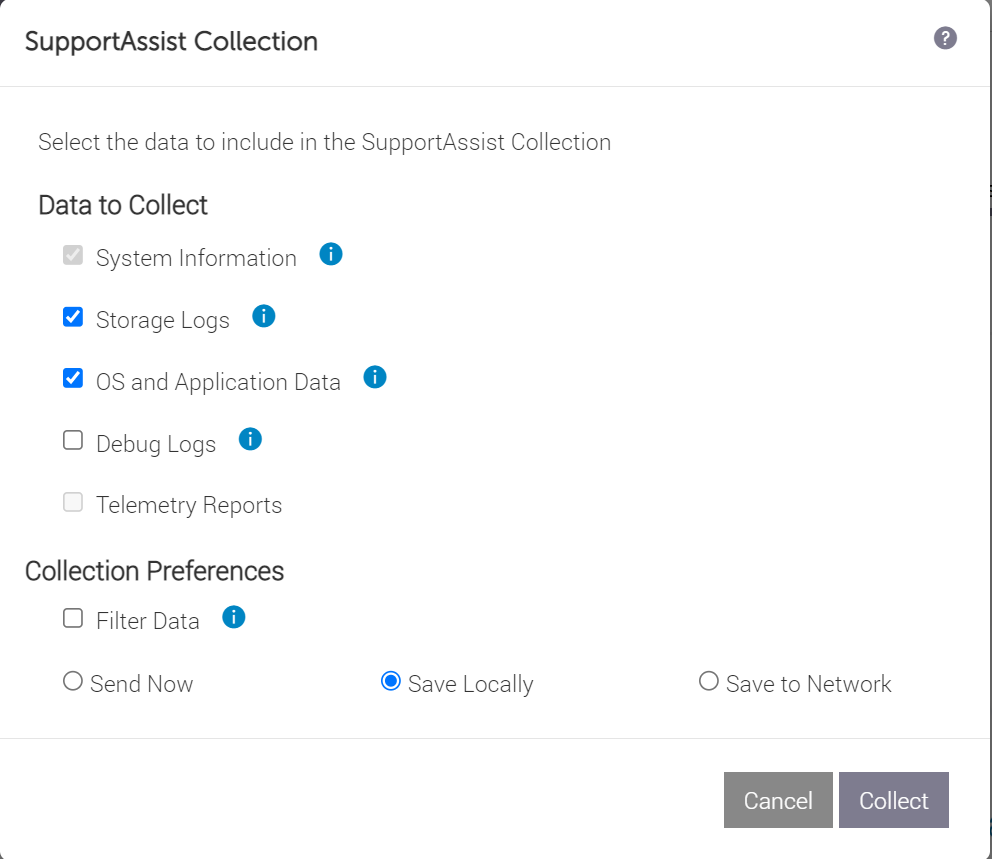
Affected Products
VxRail SoftwareArticle Properties
Article Number: 000205656
Article Type: Solution
Last Modified: 30 Mar 2026
Version: 3
Find answers to your questions from other Dell users
Support Services
Check if your device is covered by Support Services.